
For DJing at a computer, powered studio monitors are generally the most relevant choice because they are designed for desktop music listening and production. The Pioneer DJ DM-40D is the most directly DJ-oriented pick by name, while the PreSonus Eris 3.5 and Mackie CR3.5 are compact studio-monitor alternatives. The FUNLOGY and OHAYO options suit buyers prioritizing simple computer playback or multiple connection types. Compare the listed features below, then check the exact inputs and setup requirements against your DJ controller or computer.
| Product | Best suited for | Listed distinguishing feature |
|---|---|---|
| Pioneer DJ DM-40D | Buyers seeking DJ-branded desktop monitors | 4-inch active monitor pair |
| PreSonus Eris 3.5 | Music production and desktop listening | 50W pair with woven-composite woofers |
| Mackie CR3.5 | Listeners who want a tone control | Tone knob and 3.5-inch woofers |
| FUNLOGY Speaker | Compact, USB-powered computer setups | 14W, 30-degree tilt design |
| OHAYO 60W Computer Speakers | Buyers seeking several listed input types | Bluetooth 5.3, 3.5mm, RCA, and USB inputs |
Pioneer DJ DM-40D Desktop Monitors

The Pioneer DJ DM-40D is a pair of active desktop monitor speakers with 4-inch drivers. Its DJ-focused product name makes it the most directly aligned option here for someone building a computer-based DJ setup. The active design means the speakers are described as powered, rather than as a passive pair that requires a separate power amplifier.
Best for: DJs who want a compact, active monitor pair from a brand associated with DJ equipment. The 4-inch size offers a straightforward desktop-monitor form factor for a home setup where larger speakers may not fit.
Why it was selected: It is the clearest match to the search for computer speakers for DJing, and the product listing identifies it as an active desktop monitor pair rather than a general-purpose PC speaker.
Check before buying: The supplied product information does not specify its connection types, dimensions, or controls. Confirm the available inputs and your computer or controller’s output connections before choosing it.
PreSonus Eris 3.5 Powered Monitors

The PreSonus Eris 3.5 is a pair of powered near-field desktop monitors listed for music production, gaming, movies, and Hi-Fi listening. Its stated specifications include 50 watts, a 3.5-inch woven-composite woofer, and a silk-dome tweeter. Those details make it a practical candidate for people who want a small pair for both DJ practice and everyday computer audio.
Best for: Home DJs who also produce music or use their desktop for several kinds of listening. It is better suited to a buyer seeking a studio-monitor-style speaker than someone whose main priority is a one-piece, USB-powered PC speaker.
Why it was selected: The near-field desktop format and music-production use case are relevant to a DJ working close to a computer, while the listed woofer and tweeter materials give shoppers concrete specifications to compare.
Check before buying: The supplied details do not state input options or room coverage. Verify connection compatibility and consider whether a compact 3.5-inch monitor pair meets your listening needs and placement space.
Mackie CR3.5 Studio Monitors

The Mackie CR3.5 is a studio-monitor pair with 3.5-inch woofers and a tone knob. For DJ use, that control is the key listed distinction: it gives the buyer a way to adjust tone without relying only on software settings. The product information identifies the speakers as a pair, making them a compact option for a left-and-right desktop arrangement.
Best for: Computer DJs who want a small monitor pair and value an onboard tone adjustment. Choose this if the tone knob is more useful to your workflow than features such as stated Bluetooth support or USB power.
Why it was selected: Its studio-monitor positioning makes it relevant to music work, and the 3.5-inch woofer size provides a clear comparison point against the 4-inch Pioneer DJ pair and the PreSonus Eris 3.5.
Check before buying: The provided product data does not describe the tone knob’s range or list the available inputs. Check the full listing for those details, especially if you plan to connect a DJ controller directly.
FUNLOGY USB-Powered Computer Speakers

The FUNLOGY speaker is a compact 14-watt stereo PC speaker set with USB power, a 30-degree tilt design, and a volume dial. The listing describes it for desktop computers, laptops, monitors, and gaming consoles. These features make it a general computer-audio option rather than a product specifically identified as a studio monitor.
Best for: A beginner or casual DJ who needs compact speakers for computer playback and also uses the setup for gaming or everyday listening. USB power and a physical volume dial are useful priorities if a simple desktop arrangement matters most.
Why it was selected: It offers a clearly stated power method, stereo format, and tilt design, which distinguish it from the monitor pairs in this comparison. Its small desktop-focused description may suit limited workspace.
Check before buying: The listed information does not identify the audio input connection. USB power does not by itself confirm how audio is received, so verify that the speaker’s audio connection works with your computer or DJ equipment.
OHAYO 60W Computer Speakers
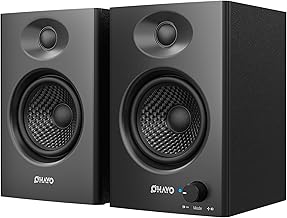
The OHAYO set is described as 60-watt active stereo 2.0 speakers for desktop computers or laptops. Its listed connection options include Bluetooth 5.3, 3.5mm, RCA, and USB input. Among these five choices, it has the broadest set of explicitly named input types, which can be useful when a buyer wants to connect more than one kind of device.
Best for: DJs who want a general-purpose computer speaker pair and value having multiple listed connection options. Choose this if Bluetooth or the named 3.5mm, RCA, and USB inputs match your intended setup.
Why it was selected: The product provides a stated power rating and several connection types, making it easier to compare for flexible desktop use than products whose supplied details do not list inputs.
Check before buying: The product description does not clarify how each input functions or whether all can be used interchangeably with a DJ controller. Confirm the connection arrangement you need before purchase.
Buying Guide: How to Choose Computer Speakers for DJing
Computer speakers for DJing need to suit both the audio source and the space where you practice. A compact near-field pair can work for listening at a desk, while a general-purpose PC speaker may be a better fit when the same system is mainly used for casual computer audio. Start by deciding whether you need studio monitors, everyday speakers, or a mix of both.
Do you need studio monitors or standard computer speakers?
Studio monitors are the more direct category to compare when music work is a priority. The Pioneer DJ DM-40D is identified as an active desktop monitor pair, and the PreSonus Eris 3.5 and Mackie CR3.5 are described as studio monitors. The FUNLOGY and OHAYO products are presented as computer speakers. The product category alone does not prove that one set will suit every room or listening preference.
If DJ practice and music production are central, compare monitor size, placement, and input requirements. If your main use is computer playback with occasional DJ practice, consider whether a standard PC speaker’s controls and connection options better match your routine.
Which connection should you check first?
Match the speakers’ audio input to the output available on your computer, controller, or other source. Do not assume that a speaker can connect to a particular controller simply because it is described as a desktop or DJ speaker. The OHAYO listing names Bluetooth 5.3, 3.5mm, RCA, and USB input. The supplied details for several other products do not list their inputs, so check the full specifications before deciding.
Also separate audio connection from power. FUNLOGY is listed as USB powered, but that does not establish that USB carries the audio signal. Confirm both how the speakers receive power and how they receive sound.
How much speaker size and power matter?
Product size can affect how easily a pair fits on a desk, but a driver measurement alone does not tell you how a speaker will sound in your room. The Pioneer DJ DM-40D lists 4-inch drivers. The PreSonus Eris 3.5 and Mackie CR3.5 list 3.5-inch woofers. FUNLOGY states 14 watts, while PreSonus states 50 watts and OHAYO states 60 watts.
Use these figures as comparison details, not as a guarantee of loudness or sound quality. The supplied information does not provide a like-for-like measurement method across all five products. Consider your listening distance, desk space, and whether you need the speakers for a small room or shared space.
Which controls and features are useful at a desk?
A physical volume control can make quick level changes convenient. FUNLOGY lists a volume dial, and Mackie lists a tone knob. These are different controls: one is specified for volume, while the other is described as tone adjustment. The product details supplied here do not explain the tone control’s exact effect, so consult the full listing if that feature is important.
The FUNLOGY product also lists a 30-degree tilt design. This may be a relevant form-factor detail when comparing desktop placement, but check the product dimensions and the way it fits your desk before buying. Do not infer adjustable positioning beyond the listed tilt design.
Should Bluetooth be a deciding factor?
Bluetooth 5.3 is listed for the OHAYO speakers. Wireless playback can be useful for compatible devices, but DJs should confirm that the connection method suits their intended workflow. If you plan to connect a controller by cable, verify that the relevant wired input is available and that it matches your equipment. Choose based on the connection you will actually use, not simply the number of connection types listed.
What should you verify before ordering?
- Confirm that the speakers’ audio input matches your computer, controller, or other audio source.
- Check the dimensions and available desk space for both speakers.
- Verify what is included in the box, since the supplied product details do not list every accessory.
- Decide whether a monitor pair or a general computer speaker better matches your main use.
- Check power requirements separately from audio connections.
- Compare physical controls and listed features that matter to your workflow, such as a volume dial, tone knob, tilt design, or Bluetooth.
Frequently Asked Questions
What type of speakers are best for computer DJing?
Powered studio monitors are a relevant starting point for computer-based DJ practice because they are designed for desktop music listening and production. Compare their inputs and size with your equipment and workspace before choosing.
Are the Pioneer DJ DM-40D speakers active?
Yes. The product name identifies the Pioneer DJ DM-40D as a pair of active desktop monitor speakers with 4-inch drivers.
Which option lists the most connection types?
The OHAYO 60W computer speakers list Bluetooth 5.3, 3.5mm, RCA, and USB input. Verify which input is appropriate for your audio source before buying.
Does USB-powered mean USB audio?
No. USB power describes how a device receives power; it does not confirm that USB also carries audio. The FUNLOGY listing states USB powered, so check its full specifications for the audio connection.
Which speakers have a physical sound adjustment?
The Mackie CR3.5 lists a tone knob, while the FUNLOGY speakers list a volume dial. These controls serve different purposes, and the available product details do not specify the tone knob’s adjustment range.
Are these speakers suitable for a large room?
The supplied product details do not establish room coverage for any of the five options. Compare the manufacturers’ complete specifications with your room, listening distance, and desired volume before selecting a pair.