Best Computer Speakers With Mic for Clear Calls and Rich Sound
Answer: If you need compact, plug-and-play desktop speakers with an integrated microphone, these models deliver clear voice pickup, easy mute controls, and space-saving monitor clips. The top picks are suited for remote workers, students, gamers, and conference callers who want reliable USB or Bluetooth connections and simple setup. Below, you’ll find five options with clear strengths for different needs, plus a practical buying guide and answers to common questions.
| Product | Best For | Key Benefit |
|---|---|---|
| INGA Computer Speakers with Detachable Mic | Gamers and online classes | Advanced echo cancellation and one-touch mute |
| ROFALL USB Computer Speakers with Microphone | Home offices and meetings | Two sound modes and clear built-in mic |
| Cyber Acoustics CA-2890BT | Users needing USB + Bluetooth | Wireless flexibility with monitor clip |
| Cyber Acoustics CA-2890PRO | Power users and multi-device setups | 20W output and front-panel controls |
| EMEET M1A USB Speakerphone | Zoom and collaboration | AI mics with 360° pickup and noise reduction |
INGA Detachable Mic Desktop Speakers
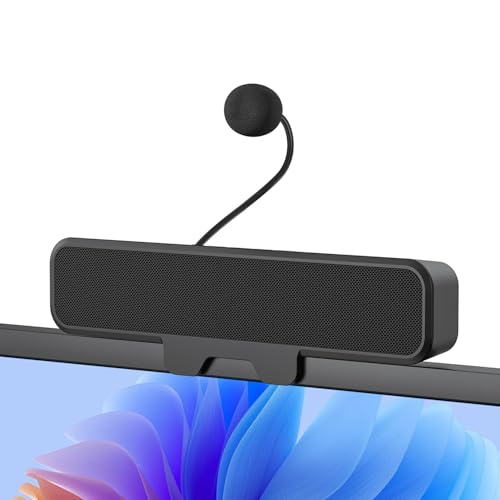
INGA’s system centers on a detachable unidirectional mic with Advanced Echo Cancellation. This makes it well-suited for gaming, Zoom meetings, and online classes where background noise suppression matters. The one-touch mute provides quick privacy, while dual drivers with a passive bass radiator deliver a balanced soundstage for both audio and voice clarity. The built-in monitor-clip design saves desk space, and USB-C plus USB-A adapters enable broad compatibility. Note that curved-back monitors may not be suitable due to mounting constraints.
- Best for: Users needing crisp voice capture with a simple mute control.
- Connectivity: USB-C and USB-A for broad device support.
- Limitation: Not ideal for curved-back monitors due to mounting.
ROFALL USB Computer Speakers With Microphone

ROFALL’s pair offers universal compatibility across Windows, macOS, Linux, and Chrome OS with plug-and-play simplicity. It provides two sound modes—Music and Move—plus a built-in microphone designed to reduce background noise for clearer calls. This setup is particularly attractive for students and professionals who rotate between music playback and conference calls, offering an affordable, flexible option.
- Best for: Budget-conscious users needing versatile modes and a ready microphone.
- Connectivity: USB plug-and-play; works with common meeting apps.
- Limitation: Sound performance is optimized by mode rather than premium audio design.
Cyber Acoustics CA-2890BT USB & Bluetooth Speaker Bar

This speaker bar combines USB connectivity with Bluetooth 5.0 for wireless pairing with smartphones and tablets, plus 5W power for compact desktop sound. The space-saving design clamps to the monitor, and controls include a mic mute LED indicator for quick status checks. It’s a good pick for single-monitor setups where desk space is at a premium and you want easy toggling between USB and Bluetooth sources.
- Best for: Users who want USB audio plus Bluetooth on one device.
- Connectivity: USB and Bluetooth with LED mic mute indicator.
- Limitation: Lower power output may not satisfy heavy bass enthusiasts.
Cyber Acoustics CA-2890PRO USB + Bluetooth
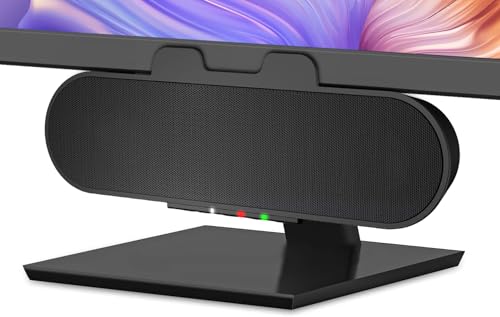
The CA-2890PRO steps up with a higher 20W output, better mids, and clear highs, designed for more demanding desktop audio. It attaches to monitors up to 2 inches thick, and front-panel controls simplify switching between USB and Bluetooth. A built-in mic with LED indicators helps track mic status during calls. This model suits power users who need stronger output for meetings and music alike.
- Best for: Users needing higher power, clearer mids, and robust source switching.
- Connectivity: USB-C or USB-A plus Bluetooth; monitor clip compatible up to 2″ thick.
- Limitation: Front-panel controls may be less intuitive in dim lighting.
EMEET M1A USB Speakerphone

EMEET M1A is Zoom-certified and uses 360° voice pickup with two omnidirectional mics and AI-enhanced VoiceIA. It supports a wide range of conferencing platforms, including Skype and Google Meet, and features nine adjustable volume levels with a clear LED indicator. When larger meetings or multiple participants are a concern, this model’s 360° pickup helps ensure every voice is captured clearly.
- Best for: Meetings with multiple participants and Zoom-centric workflows.
- Connectivity: USB-C and USB-A; plug-and-play with major platforms.
- Limitation: May require larger desks to house the sound profile for very big rooms.
Buying Guide
Key considerations help match the right model to your setup. The following questions and answers summarize practical buying criteria.
What microphone features matter for your calls?
Look for noise reduction, echo cancellation, and mute controls. Detachable mics offer flexibility, while fixed mics may provide simpler, compact designs. If you frequently join video calls or gaming sessions, a mic with echo cancellation and directional pickup reduces background noise and improves speech clarity.
Which connection type should you choose?
USB-only models are widely compatible with PCs and laptops. USB-C is future-proof and often provides better power. Bluetooth adds wireless convenience but can introduce occasional latency. Consider your device ports and whether you need clip-on convenience or full monitor attachment.
How important is desk space and mount design?
Monitor clamps save desk space and keep speakers aligned with your screen. If you have a 1-inch thick monitor, ensure the clip supports it. For larger monitors, verify clamp range to avoid overhang or instability. Some designs place the speakers on the desktop for easier access to controls.
What power and audio quality should you expect?
Power output (watts) and driver size influence volume and bass. A dedicated bass radiator or dual drivers improve low-end response, while better mids and highs yield clearer voice and music. Choose power levels consistent with your listening space and needs.
Which product best fits specific use cases?
For remote workers needing crisp calls and simple setup, INGA and ROFALL offer balanced options with clear mics. For multi-device flexibility and higher output, CA-2890PRO is strong. If Zoom compatibility and 360° pickup are priorities, EMEET M1A stands out. Gamers and students on tight budgets may prefer the ROFALL or INGA models for value.
What are common limitations to watch for?
Some monitor clips don’t fit curved-back screens. USB-only devices may rely on PC drivers, and Bluetooth can occasionally introduce pairing delays. Reading the product details helps prevent mismatches with your hardware.
Comparison snapshot
- Best overall for mixed use: INGA or CA-2890PRO depending on power needs.
- Best for meetings with a lot of participants: EMEET M1A or CA-2890BT for flexibility.
- Best space saver: CA-2890BT or INGA with monitor clip design.
Frequently Asked Questions
- Do these speakers require external microphones? Some include detachable mics; others have built-in mics. Check the product features for mic inclusion.
- Are these compatible with Mac and Windows? Yes, most are USB or USB-C and work across major operating systems.
- Can I clip speakers to any monitor? Clips vary; most support up to 1 inch or 2 inches thick monitors. Verify clip specs before purchase.
- Is Bluetooth a good option for conferencing? Bluetooth offers wireless convenience, but USB connections typically deliver more stable audio for meetings.
- What is the purpose of a monitor clip? It saves desk space and keeps speakers at ear level for clear sound during calls.
- Do these include mute controls? Most models provide a mute button or LED indicator for quick privacy checks.