
The H1 Computer Speakers are the clearest match here for a computer setup that needs SPDIF, because their listed connections include optical audio. The other four products may suit buyers prioritizing simple desktop playback, a subwoofer, compact design, or Bluetooth, but their supplied details do not confirm an SPDIF input. Check your computer’s audio outputs and the speaker’s input list before buying, especially if optical or coaxial digital audio is essential.
| Product | Best For | SPDIF Information |
|---|---|---|
| H1 Computer Speakers | Optical input and multiple connection options | Optical listed |
| ROSON Computer Speakers | Simple desktop controls and headphone access | Not specified |
| Logitech Z313 | 2.1 audio with a separate subwoofer | Not specified |
| LENRUE G11 | Compact, USB-powered desktop use | USB and AUX listed; optical not specified |
| OHAYO 60W Speakers | Compact stereo listening with Bluetooth | Not specified |
H1 Computer Speakers With Optical Input

Best for buyers who want an optical digital connection along with other ways to connect. The listed features include optical, USB-C with a 24-bit DAC, Bluetooth, and 3.5 mm AUX, giving this model the broadest stated connection selection in this group. It is a powered 2.0 stereo pair rated at 60 watts, with bass and treble controls.
Choose this if your computer or another source has an optical output and you want to connect without relying on an analog AUX cable. The USB-C DAC and Bluetooth can also be useful for sources that use those connection types. Its selection is based on the explicit optical connection in the product name, not an assumption that every digital input is SPDIF-compatible.
Limitation: The supplied details do not specify supported optical audio formats or sample rates. Confirm compatibility with the source device before purchase.
ROSON Desktop Speakers With Volume Control

Best for a desktop user who values basic access to speaker volume and a headphone jack. The product name identifies both controls, which can make everyday listening adjustments more convenient than reaching for software controls. It is included as a practical desktop-speaker alternative, rather than as a confirmed SPDIF speaker.
Choose this if headphone access at the speaker is useful and your computer can provide audio through a connection supported by the product. The supplied product information does not identify an optical input, a coaxial digital input, power output, or other detailed specifications.
Limitation: SPDIF support is not confirmed in the provided details. Avoid this option if a verified optical or coaxial digital input is required; check the full listing for connection information before ordering.
Logitech Z313 2.1 Speaker System

Best for buyers who prefer a 2.1 system with a separate subwoofer. The listed features include 25 watts RMS output, a compact subwoofer, and a convenient control pod. This makes the Z313 a different kind of choice from the two-speaker H1 and OHAYO systems: it emphasizes a subwoofer-based setup and a separate control unit.
Consider it if a compact subwoofer and control pod better match your desk or listening routine than an optical input. The feature information supplied for this model does not list SPDIF, optical, or coaxial connectivity, so it should not be treated as a confirmed digital-input solution.
Limitation: The listed details do not confirm SPDIF support or describe the system’s input connections. Buyers who need digital audio should verify the exact input specifications before choosing it.
LENRUE G11 Compact USB Desktop Speakers

Best for buyers who want a compact desktop speaker design and simple lighting control. The listed features describe USB-C or USB power, AUX audio, touch-operated lights, and a compact form intended to fit under a monitor. The product description also highlights four amplifier IC horns and claims stereo sound designed to reduce distortion and noise.
Choose this if desk space, USB power, and touch-controlled lighting are higher priorities than a confirmed optical connection. Its stated AUX audio connection may work for an analog source, but USB power should not be mistaken for USB audio or SPDIF: the supplied description does not establish either digital-audio function.
Limitation: Optical and coaxial inputs are not listed. Buyers needing SPDIF should confirm the full connection specifications rather than infer support from the USB power description.
OHAYO 60W Bluetooth Stereo Speakers
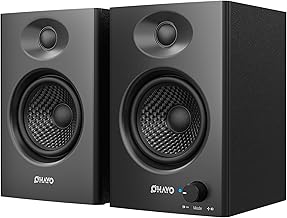
Best for buyers looking for compact stereo speakers with Bluetooth and a listed 60-watt total output. The product details describe a pair of 30-watt speakers, each with a 0.75-inch carbon-fiber silk-dome tweeter and a 3-inch carbon-fiber full-range driver. They also list an MDF wooden enclosure, a rear bass port, and a front-panel volume knob.
The cabinet and driver details may help shoppers compare its design with compact desktop options, while Bluetooth provides a wireless connection option. The product description calls the speakers suitable for desktop or small-room audio, but the supplied details do not identify an optical or coaxial input.
Limitation: SPDIF support is not confirmed, and the listed features do not specify other wired input types. Do not select it for optical digital playback without checking the full connection list.
Buying Guide: How to Choose Computer Speakers With SPDIF
What does SPDIF mean for computer speakers?
SPDIF is a digital audio connection standard. For desktop speakers, shoppers commonly encounter optical SPDIF, also called TOSLINK, and coaxial SPDIF. These use different physical connectors and cables, so the term “digital audio” alone is not enough to establish that a speaker will connect directly to a particular computer.
In this selection, the H1 product name explicitly lists an optical connection. That makes it the most directly relevant option for a computer with an optical audio output. The other products’ supplied descriptions do not confirm SPDIF support. A product without a listed SPDIF input may still suit an analog or Bluetooth setup, but it does not meet a confirmed optical-input requirement based on the information available here.
Does the computer have an optical or coaxial output?
Check the computer’s rear panel, motherboard specifications, or audio-device documentation. Optical ports often have a small square opening and may be labeled “Optical,” “S/PDIF,” or “TOSLINK.” Coaxial digital audio typically uses a different connector. Do not assume that a 3.5 mm headphone jack, USB port, or HDMI port is an optical SPDIF output.
If the computer has no matching digital output, a direct SPDIF connection may require a separate audio interface or converter. Confirm that the adapter accepts the computer’s output and provides the input type required by the speakers. This is a separate purchase and is not included in the product information provided here.
Is an optical input the same as any digital input?
No. Optical and coaxial SPDIF carry digital audio but use different physical connections. USB-C can also carry digital audio in some products, but the presence of a USB-C port does not by itself confirm USB audio, SPDIF, or compatibility with a particular source. The H1 description separately names USB-C with a 24-bit DAC and optical, while LENRUE describes USB power and AUX audio.
Match the source output to the speaker input by both connector and function. If a listing does not clearly state “optical,” “TOSLINK,” or “coaxial SPDIF,” ask the seller or consult the full specification sheet rather than relying on an image or a broad phrase such as “digital sound.”
Should you choose powered stereo speakers or a 2.1 system?
A 2.0 stereo pair uses two speakers and can be a straightforward fit for a computer desk. The H1 and OHAYO products are described as stereo 2.0 options. The Logitech Z313 is a 2.1 system with a separate compact subwoofer and a control pod. Consider desk footprint and where a subwoofer could sit, as well as whether a separate bass unit matches your listening needs.
Power figures are not directly interchangeable unless the manufacturer specifies how they were measured. The H1 is listed at 60 watts, the OHAYO at 60 watts total with 30 watts per speaker, and the Logitech at 25 watts RMS. Compare the stated rating type and system layout instead of treating wattage alone as a complete measure of sound quality.
Which connections and controls matter for your setup?
List the devices you want to connect before selecting speakers. A computer might use optical output, USB audio, Bluetooth, or analog AUX, while a phone or other source may rely on Bluetooth or a headphone output. A speaker with multiple confirmed inputs can reduce the need to switch cables, but verify each connection’s purpose in the product specifications.
- Choose the H1 if optical input is the priority and you also want the listed USB-C DAC, Bluetooth, AUX, and bass and treble controls.
- Consider the Logitech Z313 if a 2.1 layout, compact subwoofer, and control pod matter more than confirmed SPDIF.
- Consider the LENRUE G11 if compact placement, USB power, AUX audio, and touch-controlled lights fit your desk needs.
- Consider the ROSON if a volume control and headphone jack are useful, after confirming the connections you need.
- Consider the OHAYO if Bluetooth, a stereo pair, and the listed speaker drivers and cabinet design suit your setup.
What should you confirm before ordering?
Verify the exact input type, whether the connection is an input or output, and any supported audio-format requirements. Check whether the product requires a separate power connection, whether included cables meet your needs, and how the speakers will fit around your monitor. These details are not established for every product in the supplied information, so consult the current complete listing when they affect your choice.
For a strict SPDIF requirement, prioritize products that explicitly name optical or coaxial digital input. If you are willing to connect through AUX or Bluetooth instead, compare controls, layout, power information, and available desk space. This distinction helps prevent buying speakers that sound suitable on paper but cannot accept the source device’s digital output.
Frequently Asked Questions
Which product listed here explicitly includes SPDIF?
The H1 Computer Speakers list an optical connection. Optical audio is a common SPDIF format, but verify the source and supported format requirements before connecting.
Do the Logitech Z313 speakers have an optical input?
The supplied Logitech Z313 details list a control pod, 25 watts RMS output, and a compact subwoofer, but do not confirm an optical input. Check the complete specifications if SPDIF is required.
Does USB power mean a speaker supports digital USB audio?
No. USB may provide power without carrying audio. The LENRUE G11 listing describes USB-C or USB power and AUX audio; the supplied details do not confirm USB audio or SPDIF.
Can I connect optical SPDIF speakers to a computer without an optical port?
Not directly through an optical cable. You may need a compatible audio interface or converter that accepts an output available on your computer and provides the speaker’s required input.
Are Bluetooth speakers SPDIF speakers?
No. Bluetooth is a wireless connection, while SPDIF is a wired digital audio connection. A speaker may offer both, but the supplied details must confirm each connection separately.