
The best condenser microphone for a laptop depends on whether you need a simple USB mic for calls, hands-on controls for streaming, or omnidirectional pickup for group meetings. The FIFINE K669B and Amazon Basics microphone suit straightforward desktop recording, while the ZealSound and TONOR models add controls aimed at creators. The NEEWER UM04 is the group-meeting option, with omnidirectional pickup and selectable AI noise cancellation. Compare the listed features below, then choose based on your room, number of speakers, and preferred controls.
| Microphone | Best For | Listed Standout |
|---|---|---|
| ZealSound Podcast Microphone | Creators who want onboard adjustments | Gain, volume, mute, monitoring, and echo |
| FIFINE K669B | Simple laptop recording and calls | USB connection and cardioid pickup |
| Amazon Basics Condenser Microphone | Basic streaming and recording | Cardioid pickup and adjustable stand |
| NEEWER UM04 | Group calls and meetings | Omnidirectional pickup and AI noise cancellation |
| TONOR TC310+ | Streaming setups needing a boom arm | Boom arm, RGB, tap mute, and gain control |
ZealSound Podcast Microphone

Best for: Laptop users who want several recording controls on the microphone. Its listed features include gain and volume adjustment, a mute button, monitoring, and echo. Those controls can be useful when switching between a call, a stream, or a recording and wanting to adjust the mic without relying only on software.
The product is described as a USB podcast microphone with noise cancellation. Its stated use cases include YouTube, TikTok, podcasting, and streaming, as well as use with computers and named mobile devices. Choose this model if onboard adjustments matter more to you than having a minimal, control-free setup.
Limitation: The supplied product information does not specify a pickup pattern or the exact laptop setup requirements. Check the listing for the connection details you need before purchasing, especially if you plan to use a device other than a computer.
FIFINE K669B USB Microphone

Best for: Buyers seeking a direct USB condenser mic for laptop voice use. The listed description identifies it as a metal cardioid microphone for recording vocals, voice-overs, streaming, YouTube videos, and online meetings. Cardioid is the stated pickup pattern, so this model is aimed at capturing a primary speaker rather than evenly covering a group around the microphone.
The product description names Mac OS and Windows, making it a candidate for users on either platform. Choose it if your main needs are voice recording, calls, or streaming and you prefer a straightforward microphone rather than a feature-heavy creator setup.
Limitation: The supplied details do not list a mute button, headphone monitoring, or an included boom arm. If you need those features, compare the control and accessory lists of the other options before deciding.
Amazon Basics Condenser Microphone

Best for: Laptop users who want a basic USB microphone with a stand included. The listed details specify cardioid pickup, plug-and-play operation, and a 360-degree adjustable stand. Its stated uses include streaming, recording, and podcasting, so it fits common solo voice applications.
The cardioid pattern makes this a better match for a single speaker positioned in front of the mic than for a table of people speaking from different directions. The adjustable stand is useful if you want to change the microphone’s position without choosing a separate boom arm. Choose it if a simple desktop arrangement is more important than advanced onboard controls.
Limitation: The provided description does not list gain control, a mute button, or headphone monitoring. Buyers who need these controls should verify the full product listing rather than assume they are included.
NEEWER UM04 Omnidirectional Microphone

Best for: Online meetings where several people may speak around one microphone. The UM04 uses an omnidirectional pickup pattern that captures sound from all directions. NEEWER lists an optimal pickup distance of 4.9 feet, or 1.5 meters, and positions the mic for group meetings, online teaching, calls, gaming, and podcasting.
The microphone connects directly to a computer or laptop without requiring drivers, according to the supplied details. Its DSP controls include tap-to-mute, a double tap to enable AI noise cancellation, and a three-second press to switch dynamic RGB lighting on or off. Choose this model when shared, 360-degree pickup and tap controls matter.
Limitation: The listing says users may need to set it as the default PC input device. Some phones may require OTG activation. Its omnidirectional pattern may be less suitable than a cardioid mic when the priority is focusing on one speaker in a noisy room.
TONOR TC310+ Gaming Microphone Set
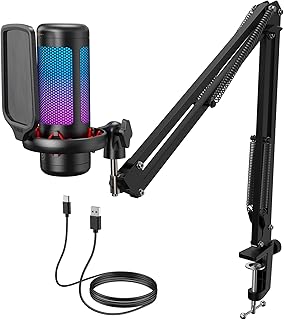
Best for: Laptop streamers and creators who want a microphone set with a boom arm. The product name lists a vocal condenser microphone, USB connection, stand, RGB lighting, tap mute, and gain control. Those features make it a more control-oriented choice than a basic USB mic, especially for users setting up a dedicated streaming or gaming space.
Choose this set if you want the microphone positioned on a boom arm and value quick mute and gain controls. Its listed use cases include Twitch and streaming, as well as content creation. The boom-arm format can also be preferable when a desktop stand would occupy space in front of the laptop.
Limitation: The supplied product information does not identify the pickup pattern, connection specifications, or detailed adjustment range. Check the full listing to confirm that the included setup meets your desk and laptop requirements.
Buying Guide: How To Choose A Laptop Condenser Microphone
Do you need to record one person or a group?
Start with the number and position of the speakers. A cardioid microphone is generally the more relevant choice when one person speaks from in front of the mic. The FIFINE K669B and Amazon Basics microphone are explicitly described as cardioid. The NEEWER UM04 is explicitly omnidirectional, so it is designed to capture sound from all directions and is the clearest listed fit for group meetings.
Pickup pattern alone does not guarantee a particular result in every room. Distance, background noise, room reflections, and microphone placement affect recorded speech. For a solo call, place the mic near the main speaker and test the input level in the application. For a group, keep the microphone within the distance stated by the manufacturer and arrange speakers around it.
Which microphone controls are useful for your work?
Onboard controls can reduce the need to search through software menus. The ZealSound listing names gain and volume adjustments, mute, monitoring, and echo. The TONOR TC310+ lists tap mute and gain control. The NEEWER UM04 has tap controls for mute and AI noise cancellation. The FIFINE and Amazon Basics descriptions supplied here do not list comparable onboard controls.
Mute is useful when you need to stop transmitting sound quickly during a call. Gain adjustment changes the microphone input level, but it does not replace good placement. Monitoring can help a speaker hear the microphone feed; confirm the product listing for the exact monitoring setup if that feature is important to your workflow.
Is a desktop stand or boom arm a better fit?
A desktop stand is a compact choice for a simple workspace. The Amazon Basics model lists a 360-degree adjustable stand. The TONOR set lists a boom arm, which may suit a creator who wants the microphone positioned over the desk rather than placed directly in front of the laptop. The supplied ZealSound, FIFINE, and NEEWER details do not establish a comparable included arm, so check the full listings for accessories.
Before choosing a larger setup, consider available desk space, where the laptop sits, and whether the microphone could block a screen or keyboard. Also check what is included rather than assuming that a stand, arm, cable, or other accessory comes with a product.
What should laptop users check before buying?
- Connection: Confirm that the microphone’s connection works with the ports available on your laptop. The supplied descriptions identify USB for these products, but do not provide the same level of connector detail for every model.
- Operating system: The FIFINE description names Mac OS and Windows. NEEWER lists macOS and Windows PC, plus selected mobile-device use. Verify current compatibility details for your exact computer and operating system.
- Default input: A computer may continue using its built-in microphone after an external mic is connected. NEEWER specifically advises setting the UM04 as the default input device on a PC when multiple audio devices are connected.
- Mobile use: A microphone that can connect to some phones may need an adapter or a device setting. NEEWER notes that some phones may require OTG activation; do not assume every phone connects the same way.
- Recording environment: Noise-cancellation features do not eliminate the need for sensible mic placement. A quiet room and a suitable distance from the speaker can help reduce unwanted background sound.
Which option is better for calls, streaming, or podcasting?
For shared online meetings, the NEEWER UM04 stands out because its listing specifies omnidirectional pickup and an optimal distance. For a single speaker recording voice-overs or attending calls, the cardioid FIFINE K669B or Amazon Basics model is a more pattern-specific match. For streamers who want a boom arm and quick controls, consider the TONOR TC310+. The ZealSound suits buyers who value several listed adjustments, including monitoring and echo.
These are feature-based comparisons, not claims about measured sound quality. The supplied product details do not provide standardized audio tests, so compare the listed pickup pattern, controls, accessories, and device requirements against your own use before buying.
Frequently Asked Questions
Can I use a USB condenser microphone with a laptop?
Yes, the products in this comparison are described as USB microphones for computer or laptop use. Check the exact connector and operating-system requirements in the current product listing, and select the microphone as the input device in your computer or recording application if needed.
Is cardioid or omnidirectional pickup better for laptop calls?
Cardioid pickup is the more relevant starting point for one main speaker positioned in front of the microphone. Omnidirectional pickup is designed to capture sound from different directions and can be more appropriate when several people share a microphone.
Does a condenser microphone automatically cancel background noise?
No. Do not assume that every condenser microphone has noise cancellation. The ZealSound name lists noise cancellation, and the NEEWER UM04 lists selectable AI noise cancellation. Check the individual microphone’s features and use a quiet room when possible.
Do I need a boom arm for a laptop microphone?
No. A boom arm is optional. A desktop stand can be sufficient for calls or recording, while a boom arm may suit a streaming desk where the user wants the microphone positioned off the desktop. The TONOR TC310+ is the option here whose product name lists a boom arm.
Why is my laptop still recording through its built-in microphone?
The laptop or application may still have its built-in microphone selected as the input. Open the computer’s sound settings or the call application’s audio settings and choose the connected USB microphone. NEEWER also advises setting the UM04 as the default input on a PC when multiple audio devices are connected.