
The best USB conference table microphone depends on your room size and whether you need a microphone only or a speakerphone with playback. The Movo MC1000 is best for larger groups because its listed pickup range reaches 20 feet across a 180-degree arc. The TONOR G11 Pro suits buyers who want noise reduction and built-in controls, while the EMEET M0 Plus adds a speaker and options for expanding a meeting setup. The picks below compare connection type, pickup coverage, controls, and limitations.
| Product | Best For | Key Distinction |
|---|---|---|
| Movo MC1000 | Wider tables and group meetings | 20-foot pickup, 180-degree arc |
| TONOR G11 Pro | Calls with distracting room noise | AI noise reduction and volume controls |
| TONOR G11 | Simple plug-and-play meetings | 360-degree pickup, 11.5-foot range |
| CMTECK USB Microphone | Compact, portable setups | Small desktop design and mute button |
| EMEET M0 Plus | Meetings needing mic and speaker | Four microphones and Bluetooth |
Movo MC1000: Best For Larger Tables

The Movo MC1000 is a tabletop USB microphone designed for conference rooms, classrooms, interviews, and hybrid meetings. Its listed pickup range is up to 20 feet across a 180-degree arc, making it a better fit for a broad table than compact microphones with shorter stated ranges.
It appears as a standard USB microphone on Windows and Mac and is listed for use with Zoom, Microsoft Teams, Google Meet, Webex, and recording or dictation software. The included 6.5-foot cable connects the microphone to a computer; the setup requires selecting it as the input device.
- Best for: Groups seated across a wide table that need one centrally placed microphone.
- Why it was selected: The stated 20-foot range is the longest listed among these microphone-only options.
- Limitation: Its pickup is a 180-degree arc, not 360-degree coverage, and the product is a microphone rather than a speakerphone.
TONOR G11 Pro: Best For Noise Control
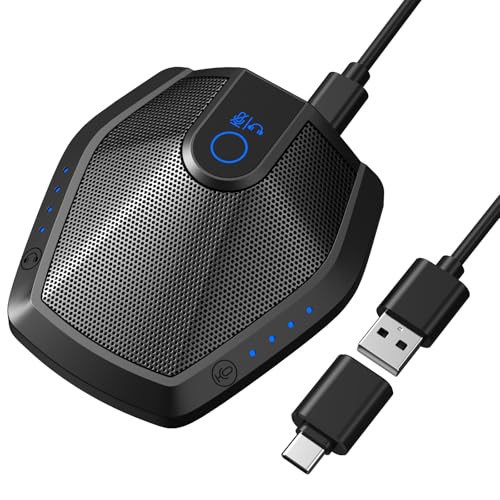
The TONOR G11 Pro is a USB condenser conference microphone with an omnidirectional pickup pattern and a stated range of 11.5 feet. Its listed AI noise reduction is intended to reduce distractions such as fan noise and keyboard clicks during calls, online learning, and chat.
Physical controls on the microphone let users adjust microphone and monitoring volume. The product description specifies four volume levels. This makes it a practical choice for buyers who want basic adjustments on the device rather than relying only on computer settings.
- Best for: A small or medium meeting area where background sounds and quick volume adjustments are concerns.
- Why it was selected: It combines 360-degree pickup, noise reduction, and built-in controls.
- Limitation: It is a microphone, not a speaker. Its 11.5-foot stated pickup distance is shorter than the Movo’s listed range.
TONOR G11: Best For Simple USB Setup

The TONOR G11 is an omnidirectional condenser microphone for desktop computers and laptops. Its listed pickup distance is 11.5 feet, with sound captured from all directions. The product is intended for small or medium online meetings, remote training, seminars, and similar uses.
It connects through USB and requires no driver installation according to the product information. It is listed as compatible with Windows and macOS. If the computer does not use it automatically, the microphone may need to be selected as the input device in system settings.
- Best for: Buyers who want a straightforward desktop mic for a small meeting space.
- Why it was selected: Its 360-degree pickup and plug-and-play setup address common conference-call needs without extra controls or features to manage.
- Limitation: It does not play meeting audio; participants need separate speakers or headphones.
CMTECK USB Microphone: Best Compact Option
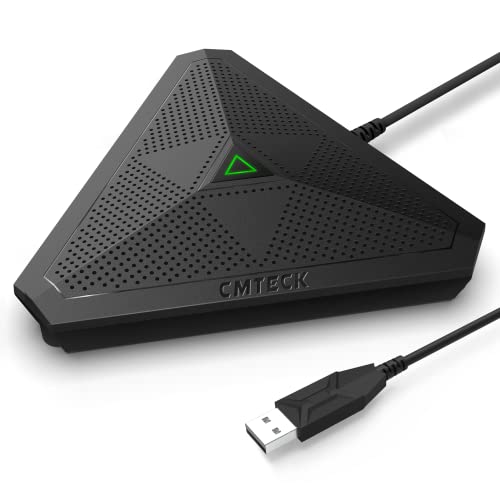
The CMTECK USB microphone is a compact, portable tabletop model with a 360-degree pickup range listed at 10 feet. Its product features mention noise-canceling technology, a built-in mute button, and a 1.8-meter USB cable. It is described for meetings, interviews, streaming, and other computer audio tasks.
The microphone connects to a computer without driver installation and is listed as compatible with Windows and macOS. Its small design may suit a desk that has limited space or a user who wants a microphone that can be carried between work locations.
- Best for: Individuals or small groups who value a compact, portable desktop microphone.
- Why it was selected: It combines omnidirectional pickup, a mute button, and a small form factor.
- Limitation: The stated 10-foot pickup range is shorter than the ranges listed for the Movo and TONOR models. It is not a speaker and is not listed as compatible with Raspberry Pi or Android.
EMEET M0 Plus: Best For Mic And Speaker

The EMEET M0 Plus is a conference speakerphone, rather than a microphone-only device. It combines four microphones with 360-degree voice pickup and a 3-watt speaker. The product description also lists noise filtering, echo reduction, and full-duplex audio, which allows participants to speak and hear audio during the same conversation.
It supports USB-C and USB-C-to-A connections as well as Bluetooth. For larger meetings, the product can be daisy-chained with a compatible EMEET speakerphone setup to support up to 16 attendees, according to the listing.
- Best for: Teams that need both voice pickup and meeting audio from one tabletop unit.
- Why it was selected: It adds a built-in speaker, multiple microphones, and an expansion option not found on the microphone-only picks.
- Limitation: It is a speakerphone, so it may be more equipment than needed if the computer already provides suitable audio playback.
Buying Guide: How To Choose A USB Conference Table Microphone
Do you need a microphone or a speakerphone?
A USB conference microphone captures voices and sends them to a computer. It does not play remote participants’ voices. A speakerphone combines microphones with a speaker, so it can handle both incoming and outgoing meeting audio. Choose a microphone-only model if your setup already has speakers or headphones. Choose a speakerphone such as the EMEET M0 Plus if you want an all-in-one tabletop device.
How much pickup coverage does the room need?
Compare the room layout and microphone placement with the stated pickup range. The Movo lists pickup up to 20 feet across a 180-degree arc. The TONOR G11 and G11 Pro list 11.5 feet, while the CMTECK lists 10 feet. These figures are product specifications, not guarantees for every room: distance, placement, and room noise can affect how voices are captured.
Omnidirectional pickup means a microphone is designed to capture sound from multiple directions around it. It can be useful when participants sit around a table, but it does not eliminate the need to place the device sensibly. Keep it near the group and away from avoidable noise sources where possible.
Will noise reduction solve a noisy room?
Noise reduction features may help limit distracting sounds, but they do not make room acoustics irrelevant. The TONOR G11 Pro lists AI noise reduction for sounds such as fans and keyboard clicks. The EMEET M0 Plus lists noise filtering and echo reduction. Consider these features if your meeting space has recurring background noise, but also reduce noise at its source when practical.
What connection and controls matter?
All the microphone-only options here use USB and are described as plug-and-play, but the cable length and controls differ. The Movo includes a 6.5-foot cable, and the CMTECK lists a 1.8-meter cable. The TONOR G11 Pro has physical volume and monitoring controls; the CMTECK includes a mute button. Check whether the cable can reach from the computer to the center of the table and whether on-device mute or volume adjustment matters for your workflow.
Check operating system and meeting software
Confirm that the microphone works with the computer and software used by your team. The TONOR G11, TONOR G11 Pro, CMTECK, and Movo listings specify Windows and Mac support. Several products also name common video-conferencing or calling apps. After connecting a USB mic, check the meeting app’s audio settings and select the device as the microphone if it is not selected automatically. The CMTECK listing specifically excludes Raspberry Pi and Android.
Frequently Asked Questions
Is a USB conference microphone also a speaker?
No. A microphone-only device sends captured voices to a computer but does not play audio. Choose a speakerphone if you need a built-in speaker as well as microphones.
What does 360-degree pickup mean?
It means the microphone is designed to capture voices from around the device rather than only from one direction. It does not mean every voice will be equally clear at any distance or in every room.
Which pick is listed for the longest pickup distance?
The Movo MC1000 lists pickup up to 20 feet across a 180-degree arc. The other microphone-only models here list shorter ranges.
Do these USB microphones require drivers?
The listed TONOR G11, TONOR G11 Pro, CMTECK, and Movo models are described as plug-and-play or requiring no driver installation. A computer or meeting app may still require you to select the microphone as the audio input.
Should I choose a USB microphone or Bluetooth speakerphone?
Choose a USB microphone if you need voice pickup and already have a way to hear the meeting. Choose a speakerphone if you want a combined microphone and speaker; the EMEET M0 Plus also lists Bluetooth and USB connection options.