
To connect a TV’s optical audio output to an old stereo, use a digital-to-analog converter (DAC) with optical input and RCA output, then connect the RCA cables to the stereo’s AUX, CD, or other line-level input. The PROZOR and AUTOUTLET converters are the closest fits for RCA-equipped stereos; the Tackston and DNXB options provide 3.5mm output. A Bluetooth receiver is better for streaming music wirelessly to a stereo, not for converting a TV’s optical output into an analog signal.
| Product | Best For | Output |
|---|---|---|
| PROZOR 192KHz DAC | RCA or 3.5mm connections | RCA and 3.5mm |
| AUTOUTLET 192kHz DAC | Direct RCA connection | RCA |
| Tackston 192KHz DAC | 3.5mm stereo input | 3.5mm |
| DNXB 192KHz DAC | 3.5mm stereo input | 3.5mm |
| SUYEE Bluetooth 5.3 Receiver | Wireless music streaming | RCA, 3.5mm, optical |
PROZOR 192KHz Optical DAC

Best for: An old stereo with RCA inputs, or a setup that may also use a 3.5mm connection. This converter accepts optical Toslink or coaxial digital audio and converts it to analog left/right RCA and 3.5mm output simultaneously.
Its listed supported sampling rates run from 32 kHz through 192 kHz, with 24-bit S/PDIF input. The product information also describes an upgraded amplifier chipset and dual-channel operational amplifier. Choose it if you want both common analog output types available from one converter.
Important limitation: Set the TV’s optical audio format to PCM. The listed instructions also say to adjust TV volume through settings; the TV remote’s normal volume control may not change the converter’s output. This is a DAC, so it converts digital audio to analog, not the reverse.
AUTOUTLET Optical-To-RCA DAC

Best for: A stereo receiver or amplifier with RCA line inputs. This converter is described as connecting an optical Toslink source directly to stereo RCA inputs, making it a straightforward choice when the stereo has red-and-white RCA jacks.
The listed specifications include 24-bit/192 kHz processing and support for optical sample rates of 32, 44.1, 48, 96, and 192 kHz. The product information says its amplifier chip and dual-channel operational amplifier amplify the RCA output level. Choose it when RCA is the only analog connection you need.
Important limitation: Confirm that the old stereo has an available line-level RCA input, such as AUX or CD. The product description emphasizes optical-to-RCA conversion; it does not list a 3.5mm output.
Tackston Optical-To-3.5mm DAC

Best for: A stereo, powered speaker, or other audio device with a 3.5mm analog input. The listed cable converts a TV’s optical digital audio signal to analog audio through a 3.5mm jack.
The converter supports optical inputs at 32, 44.1, 48, 96, and 192 kHz, with data streams up to 24-bit. Choose it if the receiving device has a 3.5mm AUX input and you want to avoid a separate RCA-output converter.
Important limitation: The signal direction is one-way: optical to 3.5mm, not 3.5mm to optical. The product information also warns that the TV remote’s volume buttons will not work during use; adjust volume on the playback device, such as the stereo or speakers.
DNXB Optical-To-AUX Converter

Best for: An older stereo with a 3.5mm AUX input. This DAC converts an optical SPDIF/Toslink digital signal to stereo analog output through a 3.5mm AUX port. It is a practical alternative to an RCA converter when the stereo’s available input is a headphone-style jack.
The listed specifications support sample rates of 32, 44.1, 48, 96, and 192 kHz and data streams up to 24-bit. Choose this product if the TV has optical audio out and the receiving stereo has a matching analog 3.5mm input.
Important limitation: It does not convert 3.5mm audio to optical. The product instructions also call for setting the TV’s digital audio output to PCM or stereo before use.
SUYEE Bluetooth Stereo Receiver
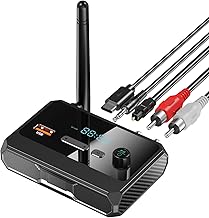
Best for: Someone who wants to stream audio from a Bluetooth-enabled phone or other device to an existing wired stereo. The receiver supports Bluetooth 5.3 and lists RCA, 3.5mm, and digital optical outputs, as well as USB-drive music playback.
Choose it to add wireless music streaming to a stereo with a suitable input. It may also suit a setup where an optical output from the receiver is useful, but it is not the direct solution for converting a TV’s optical output to the stereo’s analog RCA input.
Important limitation: The product is a Bluetooth receiver only, not a transmitter. Its listed optical connection is an output, so do not choose it as an optical-input DAC for a TV.
Buying Guide: How To Connect Optical Audio To An Old Stereo
Which converter output should you choose?
Check the inputs on the stereo before choosing a DAC. Many older receivers have red-and-white RCA inputs labeled AUX, CD, Tape, or Line In. If yours has an available pair, select an optical-to-RCA converter. If the stereo has a 3.5mm AUX input instead, choose an optical-to-3.5mm converter and use an appropriate 3.5mm connection.
Do not connect the converter to a stereo’s phono input unless the equipment instructions specifically allow it. Phono inputs are intended for turntables and are not the same as a standard line-level input. If you are unsure, look for an input labeled AUX, CD, or Line.
What cables and connections are needed?
A basic setup uses three connections: an optical cable from the TV to the DAC, an analog cable from the DAC to the stereo, and power for the DAC if its design requires it. The product descriptions here identify the conversion function and outputs, but do not provide complete details about included cables or power accessories. Check the listing contents and the converter’s connection requirements before ordering.
- Connect the TV’s optical audio output to the DAC’s optical input.
- Connect the DAC’s RCA or 3.5mm output to an available stereo line input.
- Select that input on the stereo and set the TV’s digital audio format to PCM or stereo.
- Raise the volume gradually using the control specified for the setup.
Why does the TV need to be set to PCM?
These listed converters are designed to receive compatible digital audio and produce analog stereo output. The PROZOR and DNXB product information specifically advises setting the TV to PCM; the other DAC descriptions also identify PCM digital audio conversion or compatible sample rates. If the stereo produces no sound, check the TV’s sound menu and select PCM or stereo rather than an unsupported digital format.
Menu labels vary by TV. Look for settings such as Sound Output, Digital Audio Output, Optical Output, or Digital Sound Format. If PCM is already selected, check that the TV is sending audio through its optical port and that the stereo is set to the correct input.
Will the TV remote control the stereo volume?
Not necessarily. A DAC changes digital audio into an analog signal, and some converters provide a fixed output level. The Tackston listing says TV remote volume controls will not function during use and advises adjusting volume on the playback device. The PROZOR listing also says to adjust TV volume through settings. Check the specific product instructions and use the stereo’s volume control if the TV remote does not change the sound level.
Should you buy a DAC or a Bluetooth receiver?
Choose a DAC when the audio source, such as a TV, sends digital audio through an optical port and the stereo accepts analog RCA or 3.5mm input. Choose a Bluetooth receiver when the goal is to stream music wirelessly from a phone or another Bluetooth source into the stereo. A receiver with optical output does not automatically accept optical audio input, so check signal direction before buying.
What should you check before ordering?
- TV output: Confirm the TV has an optical digital audio output, not just an optical input.
- Stereo input: Identify an available RCA or 3.5mm line-level input.
- Conversion direction: Look for optical-to-analog DAC functionality. A converter with the reverse direction will not solve this connection.
- Audio format: Confirm the TV can be set to PCM or stereo if required.
- Volume control: Check whether volume is adjusted at the TV, converter, or stereo.
- Power and accessories: Review what is included and whether the DAC needs a separate power connection.
Frequently Asked Questions
Can I connect an optical TV output directly to an old RCA stereo?
No. Optical audio is digital, while a traditional RCA stereo input is analog. Use an optical-to-RCA DAC between the TV and stereo.
Which input on an old receiver should I use?
Use an available line-level input labeled AUX, CD, Tape, or Line In. Select the same input on the stereo after connecting the DAC.
Do I need an optical-to-RCA cable or a DAC?
You need a DAC that converts optical digital audio to analog RCA. A passive cable cannot perform this digital-to-analog conversion.
Why is there no sound after connecting the converter?
Check the optical connections, stereo input selection, converter power requirements, and TV audio-output settings. Set the TV’s digital output to PCM or stereo when the converter instructions require it.
Can a Bluetooth receiver convert my TV’s optical output?
Only if the device specifically has an optical input and digital-to-analog conversion. The listed SUYEE unit is a Bluetooth receiver with optical output, so it is not the direct optical-input DAC for this purpose.
Can I use a 3.5mm converter with RCA inputs on my stereo?
Only if you have a suitable 3.5mm-to-RCA analog connection and the converter’s output is compatible. For a stereo with RCA inputs, an optical-to-RCA DAC is the more direct match.