
A standard 3.5 mm AUX connection carries audio, not video, so an AUX-to-HDMI adapter alone cannot create an HDMI picture. For older devices with yellow, white, and red RCA outputs, choose an RCA-to-HDMI converter; for HDMI sources that need analog audio, choose an audio extractor instead. The Tengchi is best for straightforward composite conversion, while the Viagkiki includes an HDMI cable. The VPFET and ARC converters address audio-routing needs, not analog AUX-to-HDMI video conversion.
| Product | Best suited for | Signal direction |
|---|---|---|
| Tengchi RCA to HDMI Converter | Basic composite video sources | RCA AV to HDMI |
| BD&M RCA to HDMI Converter | Older players and retro consoles | RCA AV to HDMI |
| Viagkiki RCA to HDMI Converter | Buyers who need an HDMI cable included | RCA AV to HDMI |
| VPFET HDMI Audio Extractor | Sending HDMI-source audio to AUX or optical audio equipment | HDMI to audio |
| HDMI ARC Audio Converter | Routing compatible TV audio to older audio equipment | HDMI ARC to audio |
What “AUX To HDMI” Means Before You Buy
“AUX” can refer to a 3.5 mm analog audio jack, but shoppers sometimes use the term loosely for an older AV connection. These are different signals. A 3.5 mm AUX cable usually carries stereo audio only. Composite RCA uses yellow for video and white and red for left and right audio. HDMI carries digital audio and video together.
If your source device has only a 3.5 mm headphone or AUX output, none of the RCA-to-HDMI products below can turn its audio into a video signal. If you want to hear that device through an HDMI display, the display must accept audio through a compatible input, or you need another appropriate audio-routing solution. If the source has yellow, white, and red RCA outputs, a powered RCA-to-HDMI converter can change that composite signal to HDMI.
Tengchi RCA To HDMI Converter

Best for: Connecting a composite RCA source to an HDMI television or monitor with a simple converter.
This adapter accepts one set of yellow, white, and red RCA plugs and outputs HDMI. Its listed output is 1080p through HDMI 1.3, and the product is described as plug and play. It is a fit for an older device that provides composite AV output and a display that accepts HDMI input.
The converter requires USB power during use. The USB cable is included, but the listed features say the 5V, 1A power supply is not included, so plan to provide a suitable power source. It does not support 3D or 4K, and its direction is RCA to HDMI—not HDMI to AV. Choose it for basic composite conversion, not for a 3.5 mm AUX-only source.
BD&M RCA To HDMI Converter

Best for: Older RCA-equipped devices such as VCRs, DVD players, camcorders, and retro game systems.
The BD&M converts analog RCA composite AV to HDMI and lists support for 720p and 1080p HDMI output. Its stated device examples include VHS players, VCRs, DVD players, camcorders, PS1, PS2, PS3, Xbox, N64, and Wii. That makes it a relevant choice when a legacy source has standard yellow, white, and red RCA output and the newer display has HDMI input.
Its selection advantage is the broad set of older AV-device examples and the listed 720p/1080p output options. The supplied product information does not specify whether an HDMI cable or USB power supply is included, so check the package details before ordering. It is not a solution for a source that has only a 3.5 mm AUX audio jack.
Viagkiki RCA To HDMI Converter

Best for: Buyers who want an RCA-to-HDMI adapter supplied with an HDMI cable and micro USB power cable.
This one-way converter accepts analog composite video and stereo audio through three RCA female inputs: yellow, white, and red. The product listing says it includes a 3.3-foot HDMI cable, a micro USB power cable, and a user manual. It requires a 5V/1A USB power source, but the power adapter is not included.
Choose it if your source has male RCA plugs and you want the HDMI cable included in the package. A device with female RCA output ports may need a separate RCA male-to-male cable, which the listing says is not included. The converter works from RCA AV to HDMI only; it does not convert HDMI to RCA or transform audio-only AUX into video.
VPFET HDMI Audio Extractor
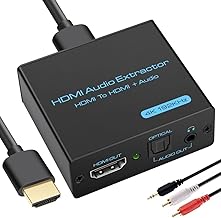
Best for: Sending sound from an HDMI source to a separate 3.5 mm stereo or optical audio device.
This product is an HDMI audio extractor, not an AUX-to-HDMI converter. It takes an HDMI signal and provides audio through optical or 3.5 mm output. Listed modes include 2.0-channel, 5.1-channel, and pass-through. The 3.5 mm output is specified for PCM 2.0; optical output supports DTS 5.1. Its HDMI 1.4 specification lists up to 4K at 30 Hz, HDCP 1.4, and 10.2 Gbps bandwidth.
Choose it when an HDMI source needs to send audio to compatible separate equipment. The listing says it does not support ARC or eARC, does not support 7.1-channel audio, and does not accept a TV as the HDMI input source. It also notes that some devices are limited to 1080p. Check the source and audio format requirements before choosing it.
HDMI ARC Audio Converter

Best for: Connecting audio from an ARC-compatible TV to listed optical or 3.5 mm audio equipment.
This adapter is designed for the reverse of RCA-to-HDMI video conversion: it converts HDMI ARC-compatible TV audio to Toslink optical or 3.5 mm AUX output. The listing specifies PCM 2.0 and 5.1-channel support, with 5.1 available only through SPDIF or coaxial output, and audio up to 192 kHz/24-bit.
Choose this product when the TV supports HDMI ARC and the goal is to route TV sound to compatible legacy audio equipment. It is not a device for turning an AUX signal into HDMI picture and sound. A listed limitation is that the TV remote’s volume controls will not work during use; volume must be adjusted on the playback device, such as a soundbar.
Buying Guide: How To Choose The Right Converter
Does Your Source Have AUX, RCA, Or HDMI?
Start by checking the actual output ports on the source device. A single 3.5 mm jack is generally an audio output. Three RCA sockets or plugs—yellow, white, and red—indicate composite video and stereo audio. HDMI is a digital connection that can carry both picture and sound. The connector shape and signal type determine which converter category you need.
- 3.5 mm AUX only: These products do not convert it into an HDMI video signal. Identify whether you need audio playback, video conversion, or both.
- Yellow, white, and red RCA: Use a one-way RCA-to-HDMI converter, such as Tengchi, BD&M, or Viagkiki.
- HDMI source, separate audio output needed: Consider an HDMI audio extractor such as VPFET, subject to its input and format limits.
- TV audio over ARC: Consider an ARC audio converter only if the TV has a compatible ARC connection and the intended audio output matches.
Which Direction Does The Converter Support?
Direction is essential. An RCA-to-HDMI converter takes an analog composite source and sends its output to an HDMI display. It does not accept HDMI from a newer device and send it to an RCA television. Likewise, an HDMI audio extractor takes audio out of an HDMI signal; it does not take AUX audio and add a video signal to it. Read the input and output descriptions, not just the product title.
Do You Need A Separate Power Source Or Cable?
Some converters need USB power even when the source and display are connected. The Tengchi listing requires a 5V, 1A power source and says its power supply is not included. The Viagkiki listing includes a micro USB power cable but not the power adapter, and includes an HDMI cable. The BD&M listing provided here does not specify its included cables or power requirements, so verify those details before purchase.
What Resolution And Audio Format Should You Check?
RCA composite is an analog standard-definition source. A converter’s 720p or 1080p HDMI output describes the output format; it does not make the original video contain native high-definition detail. For HDMI audio extractors, check the supported channel mode and the output connection. VPFET lists PCM 2.0 on 3.5 mm and DTS 5.1 on optical, while its features exclude 7.1-channel audio and ARC/eARC.
How Can You Avoid Common Setup Problems?
- Match the source’s output ports to the converter’s input ports before ordering.
- Connect the converter’s output to the display’s input; do not reverse the stated signal direction.
- Provide USB power when the product requires it, using the specified power rating.
- For an RCA source, match yellow to video and white and red to stereo audio.
- If an extractor has sound-mode settings, follow the listed output mode; the VPFET specifies 2.0CH for 3.5 mm stereo and 5.1CH for optical.
If the source has only AUX audio but the goal is to watch video, a cable or audio converter cannot supply missing video. You will need a video-capable source or a different connection path that matches the equipment’s actual outputs and inputs.
Frequently Asked Questions
Can I Convert A 3.5 Mm AUX Cable Directly To HDMI?
Not with the products listed here. A 3.5 mm AUX connection normally carries audio only, while HDMI can carry video and audio. Converting AUX audio does not create a video signal.
What Adapter Do I Need For Yellow, White, And Red Cables?
Use an RCA-to-HDMI converter if the source outputs composite AV and the display accepts HDMI. The Tengchi, BD&M, and Viagkiki products are listed for this direction.
Will An RCA-To-HDMI Converter Work In Reverse?
No. The listed RCA converters are one-way devices that convert RCA AV input to HDMI output. They do not convert HDMI to RCA.
Does 1080p Output Mean My Old Video Becomes HD?
No. A converter can provide an HDMI output format such as 1080p, but it cannot add detail that was not present in the original analog video.
Can I Use The VPFET Extractor To Connect My TV’s ARC Port?
The VPFET listing says it does not support ARC or eARC and that a TV is not supported as the input source. It is not the appropriate choice for extracting ARC TV audio.