Best Ways to Convert Records to CD and Digital
Answering the question “how do I convert records to CD?” with reliable, simple gear. This guide highlights devices that turn analog vinyl into digital formats or CD-compatible outputs, suitable for different skill levels and setups. Ideal buyers include casual enthusiasts who want quick digitization, audiophiles seeking lossless transfers, and home-to-car listeners needing portable formats.
| Product | Best For | Notes |
|---|---|---|
| DigitPro USB 2.0 Audio Capture Card | PC/Mac digitization without a dedicated turntable | Simple plug‑and‑play USB capture |
| DIGITNOW Bluetooth Record Player (Stereo Speaker) | Vinyl-to-MP3 with built‑in encoding | Includes CD/MP3 conversion features |
| DIGITNOW Bluetooth Record Player (3-Speed) | Versatile vinyl-to-digital with AM/FM/aux | Good for mixed media setups |
| Tovlroy HiFi CD Player | Ripping CDs to USB for car or devices | CD-centric, USB ripping emphasis |
| DIGITNOW USB 2.0 Audio Capture Card (Cassette Converter) | Analog-to-digital capture via PC | Compact option with inclusive software |
DigitPro USB Audio Capture Card For Vinyl

Brand: DigitPro. This plug‑and‑play device captures analog audio directly to a computer via USB. Input options include 3.5mm and stereo RCA, enabling transfers from cassette tapes, LPs, or radios for MP3 or WAV outputs. It supports Windows and Mac, though Mac OS compatibility extends only to older versions (not tested beyond Catalina-era builds). Best for: beginners or desk‑based digitization where a simple USB audio grabber is needed. Caution: Mac OS compatibility is limited to older versions, so check your system before purchase.
DIGITNOW Bluetooth Turntable With CD And MP3 Encoding
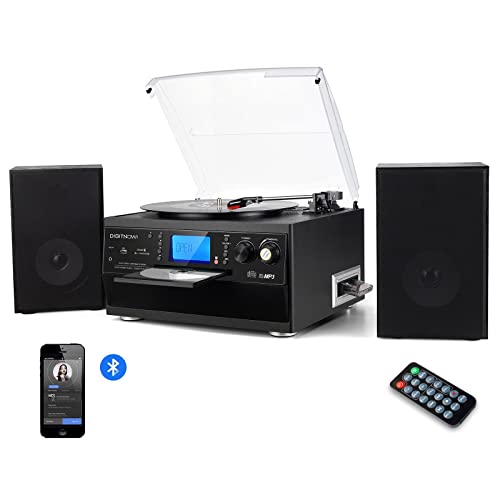
Brand: DIGITNOW. This all‑in‑one turntable system includes built‑in speakers and a CD recorder, plus MP3 encoding for vinyl to digital. Best for: users who want a compact, self‑contained unit that handles vinyl playback, Bluetooth streaming, and CD/MP3 encoding without a separate computer. Caution: While it offers CD recording, some models emphasize MP3 creation from vinyl rather than full CD burning, so verify your preferred output format.
DIGITNOW Bluetooth Turntable With 3 Speeds

Brand: DIGITNOW. Offers 33/45/78 RPM speeds with a 45‑RPM adapter and Bluetooth streaming. It can record to MP3 via USB/SD and has an AUX input for external devices. Best for: classic vinyl collectors who want flexible speed options and easy MP3 encoding from vinyl. Limitation: It does not explicitly promise lossless WAV output for archival storage, so consider your fidelity goals.
Tovlroy HiFi CD Player With USB Ripping

Brand: Tovlroy. This CD player doubles as a USB ripping device, allowing CDs to be converted into WAV files directly on a USB drive. Best for: users who primarily want to digitize CD collections and then transfer files to other devices. It also provides Bluetooth transmission and a home theater‑quality listening experience. Caution: CD ripping is limited to CDs; vinyl capture isn’t a primary function here.
DIGITNOW USB 2.0 Audio Capture Card

Brand: DIGITNOW. This USB audio grabber provides 3.5mm and RCA inputs, enabling direct recording to a PC for MP3 or WAV formats. It’s plug‑and‑play with no extra power supply, and includes professional software such as Audacity. Best for: readers who want a dedicated, computer‑based digitization workflow. Caution: Mac users should verify compatibility with current Audacity versions and drivers.
Roxio Easy VHS To DVD 3 Plus

Brand: Corel. This tool is designed to convert analog video from VHS to DVD or digital formats, with basic editing features. Best for: users who want to preserve home videos in digital formats and may also digitize audio from tape sources integrated with video transfers. Limitation: Focused on video, not a dedicated vinyl-to-CD workflow; not ideal if your primary goal is audio CD conversion.
Buying Guide
What should you consider when choosing a vinyl-to-CD or digital conversion setup?
- Output format needs: Do you want MP3, WAV, or direct CD burning? Capture devices often offer MP3/WAV outputs, while CD‑specific devices may offer direct ripping to CD or USB storage.
- Input compatibility: Are you digitizing from vinyl (RCA/3.5mm) or from cassettes? Ensure the device provides your preferred inputs and cable options.
- Computer or standalone use: Do you want a PC‑based workflow with software like Audacity, or a standalone turntable with built‑in encoding and USB output?
- Platform compatibility: Windows vs Mac support varies by device. Check OS compatibility with your current setup before purchasing.
- Ease of use vs fidelity: Standalone units are easier but may offer fewer control options. PC capture can deliver higher fidelity but requires software setup.
- Future needs: If you plan to digitize tapes, vinyl, and CDs, a versatile 3‑in‑1 or 4‑in‑1 device can simplify your setup.
Frequently Asked Questions
- What is the simplest way to convert vinyl to digital files?
Use a plug‑and‑play USB capture device connected to a computer and software like Audacity to record and export as MP3 or WAV.
- Can I burn my vinyl recordings directly to CD?
Some devices offer direct MP3/WAV capture to a computer, which you can then burn to a CD with your own disc burning software.
- Do I need a specialized turntable to digitize records?
Most USB capture devices work with any standard turntable with line out, but a phono preamp may be required if your player lacks one.
- Is Bluetooth-enabled equipment suitable for high‑fidelity digitization?
Bluetooth is convenient but can introduce compression. For archival quality, use wired connections and lossless formats.
- Will these devices work with modern macOS versions?
Some devices support older macOS versions; verify current compatibility before purchase to avoid driver issues.