
To convert Toslink to analog, use a digital-to-analog converter (DAC) with a Toslink optical input and RCA or 3.5mm analog outputs. The PROZOR volume-control model is best for listeners who want a physical output-level knob; the Hdiwousp is a useful choice if an optical cable and power adapter are priorities. Before connecting any model, confirm that the source device can output PCM or LPCM audio, as required by the listed products.
| Product | Best for | Output connections | Notable detail |
|---|---|---|---|
| PROZOR 192KHz DAC, B00KNNSKV0 | Two output types at once | RCA and 3.5mm | Supports coaxial and Toslink inputs |
| LiNKFOR Optical-to-RCA DAC | Connecting a TV to RCA speakers | RCA | Built-in amplifier chip |
| Hdiwousp 192 kHz DAC | A bundled optical cable and power adapter | RCA and 3.5mm | Optical and coaxial inputs |
| YGiTK 192 kHz DAC | A compact optical-to-RCA setup | RCA | Small form factor |
| PROZOR DAC with volume knob | Manual output-level control | RCA and 3.5mm | Built-in volume adjustment |
PROZOR 192KHz DAC With Dual Outputs

This PROZOR DAC converts digital audio from a Toslink optical or coaxial input to analog left/right RCA and 3.5mm audio. Its listed features say both analog output types can operate simultaneously. It supports PCM audio and sampling rates from 32 kHz through 192 kHz, with 24-bit S/PDIF input.
Best for: Buyers who want a choice of RCA or 3.5mm connection, or who need both output types available at once. The feature list also describes an upgraded audio amplifier chipset and dual-channel operational amplifier.
Important limitation: Set the source device’s audio format to PCM. The product information says to adjust TV volume through its settings and notes that the converter works from digital to analog, not in reverse.
LiNKFOR Toslink-To-RCA DAC

The LiNKFOR converter takes an optical Toslink digital audio signal and converts it to analog left and right RCA audio. Its stated purpose includes connecting a newer TV to older speakers with RCA inputs. The listed specifications include a built-in audio amplifier chip and support for sampling rates of 32, 44.1, 48, 96, and 192 kHz, with 24-bit S/PDIF input.
Best for: A straightforward TV-to-stereo connection when the speaker system accepts RCA plugs and does not need a 3.5mm output. It is selected for its clearly specified optical input, RCA output, and stated amplifier chip.
Important limitation: This product listing identifies RCA outputs, not a 3.5mm output. Check the source’s audio-output setting and the speaker’s input type before choosing it.
Hdiwousp DAC With Optical Cable
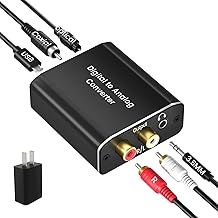
Hdiwousp’s converter accepts Toslink optical or coaxial digital PCM/LPCM audio and provides analog RCA and 3.5mm outputs. The listing says it supports sampling rates of 32, 44.1, 48, 96, and 192 kHz and 24-bit S/PDIF input. An optical cable and power adapter are included, and the product is described as plug and play without an extra driver.
Best for: Buyers who want both common analog output options and an optical cable included. The dual digital-input types may also suit a setup with an optical or coaxial source.
Important limitation: The listing specifically requires PCM/LPCM audio and says the signal direction cannot be reversed. It converts digital audio to analog; it does not digitize an analog source.
YGiTK Compact Optical-To-RCA DAC

This YGiTK model converts Toslink optical digital audio to analog RCA for connection to a stereo amplifier. The feature list describes a built-in audio amplification chipset and a compact, lightweight design. It also notes that volume adjustments must be made on the output device.
Best for: Buyers who need a compact optical-to-RCA converter and plan to control volume through their stereo or other output equipment. It is selected for its clearly described optical input, RCA connection, and small form factor.
Important limitation: The listed connection is optical-to-RCA; the supplied information does not specify a 3.5mm output or coaxial input. Confirm that RCA is the connection your speakers or amplifier require.
PROZOR DAC With A Volume Knob
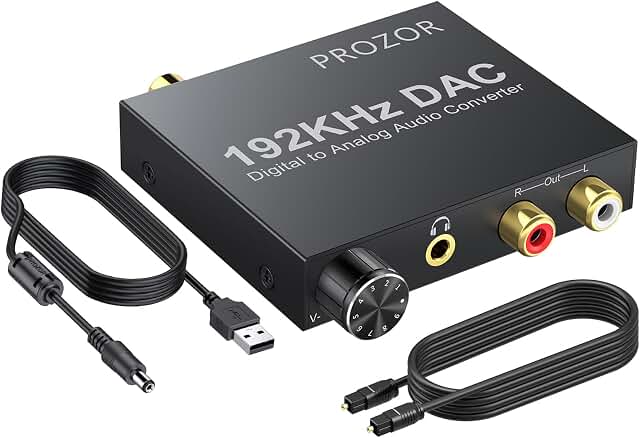
This PROZOR converter changes coaxial or Toslink digital PCM audio into analog RCA and 3.5mm output. Its built-in volume-control knob lets users adjust output level on the converter. The listing gives support for 32, 44.1, 48, 96, and 192 kHz sampling rates and 24-bit S/PDIF input. It also says the device automatically mutes with a non-audio input signal.
Best for: Buyers who want a physical volume control on the DAC rather than relying only on TV or amplifier settings. It is a better fit than a basic converter when convenient manual level adjustment is a priority.
Important limitation: The listing specifies PCM digital audio and says the input and output cannot be reversed. Confirm that the source sends an audio signal the converter can process.
Buying Guide: How To Choose A Toslink-To-Analog Converter
What does a Toslink-to-analog converter do?
Toslink carries digital audio over an optical connection. RCA and 3.5mm connections carry analog audio. A DAC receives the digital signal, converts it, and sends analog audio to equipment with a compatible input. The direction matters: a Toslink-to-analog DAC is not an analog-to-digital converter.
Use a DAC when a TV, game console, disc player, or other source has an optical audio output but the intended stereo or powered speakers use analog inputs. Check the ports on both devices first; a connector that looks similar is not necessarily the same type of audio connection.
Which analog output should you choose?
- Choose RCA if the receiving stereo, amplifier, or speakers have separate left and right RCA audio inputs.
- Choose 3.5mm if the receiving equipment has a compatible stereo mini-jack input.
- Choose a model with both if you want flexibility or if the setup may change. Check whether the model supports simultaneous output if that matters.
Output options differ across these products. The two PROZOR models and the Hdiwousp list both RCA and 3.5mm outputs. The LiNKFOR and YGiTK listings specify RCA output. Do not assume that an unlisted connector is included.
Does the source need to be set to PCM?
Check the source device’s digital-audio settings before troubleshooting. The product listings for the PROZOR B00KNNSKV0 and Hdiwousp models specify PCM or PCM/LPCM audio. A source set to another audio format may not provide a signal that the DAC can convert as intended. Menu names vary by device, so consult the source’s audio settings or instructions.
Do sampling rate and bit depth matter?
Sampling rate and bit depth describe aspects of a digital audio signal. The listed products advertise support up to 192 kHz and 24-bit input, but the source signal and its settings still matter. A converter’s maximum stated rate does not mean every source sends audio at that rate. For ordinary purchasing decisions, first confirm input type, output type, audio format, and power needs.
Should you get coaxial input or volume control?
A model with both optical and coaxial digital inputs may be useful when a source uses either connection. The PROZOR models and Hdiwousp listing describe coaxial as well as Toslink input; the LiNKFOR and YGiTK product details supplied here describe optical input. Select based on the actual output ports on your source, rather than paying attention to connection types you do not need.
For output-level adjustment, the PROZOR model with a volume knob offers a control on the converter. The YGiTK listing says volume must be adjusted on the output device, while the other listings do not establish a physical volume control. If convenient level adjustment matters, verify the control method before buying.
What else should you check before connecting?
- Confirm that the source has a Toslink optical output and that the converter has the required input.
- Confirm that the receiving equipment accepts the DAC’s analog output connection.
- Check whether a power adapter is needed and whether it is included; the Hdiwousp listing says one is included.
- Set the source to PCM or LPCM when required by the selected converter.
- Remember that the converter changes signal format, not the physical direction of the audio path.
Frequently Asked Questions
Can I connect a Toslink output directly to RCA speakers?
No. Toslink is a digital optical connection, while RCA audio inputs are analog. A DAC with a Toslink input and RCA output is needed to convert the signal.
Will a Toslink-to-RCA DAC work in reverse?
No. These products convert digital audio to analog audio. They do not convert an analog RCA input into a Toslink digital output.
Why is there no sound after connecting the converter?
Check that the optical cable is connected to the source’s audio output and the DAC’s optical input, confirm that the DAC has power as required, and set the source’s audio format to PCM or LPCM if the product requires it. Also verify the analog connection at the receiving device.
Can I use a 3.5mm output instead of RCA?
Only if the selected DAC provides a 3.5mm output and the receiving device has a compatible input. The PROZOR B00KNNSKV0, PROZOR volume-control model, and Hdiwousp listing specify 3.5mm output.
Does 192 kHz support mean the source must output 192 kHz?
No. It is a stated maximum capability for the listed converter, not a requirement for every source. The source’s audio format and output settings determine the signal being sent.
Can I control TV volume through the DAC?
It depends on the model and setup. The PROZOR B00KNNSKV0 listing says to adjust TV volume through settings, while the PROZOR volume-control model lists a physical knob. The YGiTK listing says to adjust volume on the output device.