
If you want to use 3.5mm headphones with a USB port, a USB-to-3.5mm adapter is the right type of accessory. The five options below connect USB-A ports to analog 3.5mm headset jacks, with some models supporting a microphone or offering a dual-jack setup. Important: these adapters do not convert a USB-plug headset into a 3.5mm headset. They work in the opposite direction.
| Product | Best For | Key Detail |
|---|---|---|
| MOSWAG USB to 3.5mm Adapter | Everyday headset use | TRRS microphone support; braided cable |
| JXMOX 2-Pack Adapter | Keeping a spare adapter | Two USB-A to TRRS adapters |
| Fidioto USB to 3.5mm Adapter | Headsets with a microphone | TRRS four-pole jack |
| MillSO USB to Dual 3.5mm Adapter | Separate headphone and speaker connections | Dual 3.5mm jack design |
| UGREEN USB to 3.5mm Adapter | Buyers seeking listed audio specifications | 24-bit/96-kHz claim; TRRS mic support |
MOSWAG USB To 3.5mm Adapter

The MOSWAG adapter connects a USB port to a 3.5mm audio jack and is described as an external stereo sound card. Its listed features include TRRS microphone support, a nylon-braided cable, and no-driver-required operation. The cable length is listed as 7.84 inches.
Best for: Someone who wants to connect a 3.5mm headset with a microphone to a USB-A-equipped computer or other listed device. The TRRS support is relevant when a headset combines headphone audio and microphone connections in one four-pole plug.
Why it stands out: Its braided cable and stated driver-free setup make it a straightforward choice for a basic USB-to-headphone-jack connection. The product listing names Windows, Mac, Linux, and PS4 among compatible systems.
Limitation: The cable is relatively short at 7.84 inches, and this adapter is not a way to change a USB headset plug into a 3.5mm plug.
JXMOX USB To 3.5mm Two-Pack

This JXMOX option is a two-pack of USB-A-to-3.5mm adapters with a TRRS four-pole female jack. The listing describes the adapters as external stereo sound cards for headphones and names Mac, PS4, PS5, PCs, laptops, and desktops as compatible devices.
Best for: Buyers who want a spare adapter or need to keep one in more than one location. The two-pack can be useful for a home workstation and a travel bag, provided the device has a suitable USB-A port.
Why it stands out: The TRRS jack supports a four-pole headset connection, and the package includes two adapters rather than one. That makes it a practical option when quantity matters more than a longer cable or separately listed audio specifications.
Limitation: The product information supplied does not state cable length or detailed audio specifications. Confirm the USB port type and headset plug arrangement before choosing it.
Fidioto USB Headphone Jack Adapter
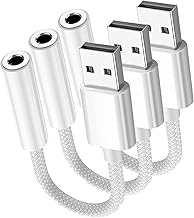
The Fidioto adapter is a USB-to-3.5mm audio jack adapter with microphone support. Its listing identifies an external sound card and a TRRS four-pole jack, and names headsets, Mac, PS4, PCs, laptops, and desktops as intended uses.
Best for: A buyer whose main requirement is using both headset audio and microphone functions through one 3.5mm connection. The explicit TRRS description helps distinguish it from an adapter intended only for headphone playback.
Why it stands out: Its product description focuses on microphone-supported headset use and lists several common computer and console categories. It is a simple candidate when a single combined headset plug is the priority.
Limitation: The supplied product details do not specify cable length, a bundled quantity, or audio-resolution figures. Check the actual device port and headset plug before ordering.
MillSO USB To Dual 3.5mm Adapter

Unlike the single-jack adapters, the MillSO model is described as a USB-to-dual-3.5mm adapter. Its listing calls it a sapphire-blue external stereo sound card and describes a headphone stereo jack splitter for headphones and speakers. The cable is listed as one foot long.
Best for: Someone whose setup calls for two 3.5mm connections rather than one combined headset jack. Its dual-jack design may suit a configuration that separates headphone and speaker connections, but buyers should verify the purpose of each socket in the product listing.
Why it stands out: The dual outputs make it distinct from the other four products in this comparison. It is also the option here with a listed one-foot cable and named PS4 and PS5 support.
Limitation: A dual-jack adapter is not automatically the right match for a headset with one TRRS plug. Check whether your headphones use one combined plug or separate plugs before selecting it.
UGREEN USB To 3.5mm Adapter

The UGREEN adapter connects USB to a 3.5mm jack and is listed with a headphone DAC specification of 24-bit/96-kHz. Other stated features include TRRS microphone support, a nylon-braided cable, and a 9.8-inch length. The listing names Windows, Mac, Linux, PC, PS5, PS4, and Switch 2.
Best for: Buyers comparing adapters by stated audio specifications and looking for a combined headset-and-microphone connection. Its listed cable length is longer than the MOSWAG model’s stated 7.84 inches.
Why it stands out: It provides specific audio-resolution figures in the product name, as well as a TRRS microphone connection and braided cable. Those details make it easier to compare on paper with simpler listings.
Limitation: A listed DAC specification does not guarantee a noticeable improvement with every headset or device. This is still a USB-to-3.5mm adapter, not a converter for a USB-plug headset.
Buying Guide: How To Choose A USB-To-3.5mm Adapter
Start by checking the direction of conversion. A USB-to-3.5mm adapter typically lets you connect analog 3.5mm headphones to a USB port. It does not turn a USB headset into a headset with a 3.5mm plug. USB audio devices send digital audio and may rely on electronics in the headset, so a simple passive plug change is not enough to provide the reverse function.
Does Your Headset Have One Plug Or Two?
Look at the end of the headphone cable. A single 3.5mm plug with three insulating bands is generally a four-pole TRRS plug, often used for headphone audio and a microphone together. A plug with fewer contacts may carry audio only. Some desktop headsets instead have separate headphone and microphone plugs. Match that arrangement to the adapter’s jack design rather than assuming every 3.5mm accessory works identically.
For a single combined headset plug, compare the MOSWAG, JXMOX, Fidioto, and UGREEN options, all of which list TRRS or microphone support. For a setup requiring two separate 3.5mm connections, the MillSO dual-jack design is the distinct option in this group. Check the product’s socket descriptions and your headset instructions to confirm the intended connection.
Do You Need Microphone Support?
If you use voice chat, calls, or recording, look for explicit microphone or TRRS support. A headphone-only adapter may provide listening but not a working microphone. The MOSWAG listing specifically says mic TRRS, while JXMOX and Fidioto describe a TRRS four-pole jack. UGREEN lists TRRS mic support. These descriptions are useful selection clues, but device settings may still need to be set to the correct audio input and output.
Which USB Port Does Your Device Have?
The listed products are described as USB or USB-A adapters. Check whether the computer, console, or other equipment has the matching port. If your device has only a different USB connector, you may need a separate compatible connection solution; do not assume an adapter’s listed compatibility means it fits every physical port.
Also consider the operating system or device. Product names list compatibility categories such as Windows, Mac, Linux, PS4, and PS5, but not every item names the same platforms. Compare the listing for the specific model with your device, particularly if you plan to use it with a console or less common operating system.
Is A Dual-Jack Adapter Better Than A Single Jack?
Neither format is automatically better. A single TRRS jack is convenient for a headset that combines audio and microphone connections in one plug. A dual-jack model is intended for a setup using separate 3.5mm connections. Choosing the wrong layout can leave a microphone or headphone plug without a matching socket, so identify your cable layout first.
What Cable Length And Build Details Matter?
Choose a cable length that reaches the USB port without pulling on the headphone connector. The listed lengths here include 7.84 inches for MOSWAG, one foot for MillSO, and 9.8 inches for UGREEN. The JXMOX and Fidioto details provided do not state a length. MOSWAG and UGREEN list nylon-braided cables; treat that as a construction detail rather than a guarantee of durability.
Should You Compare Audio Specifications?
UGREEN lists 24-bit/96-kHz audio, while the other supplied product details do not provide comparable resolution figures. Such specifications can help describe a device, but they do not by themselves establish how it will sound with your headphones. Fit, headset quality, source audio, software settings, and device support all affect the listening result.
Frequently Asked Questions
Can I Convert A USB Headset To A 3.5mm Headset With These Adapters?
No. These products connect a USB port to a 3.5mm audio jack, so they are intended for using 3.5mm headphones with USB equipment. They do not convert a USB-plug headset into an analog 3.5mm headset.
Will A USB-To-3.5mm Adapter Let My Headset Microphone Work?
It may, if the adapter supports microphone input and the headset uses a compatible plug. Look for TRRS or explicit mic support, then select the adapter as the input device in the computer or console settings if needed.
What Does TRRS Mean On A Headphone Adapter?
TRRS refers to a four-contact 3.5mm plug or jack. It is commonly used for a combined headset connection that carries headphone audio and microphone signal. Confirm the arrangement for your particular headset.
Can I Use A USB-A Adapter With A USB-C-Only Device?
Not directly if the adapter has a USB-A connector and the device has only USB-C. You would need a suitable connection solution and should verify that the device supports the resulting audio setup.
Which Adapter Should I Choose For Separate Headphone And Microphone Plugs?
Compare the plug layout with the adapter sockets before buying. The MillSO listing describes dual 3.5mm jacks, unlike the single-jack TRRS models. Verify which socket handles each connection in the product details.
Will An Adapter Improve My Headphone Sound?
Not necessarily. An adapter can provide a USB audio connection for 3.5mm headphones, but sound quality depends on the adapter, headphones, source, and device settings. A specification alone does not guarantee an audible improvement.