
Best Ways to Convert Old Audio Tapes to CD and Digital
Answering the demand for turning worn tapes into lasting digital files, this guide highlights practical tape-to-digital solutions and five top products designed for different types of buyers. Whether you want a portable on-the-go converter, easy USB transfer, or a device that also acts as a standalone MP3 player, you’ll find options that simplify the digitization process. The guide targets: casual collectors seeking quick conversions, hobbyists who value built-in recording features, and travelers needing portable devices.
Summary table of selected products:
| Product | Brand | Storage Included | Best For |
|---|---|---|---|
| KLIM K7 Cassette Tape Player – 16GB | KLIM | 16GB SD Card | On-the-go digitization with built-in mic and speaker |
| DigitNow Cassette Tape To MP3 CD Converter Via USB | DIGITNOW | USB for MP3 transfer; no included SD card | USB-based conversion to MP3; easy PC integration |
| ClearClick Cassette To USB 2.0 (Second Gen) | ClearClick | 16 GB USB drive included | Standalone USB transfer with automatic track splitting |
KLIM K7 Cassette Tape Converter — 16GB

The KLIM K7 combines cassette playback with a built-in MP3 converter and a practical 16GB SD card for direct digital storage. It also functions as an SD card music player and includes earphones, a rechargeable battery, and a built-in microphone. This option is best for buyers who want a compact device for quick, portable digitization without a computer. Note: It does not support recording onto cassettes directly, only onto the SD card. Ideal for commuters and travelers who want a self-contained solution.
DigitNow Cassette Tape To MP3 CD Converter Via USB
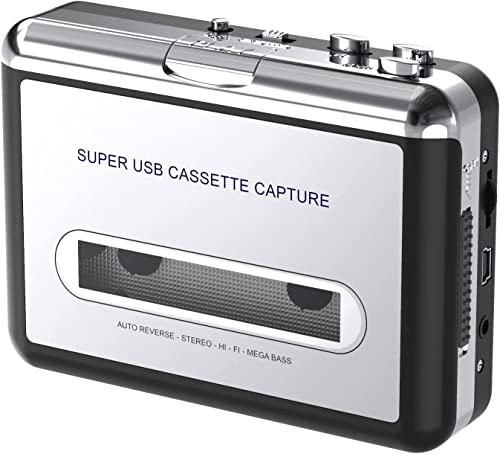
The DigitNow device uses a USB connection to convert cassette tapes into MP3 files, suitable for playback on iPod/MP3 players or for burning to a CD. It supports software-assisted conversion via compatible tools and does not require installation of drivers. Best for users who want PC-based digitization and flexible software options. A potential limitation is reliance on software for some workflows and the need for external storage beyond the device’s own memory.
ClearClick Cassette To USB 2.0 (Second Gen)

ClearClick offers a USB 2.0 transfer with a 16 GB USB drive included and features automatic track splitting. It’s designed for quick, stand-alone digitization without needing a computer or drivers. Best for users who want a simple plug-and-play experience and easy organization of tracks. The automatic track splitting can be a time-saver, but some users may prefer more manual control over track boundaries.
SEMIER Small Cassette Tape Player — USB/SD Converter

The SEMIER unit is compact and supports both USB and SD card pathways, with a built-in microphone for two-way conversion. It’s well-suited for users who want versatility in source and destination formats and who value a navigation-friendly LCD. Limitations include input support not covering Type IV or metal tapes and the need to manage SD storage separately for larger archives.
Tinxumb Cassette Tape Player — MP3 Converter

The Tinxumb model emphasizes quick MP3 conversion via USB, ease of use, and compatibility with standard 3.5mm AUX inputs for flexible listening. It’s best for those who want fast digitization with straightforward playback options on modern devices. A potential drawback is limited advanced features for audio restoration or metadata tagging.
KLIM K7 Cassette Player — 32GB

This KLIM K7 variant includes a larger 32GB SD card and same core features: easy cassette-to-MP3 digitization, built-in mic and speaker, and portable design for everyday use. Choose this if you anticipate larger collections or longer sessions of recording. Caution: Recording is directed to the SD card, not directly onto tapes.
Buying Guide
Key considerations for selecting a cassette-to-digital converter:
- Storage method: Do you prefer SD card, USB drive, or computer-based workflow? SD cards are portable and self-contained, USB drives can be convenient for direct transfers, and PC software can offer advanced editing features.
- Portability: Will you digitize on the go or mainly at home? Portable models suit traveling use, while desktop units may offer more control and larger storage options.
- Recording options: Do you need built-in microphone and speaker, or is line-in/USB sufficient? Built-in mic helps capture additional audio, but line-in may yield cleaner original recordings.
- Track management: Is automatic track splitting important? Automatic splitting saves time, but ensure it matches your tape’s track structure.
- Format needs: Are MP3s sufficient, or do you need WAV or FLAC for higher quality archiving? MP3 is widely compatible; lossless formats provide higher fidelity but larger files.
- Compatibility: Can the device handle older tape types (Type I, II, etc.) and metal tapes? Some units have limitations on certain tape formulations.
- Software integration: Will you use Audacity or other software for editing and tagging? Some devices pair with software for editing, normalization, and metadata management.
Practical tips for digitizing tape collections
- Clean tapes and players to minimize pops and hiss before recording.
- Digitize tapes in a quiet environment to reduce background noise.
- Organize files with consistent naming conventions and metadata for easy retrieval later.
Quick comparison snapshot
- Best for portable, all-in-one use: KLIM K7 16GB or 32GB variants.
- Best for PC-based workflows: DigitNow model with USB transfer.
- Best for stand-alone, plug-and-play: ClearClick with included USB drive and automatic track splitting.
- Best for compact travel with dual USB/SD options: SEMIER small converter with LCD.
- Best overall value for classic tapes: Tinxumb with fast MP3 conversion and flexible inputs.
FAQ
- Q: Do these devices also convert directly to CD?
A: Most devices convert to MP3 or WAV on SD cards or USB drives, which you can later burn to a CD on a computer. - Q: Is software required to use these devices?
A: Some models include software (like Audacity) for enhanced editing; others are USB/SD based and driver-free. - Q: Can I record new audio while digitizing tapes?
A: Several models offer built-in microphones for quick voice recordings alongside tape digitization, but check individual specs for each device. - Q: Will all cassette types work with these devices?
A: Most consumer devices support standard Type I and II tapes; some do not support Type IV or metal tapes—verify before purchasing. - Q: Which format yields the best archival quality?
A: WAV or FLAC preserves more detail than MP3; choose based on storage capacity and intended playback devices. - Q: Do these units require an internet connection?
A: No, most operate offline via USB or SD card; software-enabled workflows may require a computer connected to the internet.