
If you want one device that plays digital radio and connects to an iPhone, check that the listing explicitly identifies both a DAB or DAB+ radio and an iPhone dock. The products below include two power adapters for a View Quest DAB radio, a remote for a Revo DAB+ radio, and two iPhone speaker docks that do not have confirmed DAB reception in the supplied details. The View Quest adapters are best for owners replacing a power supply; the Revo remote is for owners of the specified radio. Compare the product type before buying.
| Product | Best suited to | Important distinction |
|---|---|---|
| View Quest 5V 2A adapter | View Quest Retro DAB/FM radio owners | Power adapter, not a radio or dock |
| View Quest 5V adapter | Owners seeking a replacement supply | Power adapter; verify exact requirements |
| Revo AXiS X3 remote | Owners of the named Revo radio | Remote only; battery not included |
| Sony ICFCS10iP | Buyers wanting an iPhone dock and clock radio | AM/FM is stated; DAB is not |
| Bose SoundDock Portable | Buyers prioritizing an iPod/iPhone speaker dock | Listing does not confirm DAB reception |
View Quest 5V 2A Adapter

Best for: Owners of a View Quest Retro DAB/FM radio with an iPod or iPhone dock who need a replacement power adapter. The product name specifically identifies that radio type and a 5V, 2A output, making this the clearest match among the listed power accessories.
The listing describes the adapter as compact and portable, with stable power delivery and rapid charging capabilities. Those are seller-provided descriptions; the supplied details do not establish charging performance for every connected device. This item is a power supply, not a DAB radio, iPhone dock, or remote.
Why it was selected: It is explicitly associated with a View Quest DAB/FM radio and gives a voltage and current specification buyers can compare against the original supply. Caution: Confirm the radio’s required voltage, amperage, connector, and polarity before ordering. The product name alone does not establish that every View Quest model uses the same adapter.
View Quest Retro Radio Adapter

Best for: View Quest Retro DAB radio owners looking for a mains power supply described as compatible with a radio featuring an iPhone or iPod dock. The listing identifies it as a 5V AC/DC adapter and says it is a non-OEM replacement.
The supplied product details state that the adapter has over-voltage, over-current, and short-circuit protection. They also state that the product is CE, FCC, and RoHS certified and tested by the manufacturer to match or exceed OEM specifications. These are claims in the listing, rather than independent verification in this article.
Why it was selected: Its stated intended use connects it directly to the View Quest Retro DAB radio category in the search. Caution: The supplied information does not give the current rating or connector dimensions. Check those details against the radio and its original adapter; 5V alone is not enough to confirm a match.
Revo AXiS X3 Replacement Remote

Best for: Owners of a Revo AXiS X3 internet DAB+ radio with an iPhone or iPod dock who need a replacement remote. The product name identifies the specific radio, making this the most directly relevant control accessory for a DAB+ dock system in the list.
The listing describes it as an infrared replacement remote that requires no programming. It is sold without a battery and manual, according to the provided features. It does not include the radio, dock, or power adapter.
Why it was selected: Unlike the general iPhone speaker docks, this remote is explicitly associated with a DAB+ radio and iPhone/iPod dock. Caution: The stated compatibility is for the Revo AXiS X3. Do not assume it works with other Revo radios or with View Quest models. Check the radio model and the battery requirements before purchase.
Sony ICFCS10iP Clock Radio Dock

Best for: Buyers seeking a clock radio with an iPod or iPhone speaker dock, dual alarms, and a remote control. The supplied features identify iPod and iPhone compatibility, two alarms, and convenient remote operation.
This product can suit someone whose main goal is an alarm clock and dock in one unit. However, the product name specifies AM/FM radio, not DAB or DAB+. The provided details do not confirm digital radio reception, so it should not be treated as a DAB radio choice based on this information.
Why it was selected: It offers the iPhone-dock and radio combination in the search phrase, even though the stated radio bands differ from DAB. Caution: Choose another product if digital DAB reception is essential. Confirm that the dock connection suits your device; the supplied features do not specify connector generations or additional compatibility details.
Bose SoundDock Portable Speaker
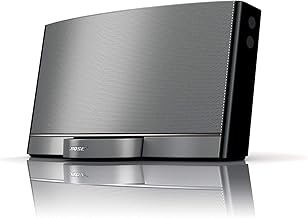
Best for: Buyers looking for a portable speaker dock listed for iPod and iPhone use. The product name also states a black finish, 30-pin and Lightning connection terminology, 8W, and one port.
The supplied information identifies this as a speaker dock, not a DAB radio. It does not provide a radio tuner feature or more detailed compatibility instructions. The connection terms in the product name should be checked against the specific phone or iPod model before purchase.
Why it was selected: It may be relevant to shoppers comparing iPhone speaker docks, but it is a weaker fit for a search specifically seeking DAB radio. Caution: Avoid choosing it as a complete DAB radio-and-dock solution unless the seller confirms that radio reception is included. The supplied product details do not confirm it.
Buying Guide: How To Choose A DAB Radio iPhone Dock
Does the product actually receive DAB or DAB+?
Start by checking the radio’s stated tuner type. DAB and DAB+ are digital radio standards; AM/FM describes different broadcast bands. A product with an iPhone dock and AM/FM tuner is not automatically a DAB radio. Look for DAB or DAB+ in the product specifications, not only in a related accessory listing or search result.
This distinction matters in the products above. The Revo remote is named for a DAB+ radio, and the View Quest adapters are described for DAB/FM radios. The Sony product is identified as AM/FM. The supplied Bose details identify a speaker dock without confirming any radio tuner.
Are you buying a complete system or an accessory?
Identify whether you need the radio itself, a dock, a remote, or a replacement power supply. A power adapter will not add DAB reception or an iPhone dock to an existing device. Likewise, a remote is useful only with the specified compatible radio and does not replace the radio or its power supply.
- Choose a complete radio-and-dock system if you do not already own the radio.
- Choose a replacement adapter only after comparing its electrical and connector specifications with the original.
- Choose a remote only after confirming the exact radio model and the remote’s battery requirements.
- Choose a speaker dock if audio playback from a compatible device is the priority, and verify whether a radio tuner is included.
What should you check on an adapter?
Compare voltage, current, connector shape, polarity, and mains input requirements with the original power supply or the radio’s documentation. The View Quest listings identify 5V, but one also specifies 2A while the other details provided do not state a current rating. Do not assume that two 5V adapters are interchangeable. A matching voltage by itself does not confirm a safe or functional fit.
Also distinguish a manufacturer’s original supply from a replacement. One listing describes a non-OEM adapter and includes protection and certification claims. Buyers who require an original part should confirm that status before ordering rather than relying on a generic compatibility description.
How should you compare iPhone dock compatibility?
Check the exact phone or iPod model and the dock’s connector or connection method. Product names may mention several connector types, but that wording is not a complete compatibility list. Confirm whether the device can physically connect and whether the product supports the intended use, such as playback, charging, or both. The information supplied for these products does not specify compatibility across every generation.
If the dock is an older design, do not assume a newer iPhone will connect directly. Look for explicit model information from the seller or manufacturer. A product described as compatible with “iPhone” may not necessarily support every iPhone generation or every function.
Which option fits your main priority?
| Buyer priority | What to look for | Relevant listing distinction |
|---|---|---|
| DAB+ radio control | Remote compatibility with the exact radio model | Revo remote is identified for AXiS X3 |
| Replacement power | Matching voltage, current, connector, and polarity | View Quest adapters list 5V; one states 2A |
| Clock and alarms | Alarm functions and supported radio bands | Sony listing states dual alarm and AM/FM |
| Speaker dock | Device connection and radio-tuner details | Bose listing names a speaker dock; DAB is unconfirmed |
Frequently Asked Questions
What is the difference between a DAB radio and an AM/FM clock radio?
DAB is digital radio, while AM/FM refers to other radio bands. A clock radio with an iPhone dock and AM/FM tuner does not meet a DAB requirement unless its specifications also explicitly list DAB or DAB+.
Does the Sony ICFCS10iP listed here receive DAB?
The provided product name identifies it as an AM/FM clock radio. The supplied details do not confirm DAB or DAB+ reception, so buyers seeking DAB should verify the full specifications or choose a clearly identified DAB model.
Can I use either View Quest adapter with any DAB radio?
No such broad compatibility is established by the supplied information. Both listings refer to View Quest Retro radios, and one specifies 5V 2A. Check the exact radio model and all power-supply requirements before buying.
Does the Revo replacement remote include a battery?
No. The supplied listing details say the remote is sold without a battery and manual. Check the required battery type before ordering.
Is the Bose SoundDock a DAB radio?
The supplied product details describe a speaker dock for iPod and iPhone. They do not confirm DAB reception, so it should not be considered a DAB radio without additional seller or manufacturer confirmation.
What should I verify before buying an iPhone dock?
Confirm the exact device model, connector or connection method, and whether the dock supports the functions you need. If radio reception is important, separately verify that DAB or DAB+ is listed as a tuner feature.