Best DAC With USB Input for Clear, High-Quality Audio
Answering the search for a reliable DAC with USB input, this guide spotlights five well-rounded models that deliver transparent sound and versatile connections. Each option suits different setups—from PC gaming rigs to home stereo systems and media centers. Whether you’re building a desktop audio hub, upgrading a TV setup, or enhancing a notebook workstation, these DACs with USB input provide cleaner, detailed audio. The following table highlights key picks and who they’re best for.
| Product | Brand | Best For |
|---|---|---|
| Fosi Audio K5 Pro Gaming DAC Headphone Amplifier | Fosi Audio | Gamers and PC/Mac users needing a USB-C/Optical/Coaxial to RCA/3.5mm solution |
| LiNKFOR USB to SPDIF/Coaxial/3.5mm Converter | LiNKFOR | TVs, soundbars, and basic external sound card use |
| Fosi Audio Q6 Mini Desktop DAC | Fosi Audio | Compact desktop setups needing high-resolution DAC with multiple inputs |
| Fosi Audio K7 DAC Headphone Amp | Fosi Audio | Workstations and gaming rigs with USB-C and Bluetooth options |
| Fosi Audio Q4 DAC Headphone Amp | Fosi Audio | Entry-level DAC needs with USB/Optical/Coaxial and simple outputs |
Fosi Audio K5 Pro Gaming DAC Headphone Amplifier

The K5 Pro is a USB-C/Optical/Coaxial to RCA/3.5mm DAC with a built-in microphone input, designed for gaming and PC use. It uses a Texas Instruments NE5532 op-amp, targets a low-noise floor, and offers a combined volume/power control for streamlined operation. Best for gamers or desktop rigs needing a compact, multipurpose DAC/amp with versatile input options. Caution: ensure compatible USB ports and note that audio sources must connect to the USB-A/C port for power/input.
LiNKFOR USB to SPDIF Coaxial RCA and 3.5mm Converter
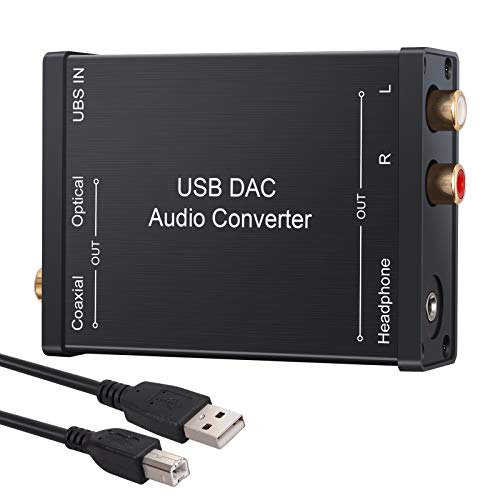
This USB DAC acts as a flexible external sound card, converting USB audio to digital optical, coaxial, or analog outputs. It’s well-suited for PCs, game consoles, and TV setups that require PCM-compatible output. Best for those who want a straightforward USB-to-digital-to-analog workflow. Limitation: 5.1-channel output isn’t supported; choose PCM/LPCM in output settings for best compatibility.
Fosi Audio Q6 Mini Desktop DAC

The Q6 is a compact desktop DAC with USB-C input, offering high-resolution decoding up to PCM 32bit/768kHz and DSD512 via AK4493S and XMOS XU316. It provides Optical, Coaxial, and USB inputs, plus RCA and Sub-Out outputs, making it a flexible hub for streamers, PCs, and home audio systems. Best for users seeking a small, high-performance DAC that can drive powered speakers or headphone amps. Caution: verify compatibility with older USB interfaces if needed.
Fosi Audio K7 DAC Headphone Amp

The K7 combines a powerful DAC/amp with USB-C, optical, coaxial, and Bluetooth (aptX HD/LL) plus a microphone input. It supports PCM up to 384kHz/32bit and DSD256, delivering high output power for demanding headphones. Best for a desktop audio powerhouse that supports gaming, music, and work. Limitation: Bluetooth adds additional latency and may affect lip-sync in some setups.
Fosi Audio Q4 DAC Headphone Amp

The Q4 is an entry-level DAC/amp with USB, Optical, and Coaxial inputs and RCA/3.5mm outputs. It’s a plug-and-play upgrade for PCs, TVs, or powered speakers, with bass and treble controls for on-the-fly sound shaping. Best for budget-conscious buyers who still want HiFi-grade sound. Limitation: lacks some advanced digital processing features found in higher-end models.
Buying Guide
Key purchase considerations help determine the right DAC with USB input for your setup:
- Connection compatibility: Ensure USB input is supported by your source devices (PC, Mac, PS, or mobile). Look for optical/coaxial outputs if you plan to connect to AV receivers or soundbars.
- Output options: Decide between RCA, 3.5mm, 4.4mm balanced, or sub-out depending on your speakers or headphones. Consider whether you need a dedicated headphone amplifier.
- Resolution and formats: Check maximum PCM resolution (e.g., 24-bit/192kHz or higher) and DSD support if you use hi-res files or streaming services.
- Chipset and processing: Premium DACs (AKM, ESS, or ESS ES9039) generally offer cleaner sound with lower distortion. An XMOS processor often improves USB data handling.
- Power and headroom: Amp sections vary in output power. Select a model with enough drive for your headphones and intended volume levels.
- Latency and gaming needs: For gaming, consider models with robust driver support and stable USB performance. If mic input is important, verify microphone compatibility.
- Size and aesthetics: Desktop DACs vary from pocket-sized to larger chassis. Choose based on space, cable routing, and display preferences.
FAQ
- What is a USB input DAC best for?
It enables digital-to-analog conversion directly from USB sources, simplifying connections to computers, consoles, or USB DAC-enabled devices.
- Do USB DACs improve audio on all setups?
They can improve clarity, noise levels, and dynamic range, especially when paired with quality headphones or powered speakers.
- Is a separate headphone amp necessary?
Not always, but high-impedance or power-hungry headphones often benefit from a dedicated amplifier built into the DAC unit.
- Can I use a USB DAC with a TV or soundbar?
Yes, if the TV or soundbar supports USB audio output; otherwise, use the optical or coaxial outputs when available.
- What should I prioritize: inputs or outputs?
Prioritize inputs if you have multiple devices; outputs matter for matching to your speakers or headphones and the intended listening path.
- Do high-resolution DACs require special drivers?
Many modern DACs are plug-and-play, but some setups may benefit from drivers to unlock full PCM/DSD capabilities on certain operating systems.