
The best decal machine for cars depends on whether you need a wide-format plotter for lettering and larger designs or a compact craft cutter for smaller custom graphics. The VEVOR 34-inch plotters are best suited to larger projects; the Likcut S41 is aimed at app-guided sticker and craft workflows. Permanent adhesive vinyl is a material option, not a cutting machine, and can be used to make decals with a compatible electronic cutter.
| Product | Best suited for | Useful distinction |
|---|---|---|
| VEVOR 34-inch Manual Vinyl Plotter | Wide-format cutting | Adjustable pressure and speed |
| VEVOR 34-inch Dual-Blade Plotter | Multi-step cutting and drawing | Includes test function and starter materials |
| VEVOR 34-inch Bluetooth Plotter | Buyers seeking a 34-inch plotter | Listed as Bluetooth-enabled; details are limited |
| Likcut S41 | Small custom stickers and crafts | Print-then-cut and wired or wireless connection |
| Lya Vinyl 65-Pack | Permanent-vinyl material supply | 65 sheets in 40 colors |
VEVOR 34-Inch Manual Vinyl Plotter

Best for: Buyers who want a wide-format cutter with adjustable controls for car lettering, shop graphics, or other larger vinyl projects. Its maximum paper feed is 34.3 inches, and its maximum cutting width is 30.7 inches, according to the listed specifications.
The plotter has adjustable cutting pressure from 20 to 500 grams and cutting speed from 20 to 800 millimeters per second. A backlit LCD provides access to settings. The listed cutting precision is plus or minus 0.01 millimeters, while the feed system uses double spring pinch rollers and a roughened steel roller intended to help keep material aligned during longer feeds.
Why it was selected: The feed width and adjustable settings make it a relevant option for people planning decals larger than small craft-cut designs. Choose this if you value a broad cutting capacity and direct machine controls.
Limitation: It is described as a manual plotter bundle, and the supplied details do not specify software, computer operating-system support, or wireless connectivity. Confirm those requirements before choosing it.
VEVOR 34-Inch Dual-Blade Plotter
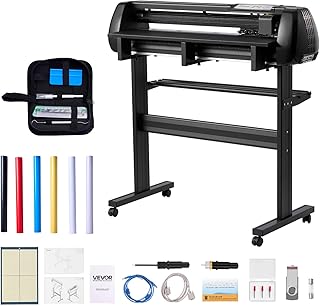
Best for: New users who want a wide-format cutter with a test function and included starter supplies. The listed maximum feed width is 34 inches. The bundle includes five assorted-color sticker rolls, transfer tape, and a licensed SignMaster activation code.
The dual-blade design supports drawing and cutting or scoring in one setup, according to the product description, so users do not need to swap manually between the main and auxiliary blades for those operations. A built-in test function lets users preview a design before cutting, which can help reduce wasted material while learning the workflow. The stated connection options are USB, U-disk, and serial port. Listed system support includes Windows 7–11 and macOS.
Why it was selected: It combines a wide feed with a test function, two-blade workflow, software activation code, and starter materials. Choose this if you want more of the listed setup components in one bundle.
Limitation: The supplied details do not state the maximum cutting width or cutting precision. Check the manufacturer’s current specifications if your design depends on a particular finished decal size or tolerance.
VEVOR 34-Inch Bluetooth Cutting Plotter

Best for: Buyers comparing wide-format cutters who specifically want to consider a model identified as Bluetooth-enabled. The product name describes it as a 34-inch Bluetooth cutting plotter, making it a possible candidate for larger decal work where a wide-format machine is preferred.
Why it was selected: A 34-inch plotter can be relevant for people planning wider vinyl projects than a small craft machine is intended to handle. The Bluetooth designation may also matter to buyers who are looking for a wireless connection option.
Limitation: No detailed product features were provided for this listing beyond its name. The available information does not confirm its maximum cutting width, supported software or devices, included accessories, or cutting controls. Do not assume that Bluetooth guarantees compatibility with a particular computer or phone; verify those details before purchase.
Likcut S41 Print-Then-Cut Cutter

Best for: People making smaller custom stickers, craft graphics, or printed designs that need a cutting step. The product is presented for print-then-cut projects, room decor, heat-transfer vinyl, cardstock, and custom stickers.
The listed workflow uses an app with a three-step process. The machine supports wired and wireless connections, and the description says its sensor and algorithm system calibrate the cutting path. The stated accuracy tolerance is 0.2 millimeters. These features make it a different kind of choice from the wide-format VEVOR plotters: it focuses on an app-guided craft workflow rather than a stated 34-inch feed capacity.
Why it was selected: Choose this if your car-decal projects are small and you also want a cutter described for printed stickers and general craft materials.
Limitation: The provided details do not list its maximum material or cutting width. Check that a design fits the machine’s working area before buying, and do not assume it can handle large vehicle graphics.
Lya Vinyl 65-Pack Permanent Sheets

Best for: Buyers who already have a compatible electronic cutter and need permanent adhesive vinyl in a range of colors. This is cutting material, not a decal machine. The pack contains 65 sheets, each 12 by 12 inches, across 40 listed colors.
The product description says the sheets are intended for electronic craft-cutting machines and gives a basic workflow: cut, weed, peel, and apply to a flat surface. It also describes the sheets as permanent and suitable for outdoor projects, stickers, and car decals. The stated extra thickness is intended to help prevent curling and piercing.
Why it was selected: It is a relevant supply choice for testing colors or producing smaller cut-vinyl designs after selecting a machine. Choose it if your cutter accepts sheet vinyl and you want multiple colors on hand.
Limitation: This pack does not include a cutting machine. The supplied information does not state how the vinyl performs on every vehicle surface or in every weather condition, so follow application instructions and test an inconspicuous area if appropriate.
Buying Guide: How To Choose A Car Decal Machine
A car decal cutter is typically a vinyl cutting plotter or craft-cutting machine. It follows a digital design and cuts the vinyl’s surface into letters, shapes, or outlines. The user then removes excess material, a process called weeding, and transfers the design to its final surface. A cutter does not necessarily print full-color artwork; print-then-cut workflows require printed material and a compatible cutting process.
How large are the decals you plan to make?
Start with the largest design you expect to cut, not just the machine’s product name. A listed feed width is not always the same as usable cutting width. For example, the VEVOR manual plotter lists a 34.3-inch maximum feed and a 30.7-inch maximum cutting width. The dual-blade listing states a 34-inch maximum feed but does not provide a maximum cutting width in the supplied details.
For small logos, labels, or short lettering, a craft cutter may be sufficient if the design fits its working area. For long lettering or broader graphics, compare the machine’s actual cutting width, feed length, and material-handling instructions. If the specifications do not state those figures, verify them before ordering.
Do you need a plotter or print-then-cut workflow?
Choose a standard vinyl plotter when your design can be made from cut shapes or lettering in colored vinyl. This is a common approach for simple text and one-color graphics. Choose a print-then-cut machine when the design depends on printed colors, illustrations, or sticker artwork that is printed first and then cut around.
These approaches are not interchangeable in every situation. A cutter’s ability to handle vinyl does not establish that it can print designs, and a print-then-cut description does not by itself show that a machine can handle large automotive graphics. Match the workflow to the design and check the listed material dimensions.
Which software and connection details matter?
Before buying, check which operating systems and devices are supported, what design software is included, and how the machine connects. The dual-blade VEVOR listing names Windows 7–11 and macOS support and lists USB, U-disk, and serial connections. The Likcut listing describes wired and wireless connections. The Bluetooth VEVOR listing identifies Bluetooth in its name, but the supplied product information does not detail compatibility.
Confirm whether the software is activated with a code, requires a download, or has other setup steps. Do not assume a cutter will work with every phone, tablet, or computer simply because wireless connectivity is mentioned. Buyers who need a particular device should verify compatibility with the manufacturer’s current documentation.
What do speed, pressure, and precision tell you?
Cutting pressure and speed affect how a machine handles different materials and designs. Adjustable settings can help users tune a cut, but they do not guarantee a clean result with every vinyl type or blade condition. The VEVOR manual plotter lists pressure from 20 to 500 grams and speed from 20 to 800 millimeters per second. Its stated cutting precision is plus or minus 0.01 millimeters.
Numbers from different products are only useful when the manufacturers define them comparably. The Likcut description states a 0.2-millimeter accuracy tolerance. Do not treat that as a direct performance comparison with another listing’s precision figure without knowing how each measurement was determined.
What supplies are required for vehicle decals?
At minimum, a cut-vinyl project needs suitable adhesive vinyl and a way to transfer the weeded design. A starter bundle may include some materials, but verify exactly what is in the package. The dual-blade VEVOR listing specifies sticker rolls and transfer tape. The Lya pack provides sheets of permanent adhesive vinyl, but it is a material supply rather than a machine.
Consider whether you need sheet or roll material, a particular color, transfer tape, a weeding tool, or a cutting mat. The required supplies depend on the cutter and its feeding method. Check the machine’s instructions before choosing material, since the supplied product descriptions do not establish compatibility with every vinyl format.
What should you consider before applying a decal to a car?
Vehicle surfaces and application conditions can affect how a decal adheres. Clean and prepare the surface according to the vinyl and vehicle-care instructions, and avoid applying over dirt, wax, damaged paint, or uneven areas. The product information provided here does not establish performance on every paint finish, window, body panel, or climate condition.
Plan the design size and placement before cutting. A small test design can help you check the cutting and transfer process before using a larger sheet. Follow the material maker’s guidance for application and removal, especially if preserving the vehicle’s finish is important.
Frequently Asked Questions
Can a vinyl cutter print a full-color car decal?
Not necessarily. A standard vinyl cutter cuts shapes from colored material; it does not automatically print artwork. A print-then-cut workflow uses printed material and then cuts its outline, but buyers should confirm the machine’s actual printing requirements and supported materials.
Is a 34-inch feed width the same as a 34-inch cutting width?
No. Feed width describes the material the machine can accept, while cutting width describes the maximum width it can cut. The VEVOR manual plotter lists a 34.3-inch maximum feed and a 30.7-inch maximum cutting width, illustrating why buyers should check both figures.
Can I use permanent adhesive vinyl for a car decal?
The Lya product is described as permanent adhesive vinyl for outdoor projects and car decals. Its details do not guarantee performance on every vehicle surface or under every condition. Check the material instructions and test application suitability before making a large decal.
Do I need transfer tape for cut-vinyl lettering?
Transfer tape is commonly used to lift and position weeded vinyl lettering or shapes together. The VEVOR dual-blade bundle lists one roll of transfer tape. Confirm the machine bundle’s contents, or obtain transfer material separately if your chosen workflow requires it.
Which option is better for large car lettering?
A wide-format plotter is generally the more relevant category when the design needs a larger cutting area. Compare maximum cutting width, feed length, software, and material handling. The VEVOR manual plotter provides a stated 30.7-inch maximum cutting width; the other wide-format listings do not provide all equivalent measurements in the supplied details.
Is the Lya Vinyl 65-Pack a decal machine?
No. It is a pack of permanent adhesive vinyl sheets intended for use with an electronic cutting machine. You need a compatible cutter to create the design and cut the material.