
The best desktop amplifier with subwoofer output depends on the subwoofer you own and the connections you need. The Fosi Audio BT30D Pro is a strong fit for a passive 2.1 speaker setup, while the Hosyond is better suited to users connecting an active subwoofer. JadeAudio’s compact amplifier offers a small footprint, and the ELZONYX adds several playback options. Check the output type before buying: a passive subwoofer connection and a line-level output for a powered subwoofer are not interchangeable.
| Product | Best for | Key distinction |
|---|---|---|
| Fosi Audio BT30D Pro | Passive 2.1 systems | Dedicated passive subwoofer output and bass controls |
| JadeAudio Level 1 | Compact desktop listening | Notebook-sized design and stated subwoofer output |
| Hosyond 600W | Powered-subwoofer connections | Dedicated SUB-OUT and Bluetooth 5.3 |
| ELZONYX AK52 | Multi-source home audio | Supports two passive speakers and a passive subwoofer |
| Pyle 2.1 CH | Small spaces and simple streaming | Compact body, USB player, and subwoofer output |
Fosi Audio BT30D Pro

The Fosi Audio BT30D Pro is designed for a 2.1 system with passive speakers and a passive subwoofer. Its listed connections include two sets of passive speaker outputs and one passive subwoofer output, making it the clearest choice here for buyers who need the amplifier to drive a passive sub directly.
Two dedicated controls adjust subwoofer frequency and volume. The SUB FREQ knob is specified for adjustment from 0 to 300 Hz, while SUB VOL sets the subwoofer level. The listed output is up to 165 watts per speaker channel and 350 watts for the subwoofer channel.
- Best for: Desktop or home listeners building a passive 2.1 system with independent bass adjustment.
- Why it stands out: The product details explicitly identify a passive subwoofer output and its own frequency and volume controls.
Limitation: This is a passive-subwoofer-oriented design. Buyers with an active subwoofer should verify the required input and connection method before choosing it.
JadeAudio Level 1 Desktop Amplifier
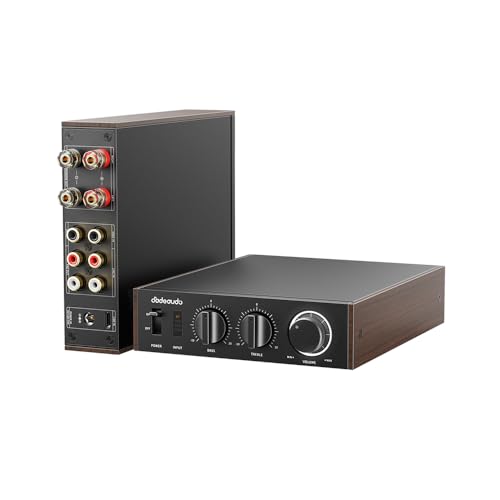
The JadeAudio Level 1 is a compact stereo amplifier for buyers who want a small unit with a stated subwoofer output. Its product description calls the design notebook-sized and lists up to 2 × 300 watts of output. It also identifies USB and coaxial inputs, along with Bluetooth LDAC.
The amplifier uses a TI TPA3255 Class-D chip. The listed internal components include a six-layer gold-plated thick-copper PCB, enclosed power inductors, and capacitors from WIMA, Nichicon, and ELNA. These details may interest buyers comparing component and format information, but they do not replace checking the amp’s output and input requirements against the connected equipment.
- Best for: Desktop users prioritizing a compact enclosure and multiple digital-input options.
- Why it stands out: The feature list combines a stated subwoofer output with USB, coaxial, and Bluetooth LDAC connectivity.
Limitation: The supplied product details do not specify whether the subwoofer output is intended for a passive or powered subwoofer. Confirm that point before purchase.
Hosyond 600W Bluetooth Amplifier

The Hosyond is a 2-channel amplifier with a dedicated SUB-OUT port. Its product description says the port connects directly to an active subwoofer, which makes it a more clearly specified option for buyers who already own a powered sub. It also lists Bluetooth 5.3, USB, and AUX inputs.
The stated amplifier chip is the TI TPA3255. The listed output is 300 watts plus 300 watts peak, and the feature description gives a frequency response of 20 Hz to 20 kHz. Bass and treble adjustment is supported through DSP sound tuning.
- Best for: Users who want to pair passive stereo speakers with an active subwoofer and switch among wired and wireless sources.
- Why it stands out: The product information explicitly identifies the subwoofer connection as a dedicated output for an active subwoofer.
Limitation: This is a two-channel amplifier, and its subwoofer port is described for an active sub. It is not the listed choice for directly powering a passive subwoofer.
ELZONYX AK52 2.1 Amplifier

The ELZONYX AK52 is a 2.1-channel receiver-style amplifier that lists support for two passive speakers and one passive subwoofer. That makes it a relevant option for buyers seeking a single unit for a passive 2.1 setup, as long as the speaker and subwoofer requirements match the amplifier.
Its listed playback options include Bluetooth 5.0, USB, SD card, FM radio, and AUX/RCA input. The product description also mentions dual microphone inputs and bass, treble, and echo controls, which may suit a shared entertainment space where karaoke or several source types are useful.
- Best for: Buyers who want varied playback sources and a stated passive-subwoofer connection.
- Why it stands out: The feature list identifies a 2.1 setup with two passive speakers and one passive sub, plus USB, SD, FM, and Bluetooth playback.
Limitation: The listed power figures distinguish a rated output of 50 watts × 2 plus 70 watts from much higher peak figures. Use the rated figures when comparing continuous system needs.
Pyle 2.1 CH Wireless Mini Amp

The Pyle 2.1 CH mini amplifier is suited to buyers who need a compact enclosure and straightforward playback features. Its listed dimensions are 4.7 by 5.8 by 1.5 inches. The product description also includes a subwoofer output, Bluetooth 5.0, a USB flash-drive player, RCA input, and bass and treble controls.
Bluetooth is specified with a range of more than 45 feet in the product details. That may be useful when a phone, tablet, or laptop is not placed next to the amplifier. The USB player provides another way to play audio without relying on a wireless connection.
- Best for: Small desks or rooms where a compact amplifier, wireless streaming, and USB playback are priorities.
- Why it stands out: It combines a small listed footprint with a stated subwoofer output and multiple everyday playback options.
Limitation: The supplied feature list does not identify whether the subwoofer output is for an active or passive model. Check the manual or seller specifications for output type and supported connections.
Buying Guide: How To Choose A Desktop Amp With Subwoofer Output
A subwoofer output is useful only if it matches the subwoofer’s input and power requirements. Before comparing Bluetooth, wattage, or size, identify whether the subwoofer is passive or active. Then check the amplifier’s exact output description and the connection required by the subwoofer.
Does the amplifier need to power a passive subwoofer?
A passive subwoofer does not have its own built-in amplifier, so it requires an amplifier output designed to drive it. The Fosi BT30D Pro and ELZONYX AK52 explicitly list passive subwoofer support. Compare the subwoofer’s impedance and power requirements with the amplifier’s documentation before connecting them; the supplied product summaries do not provide every compatibility detail.
Are you connecting an active subwoofer?
An active, or powered, subwoofer contains its own amplifier and generally takes a signal-level input. The Hosyond product description explicitly says its SUB-OUT connects to an active subwoofer. The Pyle and JadeAudio listings mention a subwoofer output but do not clarify its type in the supplied features, so verify their documentation if you have a powered sub.
What inputs do you need for a desktop setup?
Match the amplifier’s inputs to the devices you plan to use. USB or coaxial connections may matter for a computer or digital source; AUX or RCA can suit sources with analog outputs. Bluetooth is useful for wireless playback, but it does not replace a wired input when you need a direct connection. The JadeAudio lists USB and coaxial inputs, while the Hosyond lists USB, AUX, and Bluetooth.
How much power should you compare?
Do not compare peak wattage as if it were the same as continuous rated output. Product descriptions may use different measurement conditions and may not provide comparable figures. Check the amplifier’s rated output, the speaker’s impedance, and the subwoofer’s requirements in the manufacturer documentation. The ELZONYX listing, for example, gives both rated and peak figures, so its rated output is the more useful reference for a like-for-like check.
Which controls are useful for bass adjustment?
A dedicated subwoofer volume control can make it easier to balance bass against the main speakers. A frequency control can also help adjust the subwoofer’s operating range, when supported. The Fosi BT30D Pro lists separate SUB VOL and SUB FREQ controls. The Hosyond lists DSP-based bass and treble tuning, while the Pyle lists bass and treble controls.
Will the amplifier fit on your desk?
Consider the unit’s dimensions, power supply, cable clearance, and ventilation space, not just its front-panel size. The Pyle provides explicit dimensions, and JadeAudio describes its Level 1 as notebook-sized. The other product descriptions do not give dimensions in the supplied information, so check the full specifications if desk space is limited.
Frequently Asked Questions
Can I connect any subwoofer to an amplifier with subwoofer output?
No. Check whether the amplifier output is designed for a passive or active subwoofer, then confirm that the connector and electrical requirements match. A passive subwoofer needs an amplifier output that can drive it; an active subwoofer generally uses a signal input.
Which listed amplifier clearly supports a passive subwoofer?
The Fosi Audio BT30D Pro and ELZONYX AK52 explicitly list passive subwoofer support. Confirm the connected subwoofer’s requirements against the amplifier’s full specifications before use.
Which listed amplifier specifies an output for an active subwoofer?
The Hosyond 600W product description identifies its dedicated SUB-OUT as a connection for an active subwoofer.
Is a 2.1 amplifier suitable for desktop speakers?
It can be, provided the amplifier’s speaker outputs and subwoofer connection match the connected components. A 2.1 setup generally means two main speaker channels plus a subwoofer channel or output, but the type of subwoofer connection varies by product.
Does Bluetooth mean the amplifier can connect to a computer?
Bluetooth can provide wireless audio playback from a computer that supports Bluetooth audio. A wired USB, coaxial, AUX, or RCA input may be preferable when the source and amplifier both support it. Confirm the exact input options for the model you choose.