
Best Digital Audio Out Adapters for Clear TV and Console Sound
Looking for a reliable digital audio out adapter to convert optical Toslink or HDMI audio to analog RCA or 3.5mm output? This guide highlights five top options designed for common setups like HDTVs, game consoles, and Blu-ray players. Each pick targets specific buyer needs, from compact, driver-free plugs to feature-rich extractors that handle high-resolution sound. Whether you want simple plug-and-play or flexible output modes, these adapters help you connect modern sources to older speakers or amplifiers with improved clarity.
Summary table of selected products:
| Product | Best For | Key Output | Notes |
|---|---|---|---|
| AUTOUTLET 192kHz Optical to RCA Converter | General HDTV and game console users | Optical to RCA, 192 kHz | Professional-grade DAC; 3 ft or longer cable option available |
| 192KHz DAC Optical to 3.5mm AUX (ESWN DNXB) | TVs with Toslink to 3.5mm speakers | Optical to 3.5mm AUX | Not reversible; PCM/192 kHz support; set PCM/Stereo on TV |
| 4K@60Hz HDMI 2.0b Audio Extractor (avedio links) | HDMI source with multiple output options | HDMI ARC, Optical SPDIF, 3.5mm | 4K at 60Hz; supports ARC and multiple audio formats |
| AUTOUTLET 192kHz Optical to RCA Converter (3 ft) | Compact setups with shorter cables | Optical to RCA, 192 kHz | Same family as longer model; note output level is adjusted on the receiving device |
| eSynic 192kHz Optical to RCA Adapter | Audiophile-minded setups seeking clarity | Optical to RCA, 192 kHz | 24-bit DAC; plug-and-play; notes about PCM only |
AUTOUTLET 192kHz Optical to RCA Converter

This converter targets users who want direct optical-to-RCA conversion with a built-in DAC. Best for readers who need to connect HDTVs, DVD players, Blu-ray players, or game consoles to older stereo systems. It supports 192 kHz sampling with 24-bit processing to preserve fidelity and reduces distortion by processing input signals professionally. Choose this if you want a dedicated optical-to-analog path with clear midrange and strong bass from compatible amplifiers. A caution: the output level is influenced by the receiving device’s settings, so some adjustment may be needed.
192KHz DAC Optical to 3.5mm AUX (ESWN DNXB)
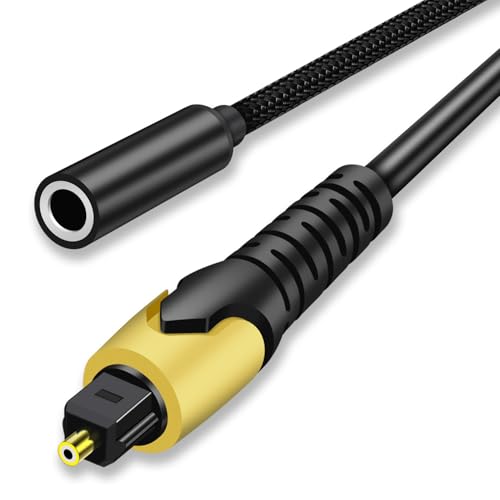
This adapter is best for viewers who want to connect a Toslink source to portable or compact speakers via a 3.5mm jack. It supports 192 kHz sampling and 24-bit streams and emphasizes precise audio details. It is not reversible, so it should be used only to convert optical to analog. Ensure the source is set to PCM or Stereo mode before use, as some TVs require mode adjustments to output optical audio correctly. This device is ideal for small living spaces or desktop setups where space-saving matters.
4K@60Hz HDMI 2.0b Audio Extractor (avedio links)

This model is best for users who need an HDMI audio extractor that can pull sound from a video source while still delivering 4K video to a TV. It provides multiple outputs, including Optical SPDIF and 3.5mm stereo, and supports ARC for compatible TVs. It’s a solid choice when you want to route TV or console audio to a separate amplifier or soundbar without powering on the TV’s speakers. Note that ARC functionality can depend on TV compatibility and settings.
AUTOUTLET 192kHz Optical to RCA Converter (3 ft)

This compact option mirrors the more extended model with a shorter cable length. It’s best for setups where space is constrained or cable management requires minimal protrusion. It delivers the same 192 kHz/24-bit capability and analog RCA output for stereo amplification. Best for small living rooms, desk setups, or wall-mounted TVs where a longer cable would be cumbersome. A potential limitation is that shorter cables can limit placement flexibility around furniture.
eSynic 192KHZ Optical to RCA Adapter

The eSynic adapter is positioned for audiophiles seeking higher fidelity from an optical-to-RCA path. It uses a 24-bit DAC with PCM decoding and supports 192 kHz sampling for a detailed, expansive soundstage. It is a plug-and-play device that draws power from the optical port, simplifying setup. It is best for readers who primarily need to upgrade sound quality on modern TVs or gaming consoles when connecting to classic speakers. Note that it is not designed for Dolby or DTS formats; PCM is the intended input.
Buying Guide
What should you consider when choosing a digital audio out adapter?
- Input and output formats: Ensure the converter supports your source (Toslink/optical or HDMI) and your destination (RCA or 3.5mm). Some units also offer HDMI ARC or SPDIF outputs for flexibility.
- Audio quality and sample rate: Look for DACs that handle 24-bit/192 kHz to preserve detail, especially for music and gaming. Note that some devices only pass PCM signals, not Dolby/DTS.
- Power and installation: Some adapters are plug-and-play and draw power from optical or HDMI ports, while others may require a separate power adapter. If you have space constraints, consider shorter cables.
- Compatibility and settings: TVs and consoles may require PCM/Stereo mode or specific output settings. Ensure your source and receiver are configured for optimal sound.
- Output flexibility: If you plan to upgrade speakers or a soundbar, choose a unit with multiple outputs or one that fits your current amplifier’s inputs.
Frequently Asked Questions
- What is the difference between optical to RCA and HDMI audio extractors?
– Optical to RCA converts a digital optical signal to analog RCA audio, typically for older amplifiers. HDMI audio extractors pull audio from an HDMI signal and may offer multiple outputs like optical, RCA, and 3.5mm, often while maintaining video on a separate feed. - Can these adapters work with all TVs?
– Most work with modern TVs that provide optical or HDMI audio output. Some models require PCM output or a specific audio mode to function correctly. - Do these devices increase volume on their own?
– Most contain a DAC and amplifier to improve signal quality, but output level is usually controlled by the receiving device. Some devices amplify the signal, while others rely on the connected amplifier. - Are these adapters reversible?
– Some are unidirectional (optical to RCA only). Always check the product description to confirm directionality before purchase. - Is ARC supported by all HDMI extractors?
– Not all TVs and extractors support ARC. If ARC is essential, verify compatibility with both the TV and the extractor model you choose. - Do I need external power for these adapters?
– Many plug directly into the optical port and draw power from the source. Others may require USB power or an external adaptor; review the product’s power requirements before buying.