
A digital audio out coax connection carries digital sound through a single RCA-style cable, but the right product depends on what your equipment needs at the other end. Choose the FosPower cable for a six-foot connection, the Monoprice cable for a three-foot run, or the TODN cable if its listed 75-ohm specification and shielding details match your priorities. For changing connection types, consider the bidirectional coax-to-optical adapter; for converting digital audio to analog, choose the Hdiwousp DAC.
| Product | Best for | Type |
|---|---|---|
| Bi-Directional Coax Digital Audio Adapter | Connecting coaxial and optical equipment | Signal converter |
| FosPower Digital Audio Coaxial Cable | A six-foot RCA-to-RCA connection | Coaxial cable |
| Monoprice 102681 Cable | A three-foot connection | Coaxial cable |
| TODN HiFi Digital Coaxial Cable | A short cable with listed 75-ohm construction | Coaxial cable |
| Hdiwousp Digital to Analog Converter | Sending digital audio to analog outputs | DAC converter |
Bi-Directional Coax Digital Audio Adapter

This adapter is designed to convert between coaxial digital audio and optical digital audio. Its bi-directional design makes it the most relevant pick when the source and destination have different digital connection types, rather than matching coaxial ports.
- Best for: A setup that needs coax-to-optical or optical-to-coaxial conversion.
- Why it was selected: The product name specifically identifies both directions of digital audio conversion, addressing a common connection mismatch.
Choose this if one device provides a coaxial digital output and the other expects optical, or vice versa. A converter changes the connection format; it is not a substitute for an RCA-to-RCA coaxial cable when both devices already have coaxial ports. The provided product information does not specify supported audio formats, power requirements, or included accessories, so check those details before purchase.
FosPower Six-Foot Coaxial Cable

This FosPower cable has male RCA-style digital coaxial audio connectors at both ends and measures six feet. The listed compatibility covers digital coaxial audio ports, including recessed ports that may be difficult to reach. Orange color-coded connectors help identify the cable ends during setup.
- Best for: Connecting devices that need more reach than a short cable provides.
- Why it was selected: It offers a stated six-foot length, male-to-male connectors, and a specific note about recessed ports.
Choose this cable when both devices have digital coaxial audio connections and the distance between them suits a six-foot run. Its connectors are described as 24K gold plated, but that detail does not establish that it will improve sound compared with another compatible coaxial cable. Avoid it if you need optical conversion, analog stereo output, or a different connector type.
Monoprice Three-Foot RG6 Coaxial Cable

The Monoprice 102681 is identified as a three-foot RG6 RCA digital coaxial audio cable with a CL2 rating. Its shorter length can suit nearby components, such as audio equipment arranged together in a cabinet, when a three-foot cable reaches between the ports.
- Best for: A compact setup that needs a three-foot digital coaxial cable.
- Why it was selected: Its product name identifies its length, RG6 construction, RCA connection, and CL2 rating.
Choose this if you want a short cable and your source and receiving device both have compatible digital coaxial ports. Measure the route, including any bends or cable-management path, before choosing a length. The available product information does not provide further connector or performance details, so do not assume specifications beyond those stated in the product name.
TODN HiFi Three-Foot Coaxial Cable

The TODN cable is listed as a three-foot, 75-ohm S/PDIF coaxial cable with RCA male connectors. Its listed construction includes dual shielding, 99.9999% OCC material, and 24K gold-plated connectors. The product description names use with home audio, amplifiers, DACs, and CD equipment.
- Best for: Buyers looking for a short cable with a stated 75-ohm specification and dual shielding.
- Why it was selected: Its description provides several specific construction details and identifies digital coaxial audio use.
Choose this if the three-foot length fits your equipment layout and you want the listed 75-ohm specification. The product title also names Dolby, DTS, and multichannel formats, but compatibility depends on the equipment and its settings. Do not choose it to connect optical ports or to convert a digital signal into analog audio.
Hdiwousp Digital-To-Analog Audio Converter
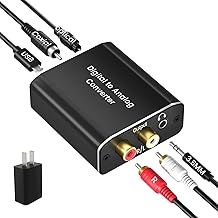
This Hdiwousp DAC converts digital coaxial or optical Toslink audio to analog left/right RCA and 3.5 mm outputs. The listed supported sampling rates are 32, 44.1, 48, 96, and 192 kHz, with a 24-bit S/PDIF incoming stream. The product description also includes an optical cable and power adapter.
- Best for: A digital audio source that needs to feed analog RCA or 3.5 mm equipment.
- Why it was selected: It directly addresses digital-to-analog conversion and accepts either coaxial or optical input.
This converter is not reversible: it does not turn analog audio into coaxial or optical digital audio. The product instructions say to set the source to PCM/LPCM. Choose it when the receiving equipment has analog inputs; avoid it if you only need a direct digital coaxial cable or a coax-to-optical converter.
Buying Guide: Choosing Digital Audio Out Coax Equipment
What does “digital audio out coax” mean?
A coaxial digital audio output sends digital audio through a coaxial connection, commonly using an RCA-style port. The port is often marked “Coaxial,” “Digital Coax,” or “S/PDIF.” It is different from an analog RCA output, which carries left and right audio channels through separate connectors. Check the labels on your source device and receiver before buying a cable or converter.
A digital coaxial cable usually has one connector at each end because it carries the digital signal as a single connection. The RCA shape alone does not confirm that a port is digital: red and white RCA jacks are commonly analog stereo outputs. Follow the device labels and manuals rather than matching plugs by appearance alone.
Do you need a cable or a converter?
Use a coaxial cable when both devices have compatible digital coaxial ports. A cable carries the signal between matching connections; it does not change coaxial audio into optical, or digital audio into analog. Choose a coax-to-optical converter if the devices use those different digital formats. Choose a DAC when a digital source must connect to analog RCA or 3.5 mm inputs.
Before ordering a converter, confirm which direction it supports. A coax-to-optical adapter may not convert optical to coax unless it is explicitly described as bidirectional. Likewise, the Hdiwousp product is specified for digital input and analog output, not the reverse.
How long should a digital coaxial cable be?
Measure the actual path between the devices, including the distance around furniture and the slack needed to connect the plugs. A short cable can reduce clutter when components are close together. A longer cable gives more placement flexibility, but extra length is unnecessary if the equipment is already adjacent. The listed choices here include three-foot cables and a six-foot cable.
Do not pull a cable tight across a cabinet or bend it sharply at the connector. If a port is recessed or hard to reach, look for a cable whose listed connector design addresses that situation. The FosPower description specifically mentions recessed digital coaxial ports.
Which specifications matter most?
- Connection type: Confirm that the product matches coaxial, optical, or analog connections as needed.
- Signal direction: Check whether a converter accepts input from the device you plan to use as the source.
- Length: Compare cable length with the measured route between equipment.
- Audio format: For converters, verify that the source output format is supported. The Hdiwousp description specifies PCM/LPCM settings.
- Power and included items: Check converter power requirements and listed accessories before setup.
Details such as gold-plated connectors, shielding, and cable material can help distinguish product descriptions, but they do not replace the main compatibility checks. A cable with the wrong connector or length will not solve a port mismatch.
How can you troubleshoot a coaxial digital audio connection?
First, confirm that the cable is connected to the digital coaxial output and the matching input, not to analog stereo jacks. Then select the corresponding input on the receiver or other audio equipment. If a DAC is in the chain, check that it is powered and that the source is set to an audio format the converter accepts. For the Hdiwousp DAC, the listed instructions call for PCM/LPCM.
If there is still no sound, check the source device’s audio-output settings and confirm that the receiving device supports the chosen signal. Try reseating the connectors and inspect the cable route for strain. For a format converter, verify signal direction and the input and output connection types rather than assuming that every converter works both ways.
Frequently Asked Questions
Is digital coaxial audio the same as optical audio?
No. Both can carry digital audio, but coaxial uses an electrical connection while optical uses a Toslink connection. A converter is needed when the two devices have different connection types.
Can I use any RCA cable for digital coaxial audio?
Check the cable and equipment specifications rather than assuming all RCA cables are interchangeable. Select a cable identified for digital coaxial or S/PDIF audio and confirm that its connectors fit the device ports.
Does a digital coaxial cable convert digital audio to analog?
No. A coaxial cable carries a signal between compatible digital ports. A DAC, such as the Hdiwousp unit described here, is needed to convert supported digital audio into analog outputs.
Can the Hdiwousp converter take analog audio and output digital coax?
No. Its listed direction is digital coaxial or optical input to analog RCA or 3.5 mm output. The product description says it is not reversible.
What audio setting should I use with the Hdiwousp DAC?
The product instructions specify PCM or LPCM audio format. Set the source device accordingly if you use this converter.
How do I know whether my device has a digital coaxial output?
Look for a port labeled “Digital Coax,” “Coaxial,” or “S/PDIF,” and consult the device manual. Do not identify a digital port solely by its RCA-style shape, because analog RCA connections can look similar.