
To connect a device’s digital audio output to an analog audio input, use a digital-to-analog converter (DAC) with the matching digital input and analog output. The PROZOR is best for users who need both RCA and 3.5mm outputs; Hdiwousp is a straightforward option with an optical cable and power adapter included. Check that the source is set to PCM or LPCM, because these converters do not necessarily decode surround formats.
| Product | Best For | Digital Input | Analog Output |
|---|---|---|---|
| PROZOR 192KHz DAC | Flexible output connections | Optical or coaxial | RCA and 3.5mm |
| Hdiwousp 192 kHz DAC | Included setup accessories | Optical or coaxial | RCA and 3.5mm |
| Optical-to-3.5mm DAC | AUX-only connections | Optical | 3.5mm |
| Rybozen 192KHz DAC | Two-channel audio | Optical or coaxial | RCA and 3.5mm |
| TAIKURA 3.5mm-to-optical | The reverse connection direction | 3.5mm analog | Optical digital |
PROZOR 192KHz DAC Converter

The PROZOR converter changes digital PCM audio from an optical Toslink or coaxial source into analog stereo audio. Its RCA left/right outputs and 3.5mm jack operate simultaneously, which is useful when the receiving equipment has a different type of analog input than expected.
- Best for: Connecting a TV, media player, or other digital source to an amplifier or speaker system with RCA or 3.5mm analog inputs.
- Why it stands out: It supports sampling rates up to 192kHz and 24-bit S/PDIF input, and the listed features describe an upgraded amplifier chipset and dual-channel operational amplifier.
- Important limitation: The source must send PCM audio. The listed instructions also note that TV volume may need to be adjusted through settings rather than the TV remote.
Choose this model if you want output-format flexibility from one DAC. Avoid it if you need an analog-to-digital converter: its signal direction is digital to analog, not the reverse.
Hdiwousp 192 kHz DAC
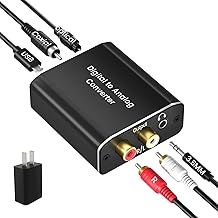
This Hdiwousp DAC converts digital PCM or LPCM audio from optical Toslink or coaxial connections to RCA stereo or 3.5mm analog audio. The product listing includes an optical cable and power adapter, so the basic accessories for an optical setup are specified.
- Best for: Buyers who want an optical cable and power adapter included with a converter that also accepts coaxial digital audio.
- Why it stands out: It supports sampling rates of 32, 44.1, 48, 96, and 192kHz, along with 24-bit S/PDIF input. The product is described as plug-and-play without an additional driver.
- Important limitation: It is unidirectional and requires PCM or LPCM audio. It does not convert analog input to digital output.
Choose this if your source offers optical or coaxial digital output and your receiver accepts RCA or 3.5mm analog audio. Before buying, confirm which digital connection your source actually provides.
Optical-to-3.5mm Audio DAC

This compact-style converter is designed for one particular connection path: digital optical PCM audio into analog 3.5mm audio. It is a more focused choice than models that also provide RCA and coaxial connections.
- Best for: A setup where the source has optical output and the receiving headphones or speakers use a 3.5mm analog input.
- Why it stands out: The listed feature set specifically describes optical-to-AUX conversion and support up to 192kHz.
- Important limitation: It needs USB power from a 5V/1A port or wall charger. The listing says volume is controlled on the connected output device, not with the TV remote.
Choose this if you only need a 3.5mm output and do not need RCA. Avoid it if you need the reverse direction, 3.5mm analog input to optical digital output, or if the source cannot provide PCM audio.
Rybozen 192KHz Audio Converter

The Rybozen DAC converts coaxial or optical digital PCM audio to analog RCA left/right and 3.5mm audio. Its stated outputs are available simultaneously, and the product listing says an optical cable and power adapter are included.
- Best for: Connecting a digital source to analog stereo equipment when you want both RCA and 3.5mm output options.
- Why it stands out: It supports 32, 44.1, 48, 96, and 192kHz sampling rates and 24-bit S/PDIF input. The listing identifies home cinema systems and media players among possible source devices.
- Important limitation: It supports uncompressed two-channel PCM or LPCM, not 5.1-channel audio. Set the player or source to PCM or LPCM before troubleshooting the connection.
Choose this when two-channel analog output is appropriate for your system. If you need surround-sound decoding or passthrough for a format outside the stated support, this product’s listed specifications do not establish that capability.
TAIKURA 3.5mm-To-Optical Converter

This product is included as a direction check, not as a match for a digital-output-to-analog-input connection. It converts 3.5mm analog audio into Toslink optical digital audio, which is the opposite of what a TV’s optical output needs when connecting to an analog input.
- Best for: A computer, laptop, or projector with 3.5mm analog output that needs to connect to a soundbar or other system through optical input.
- Why it is relevant: It demonstrates why checking the words “digital to analog” matters. Its listed output is optical digital, not analog RCA or AUX.
- Important limitation: It is explicitly not a digital-to-analog converter. It also requires USB power and provides two-channel PCM digital output.
Do not choose this for a TV’s optical digital output and an amplifier’s analog input. For that setup, select one of the DACs above that accepts optical input and outputs RCA or 3.5mm analog audio.
Buying Guide: How To Choose A Digital-To-Analog Converter
What direction does the audio need to travel?
Match the converter’s direction to the devices. A source with digital audio out and a receiver with analog audio in needs a DAC: digital input to analog output. A converter described as analog-to-digital does the reverse and will not solve this connection problem.
Check the labels on both devices rather than relying only on connector appearance. “Optical out” on a TV is a digital output. “AUX in” or RCA input on a stereo is analog. A DAC sits between them and changes the signal format.
Which digital and analog connectors do you need?
Optical Toslink and coaxial S/PDIF are different physical connections. Choose a converter with an input that matches the source. For the receiving device, check whether it takes RCA left/right, 3.5mm stereo, or both.
RCA connections commonly use separate left and right plugs. A 3.5mm analog jack is a single connector often labeled AUX. Some converters provide both types, while the optical-to-3.5mm model in this list focuses on a single analog output type.
Does the source need a particular audio setting?
Many basic DACs in this category require PCM or LPCM stereo audio. If the source is set to Dolby Digital, DTS, or another unsupported format, the converter may produce no sound or audio that does not work as expected. Check the product’s listed format support and select PCM or LPCM in the TV, disc player, or media device settings.
Some TV menus call this setting “Digital audio out,” “Audio format,” or “SPDIF format.” Menu names vary by device. The key requirement is to send a format the DAC supports, rather than assuming every digital audio format will convert.
Do sampling rate and channel count matter?
Sampling-rate support describes the digital audio rates the converter lists as accepted. The products here advertise support up to 192kHz, with specified rates varying by model. Match the source output settings to the converter’s documented capabilities when troubleshooting.
Channel support is equally important. A DAC that accepts two-channel PCM is not necessarily a surround-sound decoder. The Rybozen listing explicitly limits its support to uncompressed two-channel LPCM or PCM and says it is not available for 5.1-channel audio.
How will the DAC get power?
Confirm the power method before ordering. The Hdiwousp and Rybozen listings specify a power adapter, while the optical-to-3.5mm converter specifies USB power from a 5V/1A source. A digital-to-analog converter generally needs power to process the signal, so having the correct audio cables alone may not be enough.
How should you troubleshoot no sound?
- Confirm that the source is connected to the converter’s digital input and the receiver is connected to its analog output.
- Check that the DAC has power and that the optical or coaxial cable is seated correctly.
- Set the source’s digital audio output to PCM or LPCM if required by the converter.
- Choose the correct input on the receiving amplifier, speaker, or other audio equipment.
- Check volume on the output device and in source settings; some converters do not pass TV remote volume control.
These checks address the most common setup mismatches described by the product specifications: wrong signal direction, incompatible format, missing power, or an incorrect output-volume expectation.
Frequently Asked Questions
Can I connect a TV optical output to an RCA input?
Yes, if you place a digital-to-analog converter between them. Connect the TV’s optical output to the DAC’s optical input, then connect the DAC’s RCA outputs to the receiver’s analog inputs. Set the TV audio output to PCM or LPCM if the DAC requires it.
Will a digital-to-analog converter work in reverse?
No. A DAC converts digital audio into analog audio. It does not convert an analog 3.5mm or RCA source into optical digital audio unless the product is specifically an analog-to-digital converter.
Can I use an optical-to-3.5mm converter with RCA speakers?
Only if the speakers or an intermediate device accept 3.5mm analog audio. If the receiving equipment has RCA inputs, choose a DAC with RCA outputs or use an appropriate analog connection arrangement.
Why is there no sound after connecting the converter?
Check power, cable direction, the selected input on the receiver, and the source’s digital audio format. A converter that requires PCM or LPCM may not work with a source set to an unsupported surround format.
Can these converters send 5.1-channel audio to an analog input?
Do not assume so. The Rybozen listing specifies two-channel PCM or LPCM and excludes 5.1-channel audio. Check the individual DAC’s format and channel specifications before buying.