
To connect a TV’s digital optical audio output to the red-and-white audio inputs on a composite setup, use a digital-to-analog converter (DAC) with RCA outputs. The PROZOR 192KHz converter is best for buyers who want RCA and 3.5mm outputs, while the PROZOR cable-style DAC and AUTOUTLET model are better for a direct optical-to-RCA connection. These products convert audio only: they do not convert a digital video signal to composite video.
| Product | Best for | Connection type |
|---|---|---|
| PROZOR DAC with RCA and 3.5mm | More than one analog audio output | Optical or coaxial to RCA and 3.5mm |
| PROZOR 7-foot DAC cable | Longer optical-to-RCA reach | Optical to RCA |
| AUTOUTLET 7-foot DAC cable | Simple optical-to-RCA conversion | Optical to RCA |
| Optical-to-3.5mm DAC | Analog AUX equipment | Optical to 3.5mm |
| Eanetf 3.5mm-to-RCA AV cable | Analog 3.5mm sources | 3.5mm to RCA AV |
PROZOR DAC With RCA And 3.5mm Outputs

This PROZOR converter changes compatible digital audio from a coaxial or Toslink optical input into analog stereo RCA and 3.5mm outputs. Its two output types can be useful when connecting a TV or other digital source to equipment with RCA inputs, headphones, or an AUX input.
- Best for: Buyers who need both RCA and 3.5mm analog output options.
- Why it was selected: It supports optical and coaxial digital inputs and provides RCA and 3.5mm outputs simultaneously.
- Format support: Listed sampling rates include 32, 44.1, 48, 96, and 192 kHz, with 24-bit S/PDIF input.
The product information says to set the source device’s audio output to PCM. It also notes that TV volume may need to be adjusted in the TV’s settings. Avoid this model if the source sends an unsupported audio format or if you need video conversion; it handles audio signals only.
PROZOR 7-Foot Optical-To-RCA DAC
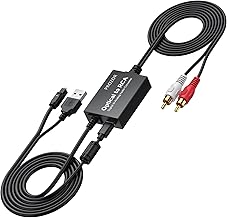
This PROZOR model converts SPDIF optical digital audio to stereo RCA analog audio and includes a 7-foot cable. Its built-in audio amplifier chip and dual-channel operational amplifier are described as addressing low RCA output volume. It is a direct option for a TV, Blu-ray player, or game console with optical output and an analog RCA audio input available on the receiving equipment.
- Best for: Buyers who want an optical-to-RCA connection with a longer cable.
- Why it was selected: It combines the DAC and a 7-foot cable, and its listed supported sampling rates extend to 192 kHz.
- Format support: The product lists 32, 44.1, 48, 96, and 192 kHz and 24-bit S/PDIF input.
The source must be set to PCM for the converter to work as intended, according to the product details. The listing specifically says optical output is not supported, so check the direction of the signal before buying: the intended path is digital optical input to analog RCA output, not the reverse.
AUTOUTLET 7-Foot Optical-To-RCA DAC

The AUTOUTLET converter is listed as a 192 kHz, 24-bit digital-to-analog audio converter with a 7-foot Toslink-to-RCA cable. It is intended to connect a compatible optical digital audio source to analog left-and-right RCA inputs. The listing describes it as plug and play and names HDTVs, DVD players, Blu-ray players, and game consoles as example source types.
- Best for: Buyers who want a straightforward optical-to-stereo-RCA connection.
- Why it was selected: Its stated connection type matches the common need to send a TV’s digital audio output to analog RCA inputs.
- Listed support: The product name specifies 192 kHz and 24-bit audio.
The supplied product details do not include further setup or format instructions. Confirm that the source offers optical audio output and that the receiving device has analog RCA audio inputs. This is an audio converter, not a device for turning HDMI or digital video into composite video.
Optical-To-3.5mm Digital Audio Converter

This DAC converts optical SPDIF or Toslink digital audio into a stereo 3.5mm AUX output. It can suit analog speakers, an audio mixer, or other equipment that accepts 3.5mm input. It is not the right choice if the destination requires red-and-white RCA connectors unless you have an appropriate analog connection solution.
- Best for: Buyers connecting an optical-output TV or set-top box to 3.5mm AUX equipment.
- Why it was selected: It provides a digital-to-analog path for a common analog audio input, with listed sampling support up to 192 kHz.
- Listed support: 32, 44.1, 48, 96, and 192 kHz sampling rates and 24-bit data streams.
The signal direction is one-way: optical digital input to 3.5mm analog output. The product details say to set the source audio output to PCM or stereo. Avoid this model when the receiving device needs RCA outputs or when you need to convert analog audio back to optical.
Eanetf 3.5mm-To-RCA AV Cable

This 5-foot cable connects a compatible 3.5mm TRRS AV output to three RCA connectors for audio and video. It is different from the DAC products above: it carries an existing analog signal and does not convert optical or other digital audio to analog. It may be useful after a digital source has already been converted to analog, provided the connector wiring and signal format match the devices.
- Best for: Buyers with an analog 3.5mm TRRS AV output and RCA-type inputs.
- Why it was selected: It is relevant to composite-style connections that use RCA connectors for analog audio and video.
- Construction details: The product listing describes flexible PVC material and a 5-foot length.
Check the source device’s AV pinout before purchasing. TRRS-to-RCA wiring is not guaranteed to match every device, and the cable is not a substitute for an optical-to-RCA DAC.
Buying Guide: How To Connect Digital Audio Out To Composite
Do you need a DAC or just a cable?
Choose a DAC when the source sends digital audio through Toslink optical or coaxial output and the receiving device accepts analog RCA audio. A passive cable cannot translate digital audio into an analog signal. Choose a cable such as the Eanetf only when both devices already provide compatible analog connections.
For a typical TV-to-composite-stereo connection, the signal path is: TV optical output, DAC optical input, then the DAC’s red-and-white RCA outputs to the receiving device’s audio inputs. Match the connector labels and colors where possible. The red and white RCA plugs carry right and left audio; a yellow RCA connector is commonly used for composite video.
Are you converting audio, video, or both?
“Composite” can refer to an analog AV connection with yellow video plus red-and-white stereo audio. The DACs in this list convert digital audio to analog audio; they do not convert digital video to composite video. If you need a picture conversion as well, look for a video converter designed for the exact source and destination formats. Do not assume an audio DAC will produce a video signal.
Which output should you choose?
- Choose RCA output when the receiving equipment has red-and-white analog audio inputs.
- Choose 3.5mm output when the destination accepts an AUX plug.
- Choose the PROZOR model with both outputs when you want either connection option available.
- Compare cable length with the distance between your source and receiving device. Two listed models include 7-foot cables; the separate Eanetf cable is 5 feet.
Why does PCM matter?
Several product listings instruct users to set the TV or source device to PCM or stereo. Some digital audio converters do not decode every multichannel or compressed audio format. If you get no sound, open the source’s sound settings and select PCM or stereo output, then verify that the optical cable is fully connected and the DAC is powered as required by its instructions.
Some TVs control optical output volume independently from the television’s speaker volume. The first PROZOR listing specifically advises adjusting TV volume through settings. Check both the source settings and the receiving equipment’s volume controls before deciding the converter is incompatible.
What should you check before ordering?
- Source output: Confirm that the TV or player has optical Toslink or coaxial digital audio output.
- Destination input: Confirm that the stereo, amplifier, or AV equipment has analog RCA or 3.5mm input.
- Signal direction: The DACs convert digital input to analog output. They do not work in reverse.
- Audio format: Check whether the source can output PCM or stereo audio.
- Video needs: If the goal includes composite video, select a separate video converter as needed.
Frequently Asked Questions
Can I connect optical digital audio directly to red-and-white RCA inputs?
No. Optical audio is digital, while RCA audio inputs are analog. Use a compatible DAC to convert the digital signal before connecting it to the RCA inputs.
Does an optical-to-RCA DAC convert HDMI to composite?
No. These products convert audio, not video. HDMI-to-composite video conversion requires a separate video converter that supports the required formats.
Why is there no sound after connecting the DAC?
Check that the optical cable is connected to the source output and DAC input, that the DAC is set up according to its instructions, and that the source is set to PCM or stereo. Also check the destination’s selected input and volume.
Can I use a 3.5mm-to-RCA cable instead of a DAC?
Only if the source already has a compatible analog 3.5mm AV output. A 3.5mm-to-RCA cable does not convert optical digital audio to analog.
Will these products send audio in both directions?
No. The listed DACs are intended to convert digital audio input to analog output. The optical-to-3.5mm model explicitly states that it is not reversible.