
The best digital audio recorder for video depends on whether you need a camera that records picture and sound together or a separate device for capturing audio. The ZYDIIE 4K camcorder is best for higher-resolution video, while the kimire camcorder offers a straightforward 1080p option. For separate audio capture, the Tonfarb recorder lists PCM recording and long battery life; the 72GB voice recorder and Comu Action Pro are additional options, but their supplied details are limited.
| Product | Best suited for | Key listed detail |
|---|---|---|
| ZYDIIE 4K Camcorder | Video-first creators | 4K video, touchscreen, night vision |
| kimire Camcorder | Basic all-in-one recording | 1080p video and pause function |
| Tonfarb Voice Recorder | Separate audio capture | PCM recording and 68-hour stated runtime |
| 72GB Voice Activated Recorder | People comparing voice-recording features | Voice activation and DSP noise reduction in name |
| Comu Action Pro | Users interested in AI transcription tools | AI documents and 70H+ battery life in name |
ZYDIIE 4K Camcorder
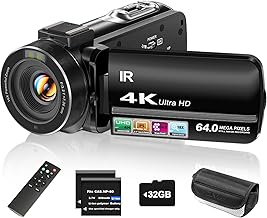
Best for: Video creators who want a camera and its recording functions in one device. The listing specifies 4K Ultra HD video, 64MP photos, and an 18X digital zoom, along with a 3-inch touchscreen that rotates 270 degrees. The rotating display can help when framing a solo shot or recording from a high or low angle.
The listed infrared night vision mode records black-and-white video in total darkness. This can be useful for scenes where conventional color footage is not the priority. A 32GB card and two batteries are included according to the product name.
Why it was selected: It is the most video-focused option in this group and provides a direct route to capturing picture and sound in a camcorder. Limitation: The supplied details do not specify external microphone support or audio recording formats. Confirm audio inputs and controls before choosing it for work that depends on a particular microphone setup.
kimire 1080p Camcorder

Best for: Buyers who want a basic camcorder with a rotating screen and built-in recording, rather than a separate audio-only recorder. Its listed video resolution is 1080p at 15 frames per second. Other stated features include a 3-inch LCD with 270-degree rotation, 16X digital zoom, fill light, anti-shake, and a pause function.
The pause function lets the user stop and continue a recording without starting a new file, which may simplify organizing footage. The listing also describes USB 2.0 transfer and TV playback through an AV cable. It can be used as a webcam after selecting PC CAM mode and downloading the AMCAP software, according to the product description.
Why it was selected: It combines video recording and convenience features in a single device, making it a simple alternative to separately recording and synchronizing audio. Limitation: The listed 15fps video rate is important to consider if smooth motion is a priority. The supplied features do not state whether an external microphone can be connected.
Tonfarb 136GB Voice Recorder
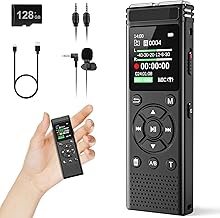
Best for: Users who need a separate audio recorder for interviews, meetings, lectures, or other spoken content. The listed features include PCM recording at 1536 kbps, dual noise-reduction microphones, automatic noise reduction, and voice-activated recording. It also has a one-click recording control designed to start capture from a powered-off state.
The product description says it includes 8GB of built-in storage and a 128GB TF card, for 136GB total, and claims up to 68 hours of continuous recording on a charge. USB-C is listed for transferring recordings to a computer. These features can support separate audio capture while video is recorded on another device.
Why it was selected: Its stated audio-focused functions and storage make it the most fully described standalone recorder in this list. Limitation: The provided details do not say it connects directly to a camera or synchronizes sound with video. Plan to align the files during editing unless a compatible connection is confirmed.
72GB Voice-Activated Recorder

Best for: Buyers comparing compact voice recorders for dialogue or spoken notes alongside a video project. The product name lists 72GB capacity, voice activation, DSP 6.0 noise reduction, playback, and a stated 10,860-hour recording figure. Those are listing claims, not a guarantee of how much usable audio will fit under every recording setting.
As a second device, a voice recorder can capture audio independently while a camera records video. That approach may be useful when the camera’s built-in audio is insufficient, but the files need to be transferred and synchronized in editing.
Why it was selected: Its stated voice-activation and noise-reduction features make it relevant to spoken audio capture. Limitation: No detailed specifications were supplied beyond the product name. Confirm recording format, actual storage configuration, battery life, connections, and microphone details before relying on it for a video production.
Comu Action Pro AI Recorder

Best for: Users drawn to an audio recorder that advertises AI-assisted document features. The product name also states battery life of more than 70 hours. These features may suit people who want to capture spoken material and explore automated documentation, but the listing information provided here does not explain the exact transcription or export workflow.
This is an audio-focused device, not a video camera. It could be used as a separate audio source for a video project if its recording and transfer functions meet the creator’s needs. Check whether the resulting files can be exported in a format accepted by the editing software.
Why it was selected: It offers a distinct AI-document angle among the listed audio recorders. Limitation: No detailed recording formats, storage capacity, microphone specifications, or camera connection information were supplied. Buyers needing a predictable production workflow should verify those details before purchase.
Buying Guide: How to Choose a Digital Audio Recorder for Video
Do you need a camcorder or a separate audio recorder?
A camcorder records picture and sound together, so its files are usually simpler to manage. This is a practical setup for casual videos, family footage, or basic vlogging. A standalone audio recorder captures sound separately from the camera. It can give you another recording source, but it adds file transfer and synchronization steps.
Choose an all-in-one camcorder if simple setup matters most. Choose a separate recorder if audio capture is your main need or you want an independent audio file. Do not assume a voice recorder connects directly to a camera; verify its inputs and outputs in the full product specifications.
How should you compare sound-recording features?
Look for the recording format, sample rate or bitrate, microphone configuration, and available manual controls. PCM and WAV generally refer to uncompressed audio formats, while MP3 is compressed. The Tonfarb listing explicitly names PCM at 1536 kbps and dual noise-reduction microphones. The other audio-device details provided here do not establish comparable specifications.
Noise reduction can help with some unwanted background sound, but it does not replace good microphone placement. For clear dialogue, keep the microphone near the speaker when practical and record a short test before filming a full session.
What storage and battery details matter?
Estimate how long each recording session will be and check whether the stated capacity refers to built-in storage, an included card, or both. The Tonfarb description identifies 8GB built in and a 128GB TF card. The 72GB recorder’s name states capacity, but the supplied information does not explain how that storage is configured.
Battery claims should be treated as advertised maximums, not guaranteed runtime in every situation. Long sessions, settings, and recording formats can affect practical use. For a video shoot, carry a charging plan and test the recorder for a duration similar to the expected session.
How do you synchronize separate audio with video?
Start the camera and recorder, then make a sharp clap or another visible and audible sync marker near the beginning of the take. In editing software, align the sharp sound in the separate audio file with the sound recorded by the camera. Keep both recordings until the edit is complete so you have a reference track.
For long recordings, check synchronization again later in the footage. Before buying, confirm that the recorder exports files your editing software can import. The supplied information does not confirm direct camera synchronization for the standalone voice recorders in this list.
Which camera features affect video use?
Resolution is only one consideration. The kimire camcorder lists 1080p at 15fps, so its stated frame rate may not suit buyers who prioritize smoother motion. The ZYDIIE listing specifies 4K video and a rotating touchscreen, along with infrared night vision. Compare the exact recording modes and audio options in the complete listing before deciding.
Frequently Asked Questions
Can a voice recorder be used for video production?
Yes. It can capture audio separately while a camera records video. You will generally need to transfer the audio file and synchronize it with the video during editing unless a compatible direct connection is specified.
Is a camcorder or standalone recorder easier to use?
A camcorder is typically simpler when you want one device to capture video and sound in the same recording. A standalone recorder creates a separate audio file, which adds a synchronization step but provides an independent audio source.
Does the Tonfarb recorder connect directly to a camera?
The supplied Tonfarb product details list USB-C file transfer to a computer but do not specify direct camera connection. Confirm its inputs and outputs before relying on it for camera-linked recording.
What is the most important feature for dialogue recording?
Prioritize microphone quality and placement, suitable recording formats, and controls that support dependable capture. A noise-reduction feature can be useful, but it cannot fully compensate for a microphone placed too far from the speaker.
Is 4K video the same as better audio?
No. 4K describes video resolution, not sound quality. Check a camera or recorder’s audio specifications separately, including microphone support, recording format, and available audio controls.