
The best digital coaxial-to-analog audio converter depends on the output you need: RCA stereo, a 3.5mm jack, or both. The PROZOR and Hdiwousp converters accept coaxial and optical input, while the Elecan cable is a coaxial-only option with USB power. Each requires a compatible digital audio signal, typically PCM or LPCM, rather than an unsupported Dolby or DTS bitstream.
| Product | Best For | Output |
|---|---|---|
| PROZOR 192KHz DAC | Flexible connections | RCA and 3.5mm |
| Elecan Coaxial DAC Cable | Direct coaxial-to-RCA wiring | Dual RCA |
| Coaxial Digital Analog Aux Cable | Compact aux-style connection | 3.5mm or RCA, as listed |
| Hdiwousp 192 kHz DAC | Coaxial and optical inputs | RCA and 3.5mm |
| OREI Digital Audio Converter | Basic stereo conversion | RCA and 3.5mm |
PROZOR 192KHz Digital-to-Analog Converter

Best for: People who want one converter for either coaxial or Toslink optical digital audio and need both RCA stereo and 3.5mm analog outputs. The PROZOR converts digital PCM audio to analog and provides both output types simultaneously, which can simplify connections to different stereo equipment or headphones.
The listed specifications support sample rates of 32, 44.1, 48, 96, and 192 kHz, with 24-bit S/PDIF input. The product description also notes an upgraded audio amplifier chipset and dual-channel operational amplifier. These features make it a flexible option when the source provides compatible PCM audio.
- Accepts coaxial or optical digital input.
- Outputs analog left/right RCA and 3.5mm audio simultaneously.
- Requires the source device to be set to PCM.
Limitation: This is a digital-to-analog converter, not an analog-to-digital converter. The product instructions also say to adjust TV volume through the TV settings, so it may not provide convenient on-device volume control.
Elecan Coaxial-to-RCA DAC Cable

Best for: Buyers who want a coaxial digital input and dual-RCA analog output in a cable-style format. Its one-way design takes a single RCA coaxial digital signal and converts it to left/right RCA analog audio for equipment with RCA inputs, such as a speaker system, amplifier, or mixer.
The built-in DAC supports 24-bit/192 kHz PCM or LPCM decoding and listed sampling rates of 32, 44.1, 48, 96, and 192 kHz. The cable also requires USB 5V power; USB supplies power only and does not carry the audio signal. The description specifies a 75-ohm coaxial section and a split cable layout.
- Connects one coaxial digital RCA input to two analog RCA outputs.
- Requires a separate USB 5V power connection.
- Supports PCM, LPCM, stereo, or 2-channel output settings.
Limitation: Do not choose it if you need optical input or a 3.5mm output. The source must be set to PCM/LPCM or stereo; Dolby, DTS, bitstream, RAW, and pass-through settings may result in no sound or noise.
Coaxial Digital Analog Aux Cable

Best for: Buyers looking for a simple connection between a digital coaxial audio source and an analog aux-style destination. The listing describes conversion to a 3.5mm or RCA analog signal and specifies that the cable is unidirectional, so it should only be used from digital audio output to analog audio input.
The product description mentions TVs and devices with optical interfaces as possible source equipment, and advises setting a TV’s “Aux Output Device” to “Spdif” if there is no sound. Because the listing does not provide the same detailed sample-rate, power, or format specifications as some standalone DACs, check the device connection and output format carefully before choosing it.
- Intended for digital-to-analog audio conversion, not reverse conversion.
- The listing references 3.5mm and RCA analog connections.
- TV audio output settings may need adjustment.
Limitation: The product information does not clearly detail supported sample rates or all required connections. Choose a converter with explicitly listed coaxial input, output type, and PCM support if those specifications are essential to your setup.
Hdiwousp Coaxial and Optical DAC
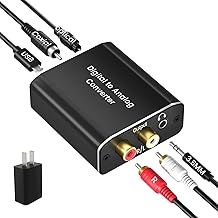
Best for: People who may connect either a coaxial digital source or an optical Toslink source and want analog RCA and 3.5mm outputs. This standalone converter accepts PCM/LPCM digital audio and converts it to stereo analog, making it a versatile choice for a TV, Blu-ray player, game console, or home cinema setup when the source offers a compatible output.
The listed supported sample rates are 32, 44.1, 48, 96, and 192 kHz, with 24-bit S/PDIF input. The product description says an optical cable and power adapter are included. It is described as plug and play without an extra driver, but the source still needs to be configured correctly.
- Accepts coaxial or Toslink optical digital audio.
- Outputs analog RCA stereo and 3.5mm audio.
- Includes an optical cable and power adapter, according to the listing.
Limitation: This converter is not reversible and requires PCM/LPCM audio. Check that your source can output that format before buying, particularly if its default setting is a Dolby or other bitstream signal.
OREI Optical and Coaxial Audio Converter

Best for: Buyers who need a straightforward converter with either coaxial or optical digital input and analog stereo outputs. The OREI provides RCA and 3.5mm outputs and lists support for common sample rates from 32 kHz through 192 kHz, at up to 24-bit resolution.
This converter is a practical choice when a TV or other source has a digital audio output but the receiving amplifier or audio equipment accepts analog stereo. Its main selection advantage is having both optical and coaxial input options alongside two common analog output formats.
- Converts optical or coaxial digital input to analog stereo.
- Offers RCA and 3.5mm output connections.
- Supports listed sample rates up to 192 kHz and 24-bit resolution.
Limitation: The product listing explicitly says it does not convert Dolby Digital and is not a Dolby decoder. Set the source output to PCM and do not rely on this converter to decode a Dolby signal.
Buying Guide: How to Choose a Digital Coaxial-to-Analog Converter
What connection does your source provide?
Confirm that the source device has a coaxial digital audio output. It commonly uses an RCA-style connector, but it carries digital audio rather than analog left/right sound. A converter’s coaxial input must connect to this digital output. Do not assume that a cable with RCA plugs can convert the signal by itself; the device must include digital-to-analog conversion circuitry.
If your source offers optical Toslink instead, select a model that explicitly accepts optical input. The PROZOR, Hdiwousp, and OREI listings include both coaxial and optical input options. The Elecan cable is specified for coaxial input, so it is not the better choice when optical is the only available digital output.
Which analog output do you need?
Check the receiving equipment before selecting a converter. A stereo receiver or powered speakers may use a pair of RCA analog inputs: one for left and one for right. A device with a 3.5mm analog input needs a compatible mini-jack connection. Some converters provide both output types, while the Elecan cable is described as a dual-RCA-output model.
Do not confuse the converter’s input and output directions. In this setup, digital coaxial audio enters the DAC, and analog audio leaves it. A product marked as an ADC performs the opposite task: it converts analog audio to digital and will not solve a digital-to-analog connection problem.
Does the source need to be set to PCM?
Often, yes. Several product listings require PCM or LPCM output, sometimes also called stereo or 2-channel audio. Open the source’s sound or digital audio menu and select PCM when available. Menu names vary by manufacturer. Dolby, DTS, bitstream, RAW, auto, or pass-through modes may send an encoded format that a basic stereo DAC cannot decode.
If you hear silence, static, or unexpected noise, check the source’s audio format first. Confirm that the selected output is the digital connection being used, then verify that the DAC has power and that its analog output is connected to the correct input on the receiving device.
Does the converter need separate power?
Standalone DACs and cable-style converters may require power. Check the product instructions and connect the included power adapter or the specified USB 5V power source. For the Elecan cable, USB power operates the converter and does not transmit audio. If USB power from a TV causes static, its listing suggests trying an external 5V phone charger instead.
Do sample rate and bit depth matter?
Match the converter’s supported formats to the source’s output when possible. The products in this list state support for sample rates up to 192 kHz, but the source and converter must still use a compatible signal format. A higher maximum specification does not make an incompatible Dolby or DTS bitstream convertible. For everyday TV stereo, PCM output and the correct physical connection are the first things to verify.
Which type is better for a simple setup?
A standalone converter is a better fit if you want clearly labeled input and output connections, multiple input choices, or both RCA and 3.5mm outputs. A cable-style DAC can reduce the number of separate pieces in a coaxial-to-RCA setup, but check its power lead, cable layout, and output limitations. Choose based on the ports you actually have rather than the broadest specification alone.
Frequently Asked Questions
Can a coaxial digital audio output connect directly to analog RCA inputs?
No. A coaxial digital audio output carries a digital signal, while analog RCA inputs expect left and right analog audio. Use a DAC that accepts coaxial digital input and outputs analog RCA stereo.
Will a digital coaxial-to-analog converter decode Dolby Digital?
Not necessarily. The listed converters require compatible PCM or LPCM audio, and the OREI listing explicitly says it does not convert Dolby Digital. Set the source to PCM unless the converter documentation specifically confirms support for another format.
Can I use a digital-to-analog converter in reverse?
No. A DAC converts digital audio to analog. It does not convert an analog input into a digital coaxial signal; that requires an analog-to-digital converter, or ADC.
Why is there no sound after connecting the converter?
Check that the converter is powered, the input and output cables are connected to the correct ports, and the source is set to digital audio output in PCM or LPCM stereo mode. Also confirm that the receiving device is set to the input connected to the converter.
Can one converter provide both RCA and 3.5mm output?
Some listed models, including the PROZOR, Hdiwousp, and OREI converters, specify both RCA stereo and 3.5mm outputs. Check the chosen product’s listed connections to confirm that they match your equipment.