
The best digital coaxial audio converter depends on the direction and type of signal you need: choose LiNKFOR for coaxial-to-optical conversion, PROZOR for switching between coaxial and optical, or a DAC such as DigitConvert or EASYCEL to connect a digital source to analog speakers. The options below clarify which formats each converter handles and what to check before buying.
| Product | Best For | Conversion Type |
|---|---|---|
| LiNKFOR 192kHz Converter | Coaxial output to an optical input | Coaxial to optical |
| PROZOR Bi-Directional Converter | Flexible coaxial and optical connections | Coaxial and optical |
| Bi-Directional Coax Digital Audio Adapter | Basic two-way digital conversion | Coaxial and optical |
| DigitConvert 192kHz DAC | Digital audio to RCA or 3.5mm | Coaxial or optical to analog |
| EASYCEL Digital-to-Analog Converter | Analog stereo outputs and included power supply | Coaxial or optical to analog |
LiNKFOR 192kHz Coaxial-to-Optical Converter
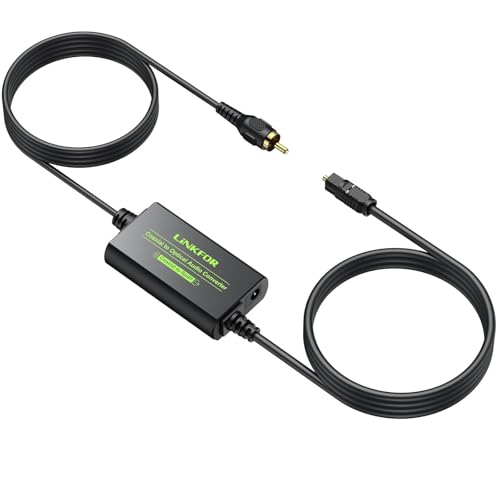
The LiNKFOR is a dedicated digital coaxial-to-optical converter. It changes a coaxial digital audio signal into an optical SPDIF Toslink signal, which can help connect a device with a coaxial output to audio equipment with an optical input. Its listed built-in coaxial and Toslink cables are each 1 meter long.
This model supports sampling rates of 32, 44.1, 48, 96, and 192 kHz at 24-bit. The listed supported formats include LPCM 2.0, DTS, Dolby AC3, and 5.1-channel audio. The product information describes plug-and-play operation and noise-free transmission.
- Best for: A setup that specifically needs coaxial input converted to optical output.
- Why it stands out: It has a clearly defined conversion direction, built-in cables, and support for sample rates up to 192 kHz.
- Limitation: It is not listed as bidirectional, so do not choose it when you need optical-to-coaxial conversion.
PROZOR 192K Bi-Directional Converter

The PROZOR converter is designed for setups that may need either coaxial-to-optical or optical-to-coaxial conversion. Its listed modes also include coaxial-to-coaxial and Toslink-to-Toslink connections. A switch button selects the input, allowing the device to accommodate different digital audio connection arrangements.
Supported formats include LPCM 2.0, DTS, Dolby AC3, and 5.1-channel audio. The product details list 24-bit sampling rates of 32, 44.1, 48, 96, and 192 kHz. An optical cable is included according to the product name.
- Best for: Buyers who need a flexible converter for more than one direction or input arrangement.
- Why it stands out: The switchable input and multiple listed connection modes make it more adaptable than a one-way coaxial-to-optical converter.
- Limitation: You must select the correct input mode; confirm the converter’s selected direction matches the source and destination ports.
Bi-Directional Coax Digital Audio Adapter

This adapter is another option for converting between coaxial digital audio and Toslink optical audio. Its listed configurations include coaxial to Toslink or coaxial, and Toslink to coaxial or Toslink. It is described as plug and play, with no software or drive required.
The product information emphasizes noise-free transmission and high-definition audio output for an amplifier or speakers. It does not specify supported sample rates or detailed audio formats in the supplied features, so buyers who need a particular rate or surround format should verify those requirements before choosing it.
- Best for: Buyers who want a straightforward two-way digital connection option and do not need a stated 192 kHz specification.
- Why it stands out: Its listed direction choices cover both coaxial-to-optical and optical-to-coaxial setups.
- Limitation: The supplied product details do not state sample-rate or format support, making it harder to compare on those specifications.
DigitConvert 192kHz Digital-to-Analog DAC

The DigitConvert DAC is appropriate when the goal is to send digital audio from a coaxial or Toslink source to analog equipment. It converts digital PCM signals to left and right RCA outputs and a 3.5 mm jack simultaneously. This is a different job from converting coaxial digital audio into optical digital audio.
Its listed support includes sample rates of 32, 44.1, 48, 96, and 192 kHz, with 24-bit SPDIF input. The product features name devices such as PS3, PS4, Xbox, Blu-ray players, HD DVD players, home cinema systems, and AV amplifiers as possible sources. The listed conversion direction is digital to analog only.
- Best for: Connecting a coaxial or optical digital audio source to analog RCA or 3.5 mm equipment.
- Why it stands out: It offers both common analog output types and lists support up to 192 kHz.
- Limitation: It does not convert analog audio back to digital, and it is not a coaxial-to-optical converter.
EASYCEL Optical and Coaxial DAC

The EASYCEL DAC converts coaxial or Toslink digital PCM/LPCM audio to stereo RCA and 3.5 mm analog outputs. It is a practical choice when an audio source has a digital output but the receiving speakers or audio equipment use analog connections. A 5V/1A power adapter and an optical cable are listed among the included items.
The stated supported sample rates are 32, 44.1, 48, and 96 kHz, with 24-bit SPDIF input. When both Toslink and coaxial cables are connected, the converter gives priority to Toslink. The product specifies that it must use a 5V/1A power adapter.
- Best for: Buyers who need coaxial digital audio converted to RCA or 3.5 mm stereo analog output.
- Why it stands out: It provides two types of analog output and includes a stated power adapter and optical cable.
- Limitation: It does not support 192 kHz audio, and Toslink takes priority when both digital inputs are connected.
Buying Guide: How to Choose a Digital Coaxial Converter
A digital coaxial converter changes the form or type of an audio signal. However, products described as converters may perform different tasks. Some change coaxial digital audio into optical digital audio. Others convert digital audio into analog RCA or 3.5 mm output. Identify the source connection and the receiving device’s input before comparing products.
Do You Need Coaxial-to-Optical or Digital-to-Analog Conversion?
For a coaxial-to-optical connection, choose a converter that explicitly lists coaxial input and optical output. This preserves the signal as digital while changing its connection type. LiNKFOR is a one-way option, while PROZOR and the basic bi-directional adapter list more than one conversion direction.
For analog speakers or equipment with RCA or 3.5 mm inputs, look for a digital-to-analog converter, often called a DAC. DigitConvert and EASYCEL accept coaxial or optical digital signals and provide analog outputs. They do not perform the same job as a coaxial-to-optical converter.
When Is a Bidirectional Converter Useful?
A bidirectional converter can handle more than one signal direction, which is useful if your equipment arrangement may change or if you need to convert optical to coaxial as well as coaxial to optical. Check the product’s input-selection method and confirm which ports function as inputs and outputs in each mode.
Do not assume that the word “bidirectional” means every port operates as an input and output at the same time. The PROZOR product lists selectable modes, so the input selection must match the intended connection.
Which Audio Formats and Sample Rates Matter?
Match the converter’s supported audio format to the signal sent by your source. The listed features for the LiNKFOR and PROZOR include LPCM 2.0, DTS, Dolby AC3, and 5.1-channel audio. The DigitConvert feature list specifies PCM digital input, while EASYCEL specifies PCM/LPCM input. These descriptions are not interchangeable, so check the source’s audio output settings and the converter’s format details.
Sample-rate support also varies. LiNKFOR, PROZOR, and DigitConvert list support up to 192 kHz. EASYCEL lists support up to 96 kHz and explicitly does not support 192 kHz. A higher maximum rate is only relevant if the source sends audio at that rate and the rest of the system supports it.
What Should You Check About Inputs, Outputs, and Cables?
- Source output: Confirm that the audio source has the coaxial or optical output required by the converter.
- Destination input: Verify that the receiving device accepts the converter’s output type.
- Direction: Match the converter’s input and output direction to the signal path.
- Included cables: Check whether a cable is included and whether its length suits your setup.
- Power: Review power requirements. EASYCEL specifies a 5V/1A adapter and cautions against using other plugs.
- Input priority: If connecting more than one source, check how the converter chooses an input. EASYCEL gives Toslink priority when both digital cables are connected.
How Do You Avoid Choosing the Wrong Converter?
Write down the connection path before purchasing: for example, “coaxial output from the source to optical input on the receiver.” Then find a product that lists that exact direction. If the destination uses analog RCA or 3.5 mm inputs, select a DAC instead. A converter cannot be assumed to work in reverse unless its features explicitly describe the reverse direction.
Also check the audio output setting on the source. Some product descriptions specify PCM or LPCM input, while others list DTS or Dolby formats. If the audio format is not supported, the converter may not deliver the intended sound. Use the format information supplied for the exact product rather than assuming all digital audio converters handle the same signals.
Frequently Asked Questions
What Does a Digital Coaxial Audio Converter Do?
It changes a digital coaxial audio signal into another signal type, such as optical digital audio or analog stereo audio. The specific conversion depends on the product. Check its listed inputs and outputs before buying.
Can a Coaxial-to-Optical Converter Work in Reverse?
Not necessarily. A one-way model converts coaxial input to optical output only. Choose a product specifically described as bidirectional if you also need optical-to-coaxial conversion.
Is a Digital-to-Analog Converter the Same as a Coaxial-to-Optical Converter?
No. A digital-to-analog converter changes a digital signal into analog output, typically RCA or 3.5 mm. A coaxial-to-optical converter keeps the audio digital and changes the connection type.
Does Every Converter Support 192 kHz Audio?
No. Support varies by model. The products in this comparison list different maximum rates: several support up to 192 kHz, while EASYCEL lists a maximum of 96 kHz.
Can I Connect a Converter to Both Coaxial and Optical Sources at Once?
Some converters provide multiple inputs, but their selection behavior varies. EASYCEL states that Toslink takes priority when both Toslink and coaxial cables are connected. Check the product instructions rather than assuming both sources can be used simultaneously.
What If My Speakers Have RCA Inputs?
Choose a DAC that lists RCA analog output, such as DigitConvert or EASYCEL. A coaxial-to-optical converter does not provide RCA output unless that feature is specifically listed.