
For a digital coaxial RCA output that needs to feed an analog 3.5mm input, choose a DAC—not a passive cable. The Hdiwousp converter is the clearest match because its listed inputs include digital coaxial and its outputs include analog 3.5mm and RCA. The cables below are for connections where both devices support the same signal type; a cable alone does not convert digital audio into analog sound.
| Product | Best suited for | Connection type |
|---|---|---|
| Hdiwousp 192 kHz DAC | Converting digital coaxial to analog 3.5mm | Active DAC |
| J-Tech Digital extender | Audio distribution over a long Cat5e/6 run | Extender/converter system |
| Digital coaxial-to-3.5mm cable | Devices with matching coaxial digital signaling | Passive cable |
| TRRS-to-RCA adapter cable | A compatible 3.5mm TRRS/RCA connection | Passive cable |
| Micca SPDIF cable | Coaxial digital connection using a 3.5mm plug | Passive cable |
Hdiwousp 192 kHz Digital-to-Analog Converter
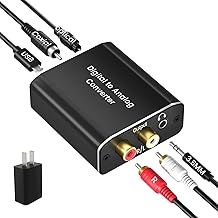
Best for: Connecting a device’s digital coaxial audio output to analog headphones, powered speakers, or another device with a 3.5mm analog input, provided the rest of the system supports the connection.
This product is identified as a digital-to-analog converter with coaxial and optical Toslink inputs and analog 3.5mm and left/right RCA outputs. Its listed 192 kHz specification and included optical cable may matter to buyers comparing input formats and accessories. Most importantly, it performs the digital-to-analog conversion that a simple coaxial-to-3.5mm cable cannot perform.
Why it was selected: It is the most directly relevant listed product for the common search intent: converting digital coaxial audio into an analog 3.5mm signal.
Limitation: The listing information provided does not specify all supported audio formats or how input selection works. Check the source’s output format and the converter’s current documentation before buying.
J-Tech Digital Audio Extender Converter

Best for: Buyers who need an audio extender system over Cat5e or Cat6 rather than a small, direct coaxial-to-3.5mm adapter.
The product name lists 3.5mm, optical SPDIF, and coaxial audio connections, plus power over cable and a stated reach of up to 1,640 feet. That makes it a specialized option for extending audio between locations using a compatible Cat5e/6 cable. It is not simply a short cable or a standalone DAC for every source-to-headphone setup.
Why it was selected: It offers both coaxial and 3.5mm connections within a product intended for longer audio runs, so it may suit installation needs that a compact converter cannot address.
Limitation: The supplied product details do not explain the exact input/output routing or what accessories are included. Confirm the connection diagram and required components before purchase.
Digital Coaxial RCA-To-3.5mm Cable

Best for: A setup where both connected devices are designed to send and receive the same coaxial digital signal through RCA and 3.5mm-style connectors.
The listing describes a 1.5-meter cable with a digital coaxial RCA connection on one end and a 3.5mm male plug on the other. It is a passive cable: the listed details do not identify a DAC or other electronics that decode digital audio and create an analog output.
Why it was selected: It matches the physical connector combination in the search phrase and may serve a purpose in a compatible digital coaxial connection.
Limitation: Do not choose it to connect a digital coaxial output directly to ordinary analog headphones, an AUX input, or powered speakers expecting analog audio. The connectors may fit while the signal types remain incompatible.
3.5mm TRRS-To-RCA Coaxial Cable

Best for: Buyers whose equipment documentation specifically calls for a 3.5mm TRRS-to-RCA coaxial cable connection.
The listing describes a 1.5-meter adapter cable with a 3.5mm TRRS male connector and an RCA male connector, and names amplifiers and speakers as possible equipment. These details describe the cable’s connectors, not proof that it converts digital coaxial audio to analog sound. Verify the signal standard and wiring required by both devices before using it.
Why it was selected: It provides another direct connector option for a narrowly matched setup, particularly when the 3.5mm end must be TRRS rather than a standard stereo plug.
Limitation: TRRS plugs can carry different contact arrangements. Avoid this cable if your device calls for a different wiring scheme or an active digital-to-analog converter.
Micca Premium SPDIF Coaxial Cable

Best for: Connecting equipment that specifies a 3.5mm-to-RCA SPDIF digital coaxial cable and the listed signal polarity.
Micca identifies this as a premium SPDIF digital coaxial cable, 3 feet long, with a 3.5mm (1/8-inch) connector to RCA. The listed polarity is tip for signal and sleeve for ground. Those details can help a buyer compare it with equipment instructions that explicitly call for this cable arrangement.
Why it was selected: The product is specifically labeled for SPDIF digital coaxial use, rather than being described only as a general-purpose stereo audio cable.
Limitation: It is still a cable, not an analog audio converter. It will not make a standard analog 3.5mm input decode a digital coaxial signal.
Buying Guide: Choosing Digital Coaxial To 3.5mm
Do you need a DAC or just a cable?
Start by identifying the signal each device sends and accepts. Digital coaxial audio is not the same as analog stereo audio, even when both connections use familiar RCA or 3.5mm-shaped plugs. If the source sends digital coaxial audio and the destination expects analog 3.5mm audio, select an active DAC with a digital coaxial input and an analog 3.5mm output.
A passive cable only connects conductors. It does not decode a digital audio stream, convert it to analog, or make an incompatible input understand a different signal. A cable is appropriate when both devices support the same signal and their manuals specify the connector and wiring arrangement.
How can you tell what the source outputs?
Check the source device’s audio-output menu and manual. Look for terms such as “digital coaxial,” “SPDIF,” or “coaxial out.” Do not assume that an RCA jack is an analog output based on its shape alone. The product documentation should identify whether it carries digital audio or analog left/right audio.
Then check the receiving device. A 3.5mm AUX input is commonly intended for analog audio, while some devices use a 3.5mm connector for a digital signal. Connector size alone does not establish signal type. Match the converter or cable to the documented input standard at both ends.
What inputs and outputs should a converter have?
For the usual digital-coaxial-to-analog-3.5mm task, look for a converter that explicitly lists a coaxial digital input and a 3.5mm analog output. If you also want to use analog RCA outputs, check that the device lists those separately. A product with optical input alone will not meet a coaxial-source requirement unless it also has a coaxial input.
- Source: Confirm it has a digital coaxial audio output.
- Converter input: Confirm it accepts digital coaxial audio.
- Converter output: Confirm it provides analog 3.5mm audio for your destination.
- Destination: Check whether it expects analog stereo audio or digital audio.
When is a 3.5mm-to-RCA SPDIF cable the better choice?
Choose a passive SPDIF cable only when the device manuals specifically identify the 3.5mm and RCA ports as compatible digital coaxial connections. This can apply to equipment that uses a 3.5mm jack for digital output or input. Check connector type, polarity, and the device’s signal requirements; a standard 3.5mm headphone cable may not be interchangeable.
A cable is not the right choice for analog headphones or a typical AUX input when the source is digital coaxial. In that case, use a DAC and connect its analog output to the destination.
Should you choose a long-range extender?
An extender is worth considering when audio must travel across a larger room, building, or installation path and the product is designed to carry audio over Cat5e or Cat6. Compare the required cable type, stated distance, power method, and available input/output formats. An extender is more specialized than a compact DAC and may require a matched transmitter-and-receiver arrangement.
Do not select an extender solely because its name includes “converter.” Confirm that it supports the exact source, destination, and routing direction you need. The product’s connection diagram is important when a device offers multiple formats such as 3.5mm, optical, and coaxial.
What common setup mistakes should you avoid?
- Do not treat a matching plug shape as proof that two devices use the same signal.
- Do not expect a passive cable to convert digital audio to analog.
- Do not confuse optical Toslink with coaxial SPDIF; they use different physical connections.
- Check whether a 3.5mm jack is TRS, TRRS, analog, or digital before ordering a cable.
- Confirm the audio format and output settings supported by the source and converter.
Frequently Asked Questions
Can a digital coaxial RCA cable connect directly to a 3.5mm AUX input?
Usually not when the RCA connection carries digital coaxial audio and the AUX input expects analog audio. Use a DAC with a digital coaxial input and an analog 3.5mm output.
Does an RCA-to-3.5mm cable convert digital audio to analog?
No. A passive cable changes the connector arrangement but does not decode digital audio. Conversion requires an active digital-to-analog converter.
Can I use a 3.5mm SPDIF cable for headphones?
Not as a direct headphone connection when the jack carries digital SPDIF. Headphones need an analog audio signal, so a compatible DAC and headphone output are required.
Is optical SPDIF the same as digital coaxial audio?
They are both digital audio formats, but they use different physical connection types. Choose a converter with the input that matches the source’s actual output.
What should I check before buying a coaxial-to-3.5mm converter?
Verify that the source has a digital coaxial output, the converter accepts that input, and the converter provides an analog 3.5mm output if the destination expects analog audio. Also check supported formats and the destination’s input requirements.