
The best digital mixer control surface depends on whether you need motorized faders, compact portability, wireless operation, or hands-on control of both a DAW and external gear. The Behringer X-TOUCH is best for users who want nine motorized faders and support for common control protocols, while the iCON P1-M adds a customizable touchscreen. For a small setup, consider the Akai MIDImix or Korg nanoKONTROL Studio; for a hybrid hardware-and-software workflow, consider the Novation Launch Control XL 3.
| Product | Best For | Standout Feature |
|---|---|---|
| Behringer X-TOUCH | DAW mixing with motorized faders | Nine touch-sensitive 100 mm motorized faders |
| iCON Pro Audio P1-M | Customizable DAW control | Motorized faders and touchscreen |
| Akai Professional MIDImix | Compact, straightforward mixing | Eight line faders and 24 assignable knobs |
| Korg nanoKONTROL Studio | Mobile or desktop MIDI control | USB and wireless connection options |
| Novation Launch Control XL 3 | Hybrid hardware and DAW setups | Dedicated MIDI ports and Custom Mode |
Behringer X-TOUCH Universal Control Surface
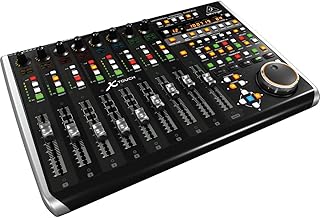
The Behringer X-TOUCH is best for studio or live users who want physical, automated faders for controlling a compatible DAW. Its nine touch-sensitive, 100 mm motorized faders provide hands-on level adjustment, and the product supports HUI and Mackie Control protocols for integration with compatible music-production software.
Choose this model if you want the faders to respond to automation rather than relying only on fixed, manually adjusted controls. The listed Ethernet, USB, and MIDI interface also gives it several connection types to consider when planning a setup.
- Best for: DAW mixing where motorized faders are a priority.
- Why it stands out: Nine touch-sensitive motorized faders and support for two widely used control protocols.
- Consider: Protocol support does not guarantee that every DAW feature will map identically. Confirm the software’s compatibility and control options before choosing.
Compared with the compact MIDImix, the X-TOUCH is better suited to a workflow that benefits from automated fader movement. It may be more control than necessary for a buyer who only needs a small, portable MIDI mixer controller.
iCON Pro Audio P1-M DAW Control Surface

The iCON Pro Audio P1-M is best for producers who want motorized faders alongside configurable on-device controls. It has eight touch-sensitive motorized faders with 12-bit resolution and a 4-inch touchscreen divided into 16 panels. The product description says users can customize up to 80 displayable and actionable functions through drag-and-drop configuration in iMAP software.
This surface is a strong choice when a workflow calls for assigning functions to a touchscreen instead of navigating every command through a computer display. Its combination of faders and configurable panels gives buyers two kinds of hands-on control in one device.
- Best for: DAW users who want configurable controls and motorized faders.
- Why it stands out: Eight touch-sensitive faders plus a customizable touchscreen.
- Consider: The listed customization uses iMAP software. Buyers should check that this setup process and the intended DAW control assignments suit their workflow.
Compared with the X-TOUCH, the P1-M offers a touchscreen with configurable functions, while the X-TOUCH is specified with nine motorized faders and HUI and Mackie Control support. Choose between them based on whether touchscreen customization or protocol-specific fader control matters more.
Akai Professional MIDImix USB MIDI Mixer Controller

The Akai Professional MIDImix is best for buyers who want a compact MIDI controller with a simple bank of physical faders and knobs. It has eight individual line faders, one master fader, and 24 assignable knobs arranged three per channel. The listed controls can be assigned to DAW mixer settings, track volume, virtual instrument parameters, effect settings, EQ, and bus sends.
Its single-button mapping feature is designed to map mixer settings to a DAW, making this a practical option for straightforward mix control. It is also described as lightweight, compact, and portable, so it may suit a smaller desktop or mobile production setup.
- Best for: Producers seeking basic hands-on DAW mixing in a compact format.
- Why it stands out: Eight channel faders, a master fader, and 24 assignable knobs offer several controls in a small unit.
- Consider: The listed features do not include motorized faders. Choose another model if you need faders that move with DAW automation.
Compared with the Korg nanoKONTROL Studio, the MIDImix specifies a larger set of assignable knobs and a dedicated master fader. Buyers should compare the physical layout and required connections against their software and desk space.
Korg nanoKONTROL Studio MIDI Control Surface

The Korg nanoKONTROL Studio is best for users who want a compact MIDI control surface for mobile or desktop music production. Its listed features include eight faders and both USB and wireless connection options. That combination can appeal to a buyer who wants to choose between a wired setup and wireless use, depending on the production environment.
The product is described as having a refined, stylish design and as suitable for mobile or desktop use. Its eight faders provide a physical alternative to controlling levels with a mouse or touchscreen, while its compact format can make it easier to fit into a space-limited setup.
- Best for: Mobile and desktop users seeking an eight-fader MIDI controller with USB and wireless options.
- Why it stands out: It combines a compact design with two connection approaches.
- Consider: The supplied product details do not specify motorized faders or the same number of assignable knobs as the MIDImix. Check the controls and software setup you need before buying.
Choose the nanoKONTROL Studio over a larger control surface when portability and connection flexibility are more important than a touchscreen or motorized fader bank. Confirm that your intended device and software support the connection method you plan to use.
Novation Launch Control XL 3 MIDI Control Surface

The Novation Launch Control XL 3 is best for users who want to combine DAW control with external MIDI hardware. Its listed connections include MIDI In, MIDI Out, and Out2/Thru, which support custom-mapped control of hardware synthesizers and effects. The product description also identifies it as suitable for hybrid setups that combine external gear, a DAW, and plugin parameters.
For software control, the manufacturer lists integration with Ableton Live, Logic Pro, FL Studio, Cubase, HUI, and more. Its Custom Mode is intended to bring selected external-gear, DAW, and plugin controls together in one setup.
- Best for: Producers who split their work between software and external MIDI equipment.
- Why it stands out: It includes dedicated MIDI ports and a Custom Mode for hybrid workflows.
- Consider: The supplied features do not specify motorized faders. If fader movement that follows DAW automation is essential, compare motorized models instead.
Compared with the MIDImix, this model is more explicitly aimed at controlling external hardware as well as software. Check the required MIDI routing and mapping options for your equipment before choosing it.
Buying Guide: How To Choose A Digital Mixer Control Surface
A digital mixer control surface sends commands to a DAW, software mixer, or connected MIDI equipment. It is not necessarily an audio mixer: the products in this guide are described as MIDI or DAW controllers, and their listed features focus on controlling software or hardware parameters. Check whether you need a controller, an audio interface, or a device that performs both roles before making a selection.
Do You Need Motorized Faders?
Motorized faders can move in response to supported automation or control data, which helps keep the physical fader positions aligned with a project. The Behringer X-TOUCH lists nine touch-sensitive motorized faders, and the iCON P1-M lists eight. If you want faders that physically move as you change tracks or automation, prioritize a model that explicitly lists motorization.
The Akai MIDImix lists eight line faders and a master fader, but its supplied features do not identify them as motorized. The Korg and Novation descriptions also do not specify motorized faders. Those products may still suit manual MIDI control, but buyers should not assume that their faders follow DAW automation.
Which Control Layout Fits Your Workflow?
Count the controls you will use regularly. The MIDImix has eight line faders, one master fader, and 24 assignable knobs. The X-TOUCH and P1-M emphasize motorized faders, with the P1-M also offering a customizable touchscreen. The nanoKONTROL Studio offers eight faders in a compact format, while the Launch Control XL 3 is notable for its hybrid MIDI routing features.
Think about the tasks you want to handle without a mouse. Track levels, effect settings, EQ, sends, and plugin parameters may all call for different control assignments. A surface with many controls can reduce the need to switch assignments, but only if its mapping options fit your software and routine.
Will It Work With Your DAW And Equipment?
Do not treat a product’s broad compatibility language as proof that every control will work automatically in every setup. The X-TOUCH specifically lists HUI and Mackie Control protocol support. Novation lists integration with several named DAWs and includes MIDI In, Out, and Out2/Thru ports for external equipment. The Akai description mentions mapping to a DAW, while the iCON describes customization through iMAP software.
Before buying, check the controller documentation and your DAW’s control-surface settings. For a hardware setup, compare the controller’s MIDI connections with the inputs, outputs, and routing you plan to use. Also confirm whether any required mapping or configuration software fits your computer and workflow.
Is Portability Or Desk Control More Important?
A compact controller may be easier to place beside a laptop or pack for mobile production. The Akai MIDImix is described as lightweight and compact, and Korg identifies the nanoKONTROL Studio as suitable for mobile or desktop use. A larger surface with motorized faders or a touchscreen may offer different control advantages, but the available product details do not provide measurements for a direct size comparison.
Measure your workspace and consider cable routing before selecting a surface. If you want wireless operation, the nanoKONTROL Studio lists wireless and USB options. Confirm how the wireless connection works for your intended setup rather than assuming it will connect to every device or application.
What Should You Compare Before Ordering?
- Control type: Decide whether you need motorized faders, manual faders, knobs, touchscreen controls, or MIDI ports.
- Software mapping: Verify the DAW protocol, integration, or configuration method that applies to your software.
- Hardware routing: If you use synthesizers or effects, check whether the controller has the MIDI connections your setup requires.
- Connection preference: Compare USB, wireless, Ethernet, and MIDI options listed for the specific model.
- Workflow scale: Choose a compact controller for a smaller control layout or a more feature-rich surface when you need additional hands-on access.
Frequently Asked Questions
What Is A Digital Mixer Control Surface?
A digital mixer control surface is a physical controller that sends commands to a compatible DAW, software mixer, or MIDI device. It can provide faders, knobs, buttons, or other controls for adjusting software and equipment without relying only on a mouse.
Is A Control Surface The Same As An Audio Mixer?
No. A control surface may control mixer functions in software without mixing audio signals itself. Check the product specifications to determine whether a device is a controller, an audio mixer, an audio interface, or a combination.
Which Product In This List Has Motorized Faders?
The Behringer X-TOUCH lists nine touch-sensitive 100 mm motorized faders. The iCON Pro Audio P1-M lists eight touch-sensitive motorized faders with 12-bit resolution.
Which Option Is Suited To A Hybrid Hardware And DAW Setup?
The Novation Launch Control XL 3 is explicitly described for hybrid setups and lists MIDI In, Out, and Out2/Thru connections. Check that its routing and mapping options suit the specific external equipment in your setup.
Can A MIDI Control Surface Work With Any DAW?
Not necessarily. Compatibility and control mapping depend on the controller, DAW, supported protocols, and configuration. Check the product’s software support and the DAW’s control-surface documentation before purchase.
Should I Choose USB Or Wireless Control?
Choose based on your setup and connection needs. The Korg nanoKONTROL Studio lists both USB and wireless options. Verify support for your intended computer or device, and choose USB if a wired connection better suits your workflow.