
The best digital optical input speakers connect directly to a TV or other device with a Toslink optical output, avoiding the need for a separate receiver in many setups. The Saiyin bookshelf speakers are best for buyers who want stereo speakers with several wired inputs, while the RIOWOIS model adds TV-ARC as an alternative connection. The Saiyin soundbar suits compact TV setups. The PROZOR converter is useful when you already own analog speakers, and the USB computer soundbar is a desk option—but it does not list an optical input.
| Product | Best suited for | Optical connection |
|---|---|---|
| Saiyin Compact Sound Bar | Small TV or gaming setups | Listed in product name |
| Saiyin Powered Bookshelf Speakers | Stereo listening with multiple inputs | Optical input listed |
| RIOWOIS Powered Bookshelf Speakers | TV and desktop use | Optical input listed |
| PROZOR Digital-to-Analog Converter | Connecting optical sources to analog audio gear | Converts optical output |
| USB-C Computer Soundbar | USB-powered desktop audio | Not listed |
Saiyin Compact Optical Sound Bar
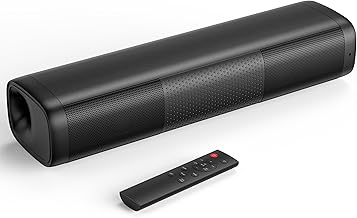
This compact Saiyin soundbar is a straightforward choice for buyers who want a single speaker unit with an optical connection. Its product name also lists Bluetooth 5.3 and auxiliary inputs, so it can serve more than one audio source. The listed 48W peak power describes the product’s stated peak output, not a guarantee of loudness in a particular room.
- Best for: Buyers who want a small soundbar for a smart TV, PC, or gaming setup.
- Why it stands out: The compact format and listed optical, Bluetooth, and auxiliary inputs offer several connection options.
- Consider: Choose another format if you specifically want separate left and right bookshelf speakers. The supplied product information does not specify included cables or detailed audio-format support.
Choose this if minimizing speaker footprint is more important than having a conventional stereo pair. Confirm that the source device has an optical output and check its audio-output settings before connecting.
Saiyin Optical Bookshelf Speakers

These Saiyin powered bookshelf speakers are a better fit than a soundbar for listeners who want left-and-right speaker placement. The product lists 30W × 2 output, 3.75-inch woofers, and optical, coaxial, auxiliary, RCA, and Bluetooth 5.3 connections. An included speaker wire connects the passive speaker to the main powered speaker.
- Best for: Buyers seeking a stereo pair for a TV, computer, or compatible turntable.
- Why it stands out: Optical and coaxial inputs support digital-source connections, while RCA and 3.5 mm inputs add wired flexibility.
- Consider: A turntable needs a Bluetooth transmitter/output for Bluetooth playback. A turntable with only PHONO output requires a preamplifier for a wired connection.
The included remote can switch among optical, coaxial, line-in, and Bluetooth modes, and buttons on the speaker provide another control option. These are powered speakers, so they do not require a separate amplifier for the listed connections. Check the TV’s output format and the speaker’s input selection when troubleshooting a silent optical connection.
RIOWOIS Optical and ARC Bookshelf Speakers

The RIOWOIS DS6701NP powered bookshelf speakers list optical, TV-ARC, AUX, and Bluetooth 5.3 inputs. That makes them a flexible option for a TV-centered setup, particularly when the buyer wants to choose between optical and ARC connections. The product information says the speakers connect to TVs, computers, turntables, and phones without an external amplifier or receiver.
- Best for: Buyers who want powered stereo speakers with both optical and TV-ARC listed.
- Why it stands out: Multiple connection types support TV use and other everyday audio sources.
- Consider: Optical and ARC cables are not included according to the product details. The speakers are not compatible with receivers or amplifiers, so avoid this model if your intended setup requires connecting them to one.
TV-ARC may be convenient when the television and speaker connection support it, while optical is a direct digital-audio alternative. Use one connection method that both devices support and consult the TV’s audio-output options if sound does not play.
PROZOR Optical-to-Analog DAC

The PROZOR is a digital-to-analog converter, not a speaker. It is relevant when a source provides digital optical audio but the speakers or amplifier accept analog RCA or 3.5 mm audio instead. The product name lists a 192 kHz capability and Toslink optical input, with RCA left/right and 3.5 mm analog outputs.
- Best for: People who already own analog speakers or audio equipment and need to connect an optical source.
- Why it stands out: It bridges an optical digital connection and the listed analog output types.
- Consider: This converter does not produce sound by itself; it must connect to separate audio equipment. Check that your source and receiving equipment use compatible connections.
Choose a converter rather than replacing working speakers if the only mismatch is digital optical output versus analog input. The product title identifies the connection types, but does not establish that every audio format or device configuration will work. Confirm the source’s output settings and the converter’s requirements before purchase.
USB-C Desktop Computer Soundbar

This computer soundbar is included as a comparison for shoppers considering desktop speakers, but it is not a match for a strict digital-optical-input requirement. Its listed connections are USB-C digital audio and Bluetooth 5.3; no optical input is specified. The product describes dual full-range drivers and a bass radiator for near-field computer listening.
- Best for: Buyers who want a USB-powered desk speaker for compatible computers and Bluetooth devices.
- Why it is included: It is a desktop soundbar alternative when the computer uses USB audio rather than optical output.
- Consider: Avoid it if your required source connection is Toslink optical. The listed USB connection supplies audio and power, and Bluetooth use still requires USB power.
The included USB-C-to-USB-A cable is described as providing digital audio and power without software or driver installation on compatible devices. The product also lists Bluetooth range up to 10 meters in open conditions. Those features do not replace an optical input, so choose an optical-equipped model or a suitable converter for a Toslink source.
Buying Guide: How to Choose Digital Optical Input Speakers
Do the speakers have an optical input or only an optical-compatible setup?
Check the exact input list. Speakers with an optical input accept a digital signal directly from a source such as a television with Toslink output. A digital-to-analog converter is different: it receives optical audio and changes it to analog output for compatible speakers or audio equipment. A product that only lists USB, Bluetooth, AUX, or RCA should not be assumed to accept optical audio.
Should you choose a soundbar or bookshelf speakers?
A soundbar uses one compact enclosure and can be easier to place below a television. A bookshelf pair separates left and right speakers, which may suit listeners who want stereo placement or multiple wired input options. Compare available space, the number of speakers, and whether the product’s listed connections match the source. The supplied Saiyin soundbar is described as compact, while the Saiyin and RIOWOIS bookshelf models are powered stereo options.
What should you check before connecting a TV?
- Confirm that the TV has an optical audio output, not merely an optical input.
- Check that the speakers or converter have the matching Toslink input.
- Select optical output in the TV’s sound settings if required.
- Check the TV’s digital audio format setting if the speakers do not play sound.
- Use a compatible cable; the RIOWOIS product details state that optical and ARC cables are not included.
Optical and TV-ARC are separate connection methods. A product listing both does not mean both are required. Choose the method supported by the TV and speakers, and check the device manuals for setup instructions.
When is a DAC converter the right choice?
A converter is useful when the source has optical digital output and the existing speakers accept analog RCA or 3.5 mm input. It is not necessary when the speakers already accept optical directly. Before choosing one, verify the converter’s input and output connectors and confirm that the source’s audio settings are appropriate for the receiving equipment.
How important are Bluetooth and other inputs?
Extra inputs can make speakers useful with more than one device. Bluetooth can support wireless playback from compatible phones or computers, while AUX, RCA, or coaxial connections support specific wired sources. These features do not substitute for optical when a direct optical link is required. For turntables, check whether the unit provides line-level output, PHONO output, or Bluetooth transmission; the Saiyin bookshelf product details note that PHONO-only turntables require a preamplifier for a wired connection.
Do powered speakers need a receiver?
The Saiyin and RIOWOIS bookshelf products are identified as powered speakers. The RIOWOIS product information specifically says no receiver or amplifier is required and warns against connecting the speakers to receivers or amplifiers. If you already use a receiver, check the speaker’s instructions and input requirements before purchasing. Do not assume that every speaker with optical capability is designed for the same system layout.
Frequently Asked Questions
What does a digital optical input do on speakers?
It accepts digital audio from a source with an optical audio output, commonly through a Toslink cable. The source and speaker must support compatible connections and audio settings.
Can I connect optical audio to speakers with RCA inputs?
Not directly. Use a digital-to-analog converter with an optical input and analog outputs, such as RCA, if those connections match your equipment.
Are powered bookshelf speakers better than a soundbar?
Neither format is universally better. A soundbar is a compact single-unit option, while bookshelf speakers provide separate left and right cabinets. Choose based on space, desired layout, and supported inputs.
Do optical speakers need a receiver?
Not necessarily. Powered speakers can use their built-in amplification, and the RIOWOIS product is specifically described as not requiring a receiver or amplifier. Confirm the requirements of the specific model.
Will a USB computer soundbar work with an optical TV output?
Not directly if it lacks an optical input. The listed USB-C computer soundbar does not specify optical connectivity, so choose an optical-input speaker or a converter that matches the equipment.