
The best digital optical sound bar depends on how you connect your equipment and what you want to improve. The Saiyin is best for a compact setup with optical input and a subwoofer output; the RIOWOIS is a wall-mountable option with optical and Bluetooth; and the detachable sound bar is suited to buyers who want several connection types. The Sony and ZVOX models are alternatives for shoppers prioritizing HDMI ARC or clearer dialogue, but their listed descriptions do not specify optical input.
| Sound bar | Best for | Connection information listed |
|---|---|---|
| Saiyin 11.7-inch Sound Bar | Small spaces and optional subwoofer expansion | Optical, Bluetooth, AUX |
| RIOWOIS 17-inch Sound Bar | Optical input and flexible placement | Optical, Bluetooth, AUX |
| Detachable Sound Bar for Smart TV | Multiple connection choices and adjustable setup | Optical, Bluetooth, ARC, AUX |
| Sony S100F | HDMI ARC and compact stereo sound | HDMI ARC, Bluetooth, USB |
| ZVOX AccuVoice AV835 | Dialogue enhancement controls | HDMI ARC |
Saiyin 11.7-Inch Sound Bar
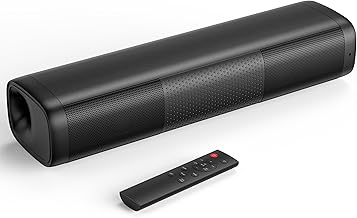
Best for: Buyers who need a compact sound bar with digital optical input and the option to add a powered subwoofer.
The Saiyin measures 11.7 by 3.5 by 2.5 inches, making it suitable for a small TV stand, desk, or shelf. Its listed connection options are Bluetooth, optical, and 3.5 mm AUX. For a TV with an optical digital audio output, the optical input offers a direct wired connection without relying on Bluetooth.
The product lists 48 watts of peak power and describes its audio as balanced, with tuned bass and treble. A dedicated subwoofer output lets users connect a powered subwoofer for additional bass. It is powered by an AC adapter.
- Choose this if: You want optical connectivity, a small footprint, or a subwoofer output.
- Why it stands out: Its listed inputs cover TV, computer, and smartphone use, while its sub out offers an upgrade path.
- Limitation: Its 11.7-inch size is compact, so check that its dimensions suit your screen and room before buying.
RIOWOIS 17-Inch Sound Bar

Best for: Buyers who want optical, AUX, and Bluetooth inputs in a compact sound bar that can sit on furniture or be wall-mounted.
The RIOWOIS model supports optical input, making it a candidate for a TV with a digital optical audio output. It also lists AUX and Bluetooth 5.3 input. The 17-inch bar is a larger option than the Saiyin, while its height of a little over 2.5 inches is designed to fit in front of many TVs or under a screen.
The product description highlights a bass reflex port and three DSP sound modes for different content, including movies, music, and news. It also says the bar is compatible with a Fire TV remote. Check the exact TV and remote setup you plan to use rather than assuming every remote function will work.
- Choose this if: Wall mounting, optical connectivity, and selectable sound modes are priorities.
- Why it stands out: It combines three stated input options with flexible placement and mode presets.
- Limitation: The supplied details do not give a power rating or dimensions for its width and depth.
Detachable Sound Bar For Smart TV

Best for: Buyers who want several ways to connect a TV, PC, gaming system, or projector and prefer a sound bar that can be detached.
The product name lists Bluetooth, ARC, optical, and AUX connections. That range can be useful when a setup includes different devices or when a TV has a digital optical output. Its 2-in-1 detachable design distinguishes it from the single-bar options in this list. The product title also identifies auto volume boost and three equalizer modes.
Those modes may help buyers select among different sound profiles, while auto volume boost is a listed feature for buyers seeking more consistent listening levels. The product description names TV, PC, gaming, and projector use, but does not provide dimensions or a power rating in the supplied information.
- Choose this if: You value connection flexibility and want the option to detach the sound bar.
- Why it stands out: Optical is listed alongside ARC, Bluetooth, and AUX, giving buyers multiple connection routes.
- Limitation: Confirm the intended configuration and available space because the provided details do not explain the detachable layout or measurements.
Sony S100F Compact Sound Bar

Best for: Shoppers who want a compact 2.0-channel sound bar with HDMI ARC, Bluetooth, and USB playback rather than a confirmed optical input.
The Sony S100F is described as a slim 2.0-channel sound bar with a bass reflex speaker and integrated tweeter. Its listed features include HDMI ARC setup, Bluetooth, USB playback, and S-Force Front Surround. The product title also highlights clear sound and use in a home office.
This model is included as a connection alternative for people comparing sound bars, but the supplied product information does not list a digital optical input. If optical is required for your TV, verify the complete input specifications before choosing it. HDMI ARC is a different connection method and requires compatible equipment.
- Choose this if: Your setup uses HDMI ARC and you want a slim 2.0-channel bar with Bluetooth and USB playback.
- Why it stands out: Its listed features include several playback and connection options beyond optical.
- Limitation: Optical input is not specified in the supplied description, so it is not the safest pick when optical is mandatory.
ZVOX AccuVoice AV835 Soundbar

Best for: Buyers prioritizing speech intelligibility and adjustable voice boost, provided HDMI ARC fits their setup.
The ZVOX AccuVoice AV835 lists 20 levels of voice boost, HDMI ARC compatibility, and dual woofers. Its description says the sound bar uses hearing-aid technology to clarify dialogue and can work with a TV remote. It is also described as a low-profile speaker for a smart TV.
Compared with the optical-equipped products above, this model is more directly positioned around dialogue adjustment. The range of voice-boost levels gives buyers control over how strongly voices are emphasized. However, the supplied product information does not list a digital optical input, so confirm connectivity before purchase if your TV only provides optical audio.
- Choose this if: You want multiple voice-boost levels and your equipment supports HDMI ARC.
- Why it stands out: Dialogue clarification is its defining listed feature, rather than a broad set of input choices.
- Limitation: Optical input is not specified in the product details provided.
Buying Guide: How To Choose A Digital Optical Sound Bar
Does the sound bar need an optical input?
Yes, if you plan to connect it to a TV using a digital optical cable. Check the TV’s audio output and the sound bar’s input list before buying. The Saiyin, RIOWOIS, and detachable sound bar descriptions specifically list optical input. The Sony S100F and ZVOX AV835 descriptions provided here do not list it. Do not assume that HDMI ARC or Bluetooth is interchangeable with optical.
Should you use optical, HDMI ARC, or Bluetooth?
Optical is a wired digital-audio option when both devices have the relevant ports. HDMI ARC is another wired TV connection, but the TV and sound bar need compatible ARC ports and settings. Bluetooth is useful for wireless playback from compatible devices, but it does not replace a wired TV connection in every setup. Select the connection that matches the ports and use you actually have.
How much space do you have?
Compare the sound bar’s height and width with the available shelf or TV stand space. The Saiyin is listed at 11.7 by 3.5 by 2.5 inches. The RIOWOIS is 17 inches wide and a little over 2.5 inches high. The supplied details do not provide complete dimensions for the other models, so check the product listing if fit is important.
Do you need dialogue controls or sound modes?
For adjustable voice emphasis, the ZVOX lists 20 voice-boost levels. For selectable sound profiles, the RIOWOIS lists three DSP modes, and the detachable model lists three equalizer modes. These are different approaches: voice boost is aimed at speech clarity, while presets or equalizer modes provide broader sound adjustments. Consider which type of control addresses your main listening need.
Could you want more bass later?
The Saiyin specifically lists a subwoofer output for connecting a powered subwoofer. The RIOWOIS description mentions a bass reflex port, but does not list a subwoofer output. If adding an external subwoofer matters, check for an explicitly stated output rather than relying on general bass-related wording.
Frequently Asked Questions
What is a digital optical sound bar?
It is a sound bar with an optical digital-audio input that can receive sound from a TV or other device with a compatible optical output. Both devices need the matching ports, and the TV may need to be set to output audio through optical.
Which listed sound bars specifically include optical input?
The Saiyin 11.7-inch Sound Bar, RIOWOIS 17-inch Sound Bar, and detachable sound bar list optical input in the supplied product details.
Can I connect an optical sound bar with Bluetooth instead?
Bluetooth can connect compatible devices wirelessly, but it is a separate connection method from optical. Use Bluetooth only if both devices support it and it meets your needs; choose optical when you want to connect through the TV’s optical output.
Is HDMI ARC the same as digital optical?
No. HDMI ARC and optical are separate connection types. Check that the TV and sound bar share the connection you intend to use. The Sony S100F and ZVOX AV835 descriptions list HDMI ARC but do not specify optical input.
Which sound bar is best for dialogue?
The ZVOX AccuVoice AV835 is the most directly focused on dialogue in this selection because it lists 20 levels of voice boost. Its supplied description does not specify optical input, so verify compatibility if optical is required.
Which option includes a subwoofer output?
The Saiyin 11.7-inch Sound Bar lists a dedicated subwoofer output for a powered subwoofer. Check the subwoofer’s connection requirements before pairing equipment.