
A digital optical-to-analog converter, also called a DAC, changes a Toslink or SPDIF optical audio signal into analog audio for RCA or 3.5 mm connections. The PROZOR aluminum-alloy converter is best for buyers who want RCA and headphone-style output options; the PROZOR model with an included 7-foot cable suits setups that need extra cable reach; and the Bluetooth-equipped PROZOR is for buyers who also want wireless audio reception. The options below differ mainly in output connections, included cable, and extra features.
| Product | Best For | Notable Detail |
|---|---|---|
| PROZOR Aluminum Alloy DAC | RCA or 3.5 mm output choice | 192 kHz listed; aluminum-alloy housing |
| PROZOR DAC With 7-Foot Cable | Setups needing a longer cable | Built-in audio amplifier chip listed |
| PROZOR RCA And 3.5 mm DAC | Flexible analog connections | RCA and 3.5 mm outputs |
| PROZOR Bluetooth DAC | Analog and Bluetooth audio options | Bluetooth 5.0 receiver and adjustable volume |
| AUTOUTLET Optical-to-RCA DAC | Direct RCA connection | 24-bit, 192 kHz listed; 7-foot cable |
PROZOR Aluminum Alloy Optical DAC

This PROZOR converter changes digital optical audio into analog RCA left/right or 3.5 mm output, according to its product name. It is listed as a 192 kHz DAC and has an aluminum-alloy housing. Its stated use cases include PS3, PS4, HD DVD, Apple TV, an amplifier, and home cinema equipment.
Best for: People who need to connect an optical audio source to either RCA stereo inputs or a 3.5 mm analog connection. The two output formats make it a flexible option when the receiving equipment’s input is not yet settled.
Why it was selected: It combines the core optical-to-analog conversion function with two named analog output choices. Choose this if you want one converter to accommodate RCA or 3.5 mm connections.
Check before buying: The listing name does not specify whether cables or a power supply are included. Confirm the package contents and your source’s supported audio output format before ordering.
PROZOR DAC With 7-Foot Cable
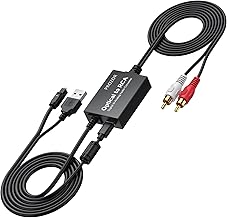
This PROZOR model converts SPDIF Toslink optical audio to RCA analog output. Its name lists a 7-foot, or 2.1-meter, cable and a built-in audio amplifier chip. The listed applications include HDTVs, amplifiers, Blu-ray and DVD players, and PS3 and PS4 consoles.
Best for: Buyers who need an optical-to-RCA connection and want a cable included in the product description. A 7-foot cable may be useful when the source and receiving device are not positioned close together.
Why it was selected: The specified cable length makes it easier to assess fit for a particular entertainment-center layout. The built-in amplifier chip is another clearly named feature, though the listing information provided does not quantify its effect on output.
Check before buying: This model is described as optical-to-RCA; the provided name does not list a 3.5 mm output. Avoid it if your receiving device requires a 3.5 mm input and you do not have a suitable connection solution.
PROZOR Optical DAC With RCA And 3.5 mm

This PROZOR DAC is described as converting digital SPDIF Toslink optical audio to analog left/right RCA and 3.5 mm output. The product name identifies a 192 kHz converter and lists use with PS3, PS4, HD DVD, Apple TV, an amplifier, and home cinema equipment.
Best for: Buyers who want both RCA stereo and 3.5 mm analog connection options from an optical source. It is a straightforward choice when output flexibility matters more than a listed long cable or Bluetooth capability.
Why it was selected: It covers the central purpose of this product category and names two common analog output styles. Choose this if you need to connect an optical source to equipment with either RCA or 3.5 mm input.
Check before buying: The provided product name does not state a cable length or package contents. Verify those details on the current listing if you need a particular cable or power accessory.
PROZOR Bluetooth Optical DAC

This PROZOR converter is listed with a 192 kHz DAC, Bluetooth 5.0 receiver, and adjustable volume. Its product name describes optical and coaxial digital inputs and analog left/right RCA and 3.5 mm outputs. It is intended to provide more connection choices than a basic optical-to-RCA converter.
Best for: Buyers who want wired digital-to-analog conversion plus a Bluetooth receiver in one device. The adjustable-volume feature may also appeal to users who want volume adjustment at the converter.
Why it was selected: It is the only product in this group whose name specifically identifies Bluetooth 5.0, coaxial input, and adjustable volume in addition to optical conversion. Choose it if those extra functions match your setup.
Check before buying: The product information provided does not explain Bluetooth pairing details, supported Bluetooth codecs, or how volume control behaves with each connection. Check the listing for those specifics if they are important to your use.
AUTOUTLET 24-Bit Optical-to-RCA DAC

The AUTOUTLET converter is described as a 24-bit, 192 kHz digital-to-analog audio converter with optical input and RCA male output. Its name also lists a 7-foot, or 2.1-meter, cable and plug-and-play operation. Stated applications include HDTVs, DVD and Blu-ray players, and game consoles.
Best for: Buyers whose analog equipment accepts RCA and who want a cable length specified in the product name. It is a practical comparison choice for people looking for a direct optical-to-stereo-RCA connection.
Why it was selected: It clearly identifies its bit-depth and sample-rate specifications, RCA output, and cable length. Choose this if those listed specifications and the direct RCA connection fit your requirements.
Check before buying: The name lists RCA male output but does not list a 3.5 mm output. Avoid it if your receiving device has only a 3.5 mm analog input unless you have confirmed an appropriate connection method.
Buying Guide: How To Choose An Optical-To-Analog Converter
What connections do your devices need?
Start by checking the audio output on the source device and the audio input on the receiving device. The source must provide a compatible digital optical signal for an optical converter. The receiving device must accept the converter’s analog output, such as RCA left/right or 3.5 mm. Match the converter’s output to the actual input available on your amplifier, speakers, or other audio equipment.
- Choose RCA output if the receiving device has separate red and white analog audio inputs.
- Choose 3.5 mm output if the receiving device uses a 3.5 mm analog input.
- Choose both output types if you want flexibility across different analog devices.
- Check for coaxial input only if you also need to connect a coaxial digital audio source.
Do not assume that a converter’s input and output are interchangeable. A product described as optical-to-RCA is designed to receive optical digital audio and provide analog RCA audio, not to turn an analog source into an optical signal.
Does the stated sample rate matter?
The products in this list are described as 192 kHz converters, and the AUTOUTLET name also states 24-bit. These figures describe listed audio specifications, but they do not guarantee that every source sends audio in a format the converter accepts. Check the source device’s audio output settings and the converter’s current product details. If the source offers selectable output formats, follow the converter manufacturer’s instructions.
How much cable length do you need?
Measure the route between the optical source and the converter, then consider the route from the converter to the receiving equipment. Two products here name a 7-foot, 2.1-meter cable. That makes their stated cable length easier to compare, but the product information provided does not confirm whether every necessary cable is included with the other models. Review package contents before purchase.
Longer cable needs are not the only placement concern. Check where the converter will sit and whether its power connection can reach an outlet. The provided product names do not give complete power-supply details for every model, so confirm those details in the listing rather than assuming accessories are included.
Should you choose Bluetooth or a basic converter?
A basic optical-to-analog DAC is a simpler match when you only need to connect a digital optical source to RCA or 3.5 mm analog equipment. The PROZOR Bluetooth model adds a Bluetooth 5.0 receiver and adjustable volume, as well as coaxial input in its product name. Those functions may be useful when you need them, but they are not necessary for every optical-to-analog setup.
Before choosing a Bluetooth model, check how it handles the specific wireless devices and controls you plan to use. The details provided here do not identify supported codecs or explain pairing behavior. If you only need a wired connection, compare output type, cable needs, and stated audio specifications instead.
What should you verify before ordering?
- Confirm that the source device has an optical Toslink output or another digital input specifically supported by the converter.
- Confirm that the receiving device accepts the converter’s RCA or 3.5 mm analog output.
- Check the source’s audio-output format and the converter’s supported formats.
- Review whether the required cables and power accessories are included.
- Measure the cable route and compare it with any stated cable length.
- Choose added Bluetooth or coaxial functions only when they serve a real setup need.
Frequently Asked Questions
What does an optical-to-analog audio converter do?
It converts digital audio received through a supported optical connection into analog audio, commonly through RCA left/right or 3.5 mm output. The analog output connects to compatible audio equipment.
Can I connect a TV’s optical output to RCA speakers?
You can use an optical-to-RCA converter when the TV provides a compatible optical digital audio output and the speakers or amplifier accept RCA analog input. Check the TV’s audio-output settings and the converter’s supported formats.
Do all these converters include a 3.5 mm output?
No. The product names for several PROZOR models specify RCA and 3.5 mm output, while the PROZOR cable model and AUTOUTLET model are described as optical-to-RCA. Verify the exact output connections before ordering.
Is a 192 kHz converter automatically compatible with every audio source?
No. A stated maximum sample rate does not establish support for every audio format or source-device setting. Check the converter’s supported formats and configure the source accordingly.
When is the Bluetooth model a better choice?
It may be a better fit when you want Bluetooth reception in addition to digital audio conversion. Its product name also identifies coaxial input and adjustable volume. For a wired optical-to-analog connection only, a simpler model may be sufficient.
What if my audio connection does not work?
Check that the optical cable is connected to the source’s output and the converter’s optical input, and confirm that the analog output reaches an input on the receiving device. Then review the source’s audio-output format and the converter’s power and setup instructions.