Best Digital Signage Player for TV: Top 5 Solutions for Businesses
The following selection focuses on reliable digital signage players that plug into TVs and deliver bright, professional content. Each option supports easy setup, remote management, and compatibility with common CMS or content formats. The list below highlights five strong choices for businesses of varying sizes, from retail and hospitality to corporate lobbies and conference spaces.
| Product | Brand | Key Strength |
|---|---|---|
| Amazon Signage Stick – Professional Digital Signage 4K Media Player | Amazon | Kiosk mode auto-launch and CMS compatibility |
| EZ AD TV Digital Signage Player, 4K | EZ-AD | Extensive content library and cloud control |
| 4K HD Digital Media Player by fnetic | fnetic | 4K playback with broad USB/SD support |
| EZ-AD TV Stick Digital Signage Player 4K | EZ-AD | PowerPoint uploads and template tools |
| Micca 4K Ultra-HD Digital Media Player | Micca | 4K compatibility and versatile USB/SD inputs |
Each option below is presented with a concise overview, a direct link to the product page, a visual, and a summary of features to help you compare capabilities quickly. All details are based on listed product specifications to support objective evaluation for business deployments.
Amazon Signage Stick: Ready For Unattended Signage

The Amazon Signage Stick is designed for professional digital signage with kiosk-style operation. It auto-launches your CMS in kiosk mode for unattended operation, ideal for displays that run continuously in stores or lobbies. Setup is straightforward through the free Amazon Signage app, enabling quick configuration across multiple sticks. This device is positioned to integrate with major CMS providers, requiring a CMS subscription for full functionality. It emphasizes ease of deployment and reliable, hands-off operation for non-technical staff.
EZ AD TV Digital Signage Player 4K Kit

EZ-AD’s digital signage player for TV offers 4K content playback with a cloud-controlled framework. It supports auto-posting content and provides access to a broad template gallery with thousands of templates. A built-in mobile app aids content management on the go, while a free plan lets you start with essential features, including support for up to 50 slides. This option suits businesses seeking scalable content creation and cloud-based control without upfront software costs.
4K HD Digital Media Player From Fnetic
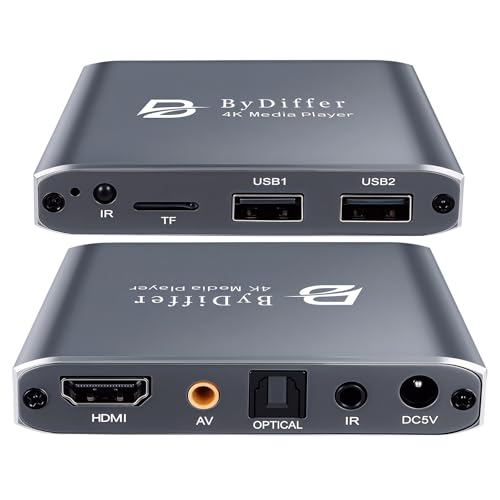
The 4K HD Digital Media Player from fnetic supports 4K playback via HDMI with H.265/HEVC decoding for efficient, high-quality video. It accepts content from USB drives or microSD cards and offers dual USB ports for multiple devices, though only one drive reads at a time. Supported file systems include FAT32, exFAT, and NTFS. Its network of outputs and compatibility with legacy AV systems makes it flexible for varied signage setups in retail or conference spaces.
EZ-AD TV Stick Digital Signage 4K

EZ-AD’s 4K TV Stick emphasizes PowerPoint upload capability and cloud-backed content management. It supports auto content updates and a large template library, with an AI image enhancer to optimize visuals. A dedicated mobile app enables on-the-go content creation and scheduling, making it suitable for education, hospitality, and retail environments requiring frequent updates and polished presentations on display screens.
Micca 4K Ultra-HD Digital Media Player

The Micca 4K Ultra-HD player brings USB and microSD-based playback to TVs with 4K HDMI output. It supports H.265/HEVC and MP4/MKV formats, with digital audio options suitable for home theaters and business displays. Dual USB and microSD inputs enable flexible media sourcing, while compatibility with FAT/FAT32, exFAT, and NTFS fosters a broad range of drive formats. It’s a compact option for small signage installations or test deployments across multiple screens.
Buying Guide: Key Considerations And Comparisons
- Resolution and video formats: Look for 4K support and HEVC decoding for high-quality playback with efficient bandwidth use. Ensure the device handles the common file formats you plan to deploy (MP4, MKV, JPG, etc.).
- Content management and CMS compatibility: If you rely on a CMS, prioritize players that offer seamless CMS integration, scheduled updates, and remote management. Check for CMS subscriptions or included templates that match your branding needs.
- Ease of setup and maintenance: Unattended or kiosk-mode operation reduces on-site IT needs. Apps for mobile management and cloud dashboards can simplify content changes across multiple displays.
- Input options and expansion: Verify USB, microSD, and network connectivity align with your media sources. Consider players with multiple USB ports if you plan to run from external drives.
- Output versatility: HDMI is standard, but consider analog AV or optical audio outputs if you’re integrating with older TVs or external audio systems.
- Content scheduling and templates: A robust set of templates and a template builder can speed up content creation. AI image enhancement helps optimize visuals automatically for unusual aspect ratios.
- Pricing model: Some players offer a free plan with limited features alongside paid upgrades. Assess long-term costs for CMS licenses, storage, and premium features.
- Security and reliability: Look for auto-recovery, stable firmware updates, and secure cloud connections to protect enterprise signage networks.