
The best digital speaker volume control depends on the audio setup: the DROK USB knob is suited to adjusting a computer’s system volume, while Logitech’s S150 speakers provide simple built-in controls. For wired home-audio zones, OSD Audio’s impedance-matching wall controls offer local adjustment for passive speakers. These options serve different purposes, so check whether you need a computer-connected digital controller or a passive control installed between an amplifier and speakers.
| Product | Best For | Control Type |
|---|---|---|
| DROK USB Volume Knob | Computer volume adjustment | USB digital controller |
| Logitech S150 USB Speakers | Basic desktop audio | Speaker-mounted volume and mute |
| OSD Audio SVC100 | Home speaker zones | In-wall passive rotary control |
| OSD Audio SVC300 | Higher-power home audio | In-wall passive rotary control |
| OSD Audio VMS100 | Wall-mounted slider control | In-wall passive slider |
DROK USB Volume Knob

Best for: People who want a separate physical control for a computer’s system volume. The DROK connects by USB and is listed as plug-and-play with Windows 7, 8, and 10, as well as Mac. Its rotary knob adjusts system volume, and its one-click mute button provides a quick way to silence audio.
The controller has a metal housing, a rotary mechanism, and a detachable 1.5-meter USB Type-C cable. Its weighted base and non-slip pads are designed to keep it in place on a desk. These features make it a practical choice when keyboard shortcuts or software controls are less convenient.
Choose this if your goal is direct computer volume adjustment rather than controlling a passive speaker circuit. The listed compatibility does not name every operating system, so check your computer’s requirements if it uses a different system. The product information also does not specify whether the control operates independently of particular audio applications.
Logitech S150 USB Speakers
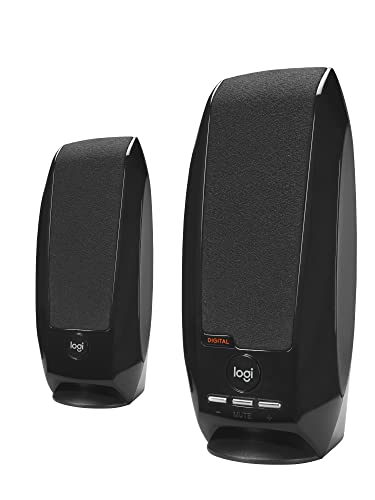
Best for: Desktop listeners who want speakers and convenient volume controls in one setup. The S150 speakers connect to a computer using USB-A, and the right speaker has front-mounted volume and mute controls. An orange LED indicates when the speakers are on; disconnecting the USB-A cable powers them off.
Logitech lists 2 watts peak and 1.2 watts RMS output. This is a compact computer-speaker option, not a separate control for a home theater receiver or a multiroom passive-speaker system. It makes the comparison list because it offers straightforward digital audio connectivity and accessible physical controls.
Choose this if you need a basic USB speaker setup with volume and mute buttons close at hand. Avoid it if you need a standalone knob for speakers you already own, or a wall control for separate home-audio zones. Its listed connection is USB-A, so the computer needs a compatible port or an appropriate connection solution.
OSD Audio SVC100 Rotary Control
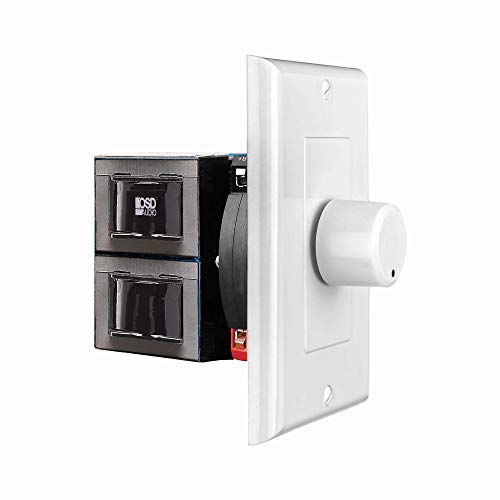
Best for: Home-audio users who need a wall-mounted rotary control for a pair of passive speakers. OSD Audio rates the SVC100 at 100 watts per channel and describes it as an impedance-matching control. Adjustable front-mounted jumpers are listed for adding up to eight pairs of 8-ohm speakers simultaneously.
The control lets a speaker pair’s volume be adjusted independently of other locations in a house-audio system. Its impedance protection is intended to help stabilize the load returning to the amplifier or receiver when speakers are connected in parallel. This makes it a better fit for distributed speaker setups than a USB computer knob.
Choose this if you want local, in-wall adjustment and need impedance matching for a compatible multi-speaker arrangement. It is a passive speaker-level controller, not a digital USB control for computer audio. Confirm the speaker configuration and amplifier requirements before installation; the listed features do not describe a digital display or remote operation.
OSD Audio SVC300 Rotary Control

Best for: Buyers considering an in-wall volume control for a higher-power home speaker setup. The SVC300 is rated at 300 watts per channel, higher than the SVC100’s listed 100 watts per channel. It has a rotary knob and adjustable impedance jumpers, with support listed for up to eight pairs of 8-ohm speakers.
Like the SVC100, this model is designed to adjust a pair of speakers independently in a house-audio system. Its impedance-matching feature is intended to help stabilize the load on the amplifier or receiver when speakers are connected in parallel. The product information also notes minimal bass roll-off.
Choose this over a lower-rated wall control when the listed 300-watt-per-channel capacity better matches your system requirements. Do not choose it as a computer USB volume knob: it is an in-wall passive speaker control. Check the system’s power and speaker arrangement rather than assuming that a higher rating alone guarantees compatibility.
OSD Audio VMS100 Slider Control
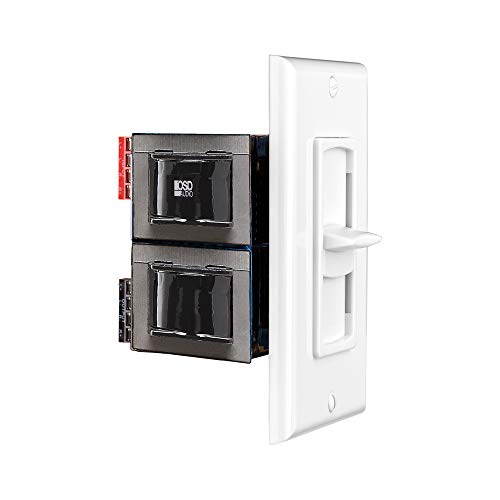
Best for: Buyers who prefer a wall-mounted slider rather than a rotary knob. The VMS100 is rated at 100 watts peak and is designed for adjusting volume in a speaker zone. OSD Audio lists adjustable jumpers for adding up to eight pairs of 8-ohm speakers and impedance protection for parallel connections.
The company describes the control as suitable for dedicated audio zones and whole-house sound systems, including locations such as dining rooms, porches, and saunas. It is listed as maintaining the full hi-fi audio frequency with minimal bass roll-off. This model is useful when the control style matters as much as the basic in-wall function.
Choose the VMS100 if a slider is easier to operate in your installation than a rotary knob. It is still a passive in-wall speaker controller, not a digital computer accessory. The listed rating is 100 watts peak, so compare the amplifier’s output and speaker configuration carefully before selecting it.
Buying Guide: Choosing a Speaker Volume Control
Do you need a digital control or an in-wall speaker control?
Start by identifying where the control belongs in the audio chain. A USB controller such as the DROK changes a computer’s system volume. A compact speaker set such as the Logitech S150 has its own physical controls. An impedance-matching wall control, such as the OSD Audio models, adjusts a passive speaker zone in a home-audio system.
These categories are not interchangeable. A USB knob should not be treated as a speaker-level control for passive speakers, and an in-wall impedance-matching unit should not be expected to operate as a computer interface. Match the product type to the source, amplifier, and speakers you plan to use.
How many speakers will the control serve?
For a single computer listening setup, a USB knob or speakers with built-in controls may be the simplest fit. For a home with speakers in different locations, a wall-mounted zone control can provide local adjustment. The OSD SVC100 and VMS100 list support for up to eight pairs of 8-ohm speakers through adjustable jumpers, and the SVC300 lists the same capacity.
That stated capacity does not remove the need to check the wiring plan and amplifier load. Review the manufacturer’s instructions and ensure the selected impedance settings suit the actual speaker arrangement. If you are unsure how parallel connections affect your amplifier, seek qualified installation advice.
How should you compare power ratings?
Compare the control’s stated power rating with the requirements of the audio system. The SVC100 and VMS100 are listed at 100 watts per channel or 100 watts peak, respectively; the SVC300 is listed at 300 watts per channel. The rating language differs, so do not assume the figures are directly equivalent without checking the product documentation.
A higher listed rating may be relevant for a higher-power system, but it does not by itself establish compatibility. Consider amplifier output, speaker impedance, wiring, and the number of speaker pairs. Choose based on the complete setup, not just the largest number on a product description.
Which control style is easiest for daily use?
A rotary knob provides a familiar turning motion, while a slider lets users move a control along a track. The DROK’s desktop knob is designed for computer system volume, and its mute button adds a quick silence option. The Logitech S150 places volume and mute controls on the right speaker.
For an in-wall installation, choose the control style that suits the room and the people who will use it. Consider whether users need a quick mute button, a visible slider position, or a rotary adjustment. Product placement and access can matter as much as the control mechanism.
What should you check before buying?
- Connection type: Confirm whether the product uses USB or connects to passive speaker wiring.
- Operating system: For a computer controller, verify listed compatibility. The DROK names Windows 7, 8, and 10 and Mac.
- Speaker configuration: Check the number of speaker pairs, their impedance, and the amplifier’s requirements.
- Power rating: Compare the product’s stated rating with the intended audio system.
- Installation location: Determine whether you need a desktop accessory, speaker-mounted controls, or an in-wall control.
- Control preference: Choose between a rotary knob, slider, or built-in speaker buttons based on how users will adjust volume.
Frequently Asked Questions
What is a digital speaker volume control?
It is a control that adjusts audio volume through a digital connection or a digital audio system. In this selection, the DROK USB knob adjusts a computer’s system volume. In-wall impedance-matching controls are different: they are passive controls for speaker wiring.
Can I use a USB volume knob with passive home speakers?
A USB volume knob such as the DROK is listed for adjusting a Windows or Mac computer’s system volume. It is not listed as a speaker-level controller for passive home speakers. Use a control designed for the specific amplifier and speaker setup.
What does impedance matching do in a wall volume control?
Impedance matching helps manage the electrical load presented to an amplifier when multiple speaker pairs are connected. The listed OSD wall controls use adjustable jumpers and describe impedance protection for parallel speaker connections. The correct setting depends on the actual system configuration.
Is a rotary control better than a slider?
Neither control style is universally better. A rotary knob adjusts by turning, while a slider moves along a track. Choose based on user preference, installation needs, and whether the product’s power and speaker specifications fit the system.
Which option is best for a simple computer setup?
The DROK USB knob is best suited to adding a separate computer volume control, while the Logitech S150 is suited to buyers who also need USB-connected desktop speakers. The right choice depends on whether you already have speakers or want a speaker set with controls built in.