
Best DJ Light Controller Software and Hardware for Seamless Shows
Answering the question “which DJ light controller software or setup should I choose?” this guide highlights five solid options that work well for different needs—live gigs, home studios, and club setups. Best for beginners: American DJ myDMX 5 Express and SoundSwitch Control One, which pair easy software with plug-and-play hardware. Best for small venues or portable setups: Hercules and CO-Z units. Best for full DMX troubleshooting and advanced scenes: JCYW FLODY and the Wiwreenm model. Below, you’ll find quick product comparisons, who each option is best for, and practical buying tips.
| Product | Best For | Key Benefit |
|---|---|---|
| American DJ myDMX 5 Express DMX Lighting Control Software | Home studios & small venues | 256 (upgradable) channels; macOS/Windows compatibility |
| SoundSwitch Control One DMX Lighting Controller | DJs needing quick shows | 1:1 with SoundSwitch Software; 2 DMX universes; USB for Engine DJ |
| CO-Z 192 DMX 512 Stage Light Controller | Versatile stage shows | 192 groups; 240 scenes; multi-fixture control |
| JCYW FLODY 192 DMX Controller for DJ Lights | Complex light shows | 240 programmable scenes; sound-activated mode |
| 192 DMX Controller Use for Editing Program of Stage Lighting (Wiwreenm) | DIY DMX setups | 192 channels; 240 scenes; beginner-friendly |
American DJ MyDMX 5 Express DMX Software

The American DJ myDMX 5 Express provides DMX lighting control software for PC and Mac with USB-C connectivity. It supports up to 256 channels, upgradeable to 512, and includes 99 scenes for quick programming. This option is best for home studios and small venues seeking a reliable software interface with flexible channel counts. A potential limitation is the need for compatible hardware to run the software in some setups.
SoundSwitch Control One DMX Lighting Controller

The SoundSwitch Control One combines DMX hardware with the SoundSwitch software for automated light shows. It offers 2 DMX universes, a Thru option for install, and dual-USB for smooth DJ transitions. It’s ideal for DJs using Engine DJ devices and wanting plug-and-play operation without a computer during performances. A limitation is the need for ongoing software subscriptions after the trial period.
CO-Z 192 DMX 512 Stage Light Controller

CO-Z’s 192 DMX 512 controller supports up to 12 fixtures with 16 channels each and up to 240 scenes. It includes front-facing controls and a seven-section layout that’s beginner-friendly. Best for users seeking a balance of ease-of-use and expansive scene creation for club nights or parties. Caution: some users may prefer a dedicated software interface for advanced scripting.
JCYW FLODY 192 DMX Controller for DJ Lights

The JCYW FLODY DMX controller supports up to 12 fixtures with 16 channels each and stores up to 240 programmable scenes. It features a built-in microphone for dynamic sound-activated mode, making it well-suited for live DJ gigs, clubs, weddings, and church services. Strong suit: direct control over multiple fixtures with straightforward operation. Limitation: hardware-focused control may require additional software for complex scripting.
Wiwreenm 192 DMX Controller For Stage Lighting
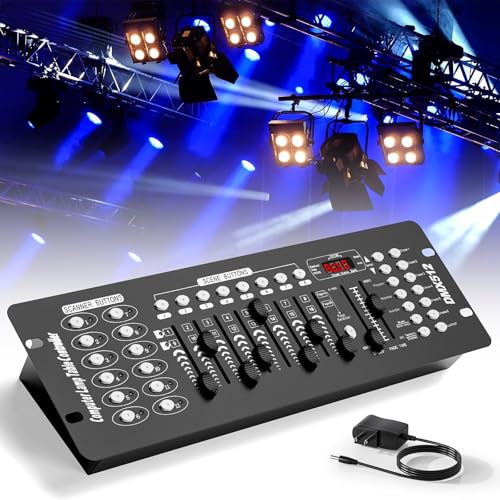
This Wiwreenm DMX controller uses 192 channels across 12 scanners with 16 channels each and supports up to 240 programmable scenes. It’s described as beginner-friendly with seven sectional controls, including LED display and speed/time sliders. Choose this if you want a standalone DMX console with broad scene capacity and straightforward operation. Caution: user experience may vary with more complex show scripting.
Buying Guide
What to consider when choosing DJ light controller software
- Channel capacity: Match the number of channels to your fixtures. More channels provide flexibility for future upgrades.
- Software compatibility: Ensure the software works with your computer OS and hardware interface. USB-C or USB-DMX interfaces are common.
- Ease of use: For beginners, hardware with a straightforward layout and presets can reduce setup time.
- Automation and scenes: Look for the ability to save scenes, chases, and presets to speed up live performances.
- Sound-reactive features: Built-in mic or beat-synced modes help sync lighting to music without additional gear.
- Upgrade and maintenance: Some options include trial periods or subscriptions; consider long-term costs.
- Portability and footprint: For mobile DJs, compact controllers with reliable power requirements are advantageous.
Recommended setups by use-case
- Home studio or small party: American DJ myDMX 5 Express or SoundSwitch Control One offer easy software integration and solid channel support.
- Portable DJ setup: CO-Z or JCYW FLODY provide robust standalone DMX control with convenient interfaces for quick gigs.
- Advanced shows or clubs: A multi-unit approach with JCYW FLODY and Wiwreenm can deliver complex scenes across many fixtures.
How to maximize buying value
- Check for included software trials or subscriptions to forecast ongoing costs.
- Verify compatibility with your existing DJ hardware to avoid integration issues at events.
- Consider future-proofing by choosing a controller or software with room for additional fixtures and scenes.
FAQ
- What is DMX in lighting control? DMX is a digital protocol used to control lighting fixtures and effects from a central controller or software.
- Do I need a computer to run DMX software? Many DMX software options run on PC or Mac, but some hardware controllers operate standalone with built-in interfaces.
- Can I sync lights to music without a professional lighting tech? Yes, several controllers offer built-in sound-activated modes to sync to the beat.
- What should I consider when upgrading channel counts? Plan for current fixtures and future expansions; more channels prevent needing a replacement soon.
- Are there subscription costs after a trial? Some products include a trial period with ongoing subscription or license fees thereafter.
- Is portability important for mobile DJs? Yes. Look for compact hardware, USB-powered interfaces, and simple cabling to minimize setup time.