
Best Music Keyboard for Mac: Top 5 Picks for Macs and Apple Devices
Looking for a music keyboard that pairs seamlessly with a Mac? This guide highlights five top options, spanning MIDI controllers, backlit command keyboards, and Apple’s own typing accessories. Each pick is evaluated for Mac compatibility, ease of use, and how it helps different buyers—from beginners to professionals. The top performers include compact MIDI controllers for songwriting, backlit keyboards designed for Pro Tools workflows, and Apple’s sleek, efficient options for everyday Mac tasks.
Quick comparison table of chosen products:
- Akai Professional LPK25 25-Key USB MIDI Keyboard Controller — Best for portable music creation on Mac.
- KB Covers Pro Tools Backlit Aluminum Keyboard — Best for Pro Tools users on macOS.
- KB Covers Dorico Backlit Aluminum Keyboard — Best for Dorico notation users on Mac.
- Alesis Melody 32 Mini Piano Keyboard — Best for beginners and portable practice on Mac.
- Apple Magic Keyboard with Numeric Keypad — Best for general Mac productivity and music workflow.
Akai Professional LPK25 25-Key USB MIDI Keyboard Controller

Best for mobile music creation on a Mac. The Akai LPK25 features 25 mini keys with responsive playability for expressive melodies and bass lines. It supports full-range performance with octave controls and a sustain button to enhance performances in software instruments. This model includes an arpeggiator and clock for creative control when using Mac-based DAWs or software synths. It is ideal for songwriters, students, and traveling musicians who need a compact device that travels well with Macs.
Who it’s best for: Your go-to compact MIDI controller when you need portability without sacrificing key range. Choose this if you want a lightweight device that plugs in via USB and works immediately with popular Mac DAWs.
Caution: With only 25 keys, it’s not ideal for players needing full-size keys or extended ranges for complex performances.
KB Covers Pro Tools Backlit Aluminum Keyboard – macOS

Best for Pro Tools workflows on Mac. This backlit aluminum keyboard is optimized for macOS and Pro Tools, featuring 150+ color-coded shortcut keys that align with common editing, mixing, and recording tasks. The durable aluminum build offers stability for long editing sessions, and the backlight improves visibility in dim studio environments. It helps professionals and serious hobbyists speed up tasks and stay organized while working with Mac-based audio projects.
Who it’s best for: Audio engineers and music producers who rely on Pro Tools on Mac and want streamlined shortcuts. Choose this if you want a dedicated editing-friendly keyboard to reduce navigation time.
Caution: It focuses on Pro Tools shortcuts; users who rely on other DAWs may need to adapt to the color-coded layout.
KB Covers Dorico Backlit Aluminum Keyboard – macOS
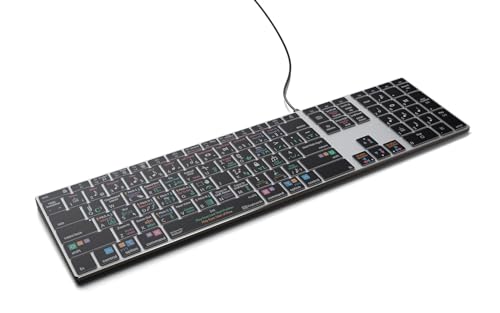
Best for Dorico notation users on Mac. This backlit keyboard provides a dedicated layout to simplify input of notes, dynamics, and articulations, reducing the need to navigate menus. The aluminum construction ensures durability for frequent use, and the backlit keys support late-night creativity. It’s a strong fit for composers and notation-focused workflows on Mac systems.
Who it’s best for: Dorico users and composers who prioritize efficient notation entry. Choose this if you want a hardware layout tailored to Dorico’s features and a reliable build for long sessions.
Caution: It’s specialized for Dorico; users mainly using other notation or DAW software may find the layout less advantageous.
Alesis Melody 32 Mini Piano Keyboard

Best for beginners seeking a portable practice piano on a Mac. The Melody 32 offers 32 mini keys, USB power, built-in speakers, and 300 built-in voices beyond piano sounds. It includes 40 demo songs and an accompaniment mode with 300 rhythms. A dedicated recording feature supports simple capture of practice sessions, making it suitable for learners, students, and home studios on Mac setups.
Who it’s best for: New players and casual learners who want an affordable, all-in-one mini keyboard with built-in sounds. Choose this if you prefer a self-contained instrument that can run on USB power and doesn’t rely on a separate computer instrument setup.
Caution: Built-in speakers may not satisfy critical listening; consider using headphones or external speakers for detailed practice.
Apple Magic Keyboard with Numeric Keypad

Best for Mac productivity and daily music workflow integration. The Magic Keyboard with Numeric Keypad provides wireless Bluetooth connectivity and a rechargeable battery for ongoing use without disposable batteries. The extended layout includes full-size arrow keys and a numeric keypad, which can streamline data entry, scripting, and music software navigation on Macs and iPads. The typing experience is well-regarded for general use and music-related tasks on Mac.
Who it’s best for: Mac users who want a reliable, low-profile keyboard with a numeric keypad for productivity and music software navigation. Choose this if you value seamless Mac integration and cordless convenience.
Caution: This is primarily a typing keyboard, not a MIDI controller; use it in conjunction with a dedicated music interface if needed for instrument control.
Buying Guide: Key Considerations For Mac Music Setups
- Purpose and use-case: Are you composing, editing audio, or practicing keyboard skills? Pick a device that aligns with your primary activity.
- Key count and feel: Do you need full-size keys or a compact layout? Consider comfort for long sessions and the range you require.
- Platform compatibility: Ensure the device is compatible with macOS and your preferred DAW or notation software (Logic Pro, GarageBand, Pro Tools, Dorico, etc.).
- Connectivity: USB vs Bluetooth; power requirements; portability needs; whether a device can operate without external power.
- Specialized features: Arpeggiators, transpose controls, backlit keys, and dedicated shortcut mappings can speed up workflows in Mac-based software.
- Durability and build quality: Aluminum backlit keyboards offer longevity for studio use; plastic bodies may be lighter but less robust.
- Notational workflows: If you work with notation, a Dorico-specific or Pro Tools-optimized keyboard can reduce menu navigation.
Frequently Asked Questions
- What is the best Mac keyboard for music production?
It depends on your use case: a compact MIDI controller is ideal for on-the-go songwriting, while a backlit Pro Tools keyboard suits studio editing on Mac.
- Do I need a special keyboard for Dorico on Mac?
Not strictly necessary, but a dedicated Dorico backlit keyboard can speed up notation entry and reduce navigation.
- Can I use any keyboard with Logic Pro on Mac?
Yes, as long as the keyboard is compatible with macOS. MIDI controllers connect via USB; dedicated keyboards can work via USB or Bluetooth depending on the model.
- Is a backlit keyboard worth it for studio use?
Backlit keys improve visibility in dim rooms and can enhance accuracy during late-night sessions.
- Should I buy Apple’s Magic Keyboard for music work?
It’s a great general-purpose keyboard for Mac, but for instrument control or editing shortcuts, you may prefer a device tailored for music software.
- How many keys do I need on a MIDI controller for Mac?
Even 25 keys can be sufficient for basic melodies and bass lines; larger layouts (49–61 keys) suit more comprehensive keyboard parts.