
For in-car DVD playback, a portable DVD player with its own screen is the clearest choice; for listening to music CDs through a car stereo, a USB CD player may be more suitable. The products below include both types, but their listings do not confirm support for the specialized DVD-Audio disc format. The MEGATEK is best for a larger screen and longer listed battery life, while the SQQBZZ offers car charging and USB or SD support. Check your vehicle’s inputs and the disc format you intend to play before choosing.
| Product | Best suited for | Key listed detail |
|---|---|---|
| MEGATEK Portable DVD Player | Travelers who want a built-in screen | 10.5-inch screen; up to six hours of playtime |
| SQQBZZ Portable DVD Player | Car use with flexible charging | Car charger; supports CD/DVD, USB, and SD card |
| Jupiter USB CD Player | Cars with a compatible USB stereo | USB plug-and-play design; WAV-compatible stereo required |
| Portable Universal CD Player | Buyers considering USB or AUX connections | USB and AUX ports listed in the name |
| USB CD Player with Bluetooth | Buyers seeking a portable CD player with Bluetooth | Bluetooth support stated in the product name |
MEGATEK Portable DVD Player
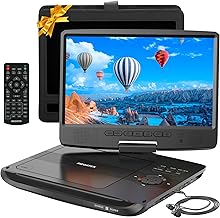
Best for: Travelers who want to watch DVDs on a built-in screen without relying on a car display. The 10.5-inch LCD has a listed 1024 × 600 resolution, and the screen swivels 270 degrees and flips 180 degrees for different viewing positions.
The listing states that its rechargeable battery provides up to six hours of playback. It supports DVD±R/RW, VCD, audio CDs, MP3 CDs, and JPEG discs, among other formats. It is described as region-free, which may help buyers with DVDs from different regions.
Why it was selected: It is the most clearly specified standalone DVD option in this group, with screen dimensions, resolution, battery duration, and disc formats stated. It can also play audio CDs, making it useful for both video and basic disc-based music listening.
Limitation: The listing explicitly says it does not support Blu-ray. It does not confirm DVD-Audio disc support, so do not assume it will play that specialized audio format.
SQQBZZ Portable DVD Player

Best for: Car passengers who want a portable player with several charging options. The product information lists a car charger and an AC charger, and says the player can be used while charging. It also lists up to five hours of video playback on battery.
The 9.5-inch screen is specified at 800 × 480 resolution and swivels 270 degrees and flips 180 degrees. Supported media listed include CD, DVD, CD-R/RW, DVD-R/+R, DVD+RW/-RW, VCD, and SVCD. The player also supports USB and SD card media and is described as region-free.
Why it was selected: The stated car charger and use-while-charging option make it a practical candidate for longer road trips when an outlet is not available. Its listed disc and external-media support gives buyers more than one playback route.
Limitation: The listing says it does not support Blu-ray. Its screen resolution is lower than the MEGATEK’s stated resolution, and DVD-Audio compatibility is not specified.
Jupiter USB CD Player

Best for: Drivers who want to play music CDs through a car stereo with a USB port. The described connection process is to plug the player into the vehicle’s USB port, insert a CD, and select the USB drive on the stereo. The listing says tracks appear on the stereo for selection.
The product includes a USB extension cable for flexible placement and a USB-A-to-USB-C adapter. It is described as compatible with Android and non-Android car stereos that can play WAV music files. The listing also mentions anti-skip playback and resume memory.
Why it was selected: Among the products here, it gives the clearest explanation of how an external disc player connects to a car stereo. It is a better fit than a standalone-screen DVD player when the main goal is listening to CDs through the vehicle’s existing audio system.
Limitation: The car stereo must have a USB port and support WAV playback, according to the listing. This is a CD player, not a stated DVD-video player, and DVD-Audio support is not listed.
Portable Universal CD Player

Best for: Buyers comparing an external CD player that advertises USB and AUX ports. Its product name also identifies use with vehicles, computers, televisions, and some Android navigation systems. This broader stated use may suit someone who wants to consider the device for more than one setup.
Why it was selected: It is a relevant option for drivers looking beyond an installed dashboard disc player. The listed title specifically calls out USB and AUX connections, so it may be worth comparing with a USB-only CD player when connection options matter.
Limitation: The supplied product information does not include detailed features, supported disc formats, setup instructions, or vehicle-specific compatibility. Confirm the connection method and your stereo’s requirements before purchase. Despite appearing in a search for DVD audio, the product name identifies it as a CD player, not a DVD player.
USB CD Player With Bluetooth

Best for: Buyers who want to compare a portable CD player whose title specifically mentions Bluetooth support. The name also describes it as a USB CD player for car audio, which may appeal to drivers considering a wireless connection as part of their setup.
Why it was selected: It is the only listed product whose name pairs car audio, a USB CD player, and Bluetooth. That combination makes it a relevant candidate for shoppers exploring alternatives to an installed disc drive.
Limitation: No detailed feature list was provided. The exact Bluetooth function, connection steps, supported disc types, power needs, and compatibility with a particular vehicle are not confirmed. The product name does not establish DVD-video or DVD-Audio playback.
Buying Guide: How to Choose In-Car DVD or Disc Audio
Do you want to watch DVDs or listen to CDs?
Start by identifying the media and experience you need. A portable DVD player with a built-in screen is intended for viewing video discs on its own display. An external USB CD player is aimed at playing audio CDs through a compatible car stereo. A product described as a CD player should not be treated as a DVD player unless its specifications explicitly say it plays DVDs.
Also distinguish DVD video from DVD-Audio. DVD-Audio is a specific disc format for high-quality audio; a listing that says “DVD” or “audio CD” does not automatically confirm that format. None of the supplied product details expressly confirms DVD-Audio support. Ask the seller or check the manual for the exact format before buying if DVD-Audio discs are your priority.
Does your car stereo support an external USB player?
USB connections do not guarantee that every car stereo can control or play every external disc device. The Jupiter listing, for example, says the stereo must support WAV files and have a USB port. Check your stereo manual for supported file formats and external-device behavior. If your vehicle has no compatible USB input, a USB-connected player may not meet your needs.
For a player advertised with AUX, Bluetooth, or other connections, verify what those connections actually do. Product names alone do not establish whether a connection sends audio to the car stereo, controls playback, or requires additional equipment.
Would a standalone screen be more convenient?
A portable DVD player with its own screen can play video without depending on a dashboard display. Compare screen size, resolution, swivel range, and power options. The MEGATEK listing specifies a 10.5-inch screen and up to six hours of battery life. The SQQBZZ listing specifies a 9.5-inch screen, up to five hours, and a car charger.
For long drives, consider whether the player can be used while charging and whether its listed charging options suit your trip. Screen angle and placement matter too: choose a position that passengers can see without obstructing the driver’s view.
Which disc formats and regions matter?
Check the exact disc types you own, such as DVD-R, DVD+RW, CD-R, or audio CDs, against the player’s supported-format list. “Region-free” describes region handling for certain DVDs, but it does not mean that every disc format is supported. The MEGATEK and SQQBZZ feature lists name several DVD and CD formats but exclude Blu-ray.
What should you confirm before ordering?
- Whether you need DVD video, standard audio CD playback, or DVD-Audio support.
- Whether the product plays the exact disc format you own.
- Whether your car stereo has a suitable USB or AUX input and supports the required media or files.
- Whether the player has its own screen, battery, or car charger if you need independent playback.
- How the device is powered and whether the cable placement will work in your vehicle.
- Whether the product listing or manual confirms compatibility with your specific vehicle setup.
Frequently Asked Questions
Can I play DVD-Audio discs with these products?
The supplied product details do not confirm DVD-Audio support for any of the five products. Verify the exact disc format with the product seller or manual before buying.
Can a portable DVD player play music CDs in a car?
The MEGATEK listing says it supports audio CDs. The SQQBZZ listing also names CD formats. Both have screens, but their listings do not specify a connection to a vehicle stereo for audio output.
Will a USB CD player work with any car?
No. A compatible USB port and support for the required playback format may be necessary. The Jupiter listing specifically calls for a car stereo that supports WAV files.
Is a DVD player the same as a DVD-Audio player?
Not necessarily. DVD-video playback and DVD-Audio playback are distinct capabilities. Look for explicit DVD-Audio support rather than assuming that a device described as a DVD player can play DVD-Audio discs.
Which option is better for watching movies on a road trip?
A portable DVD player with a built-in screen is the more direct choice for passengers who want to watch discs. The MEGATEK has a larger listed screen and longer listed battery life than the SQQBZZ, while the SQQBZZ lists a car charger and use while charging.