
The best earphone headset with a microphone depends on how you connect and where you use it. The Logitech H390 is best for USB-A computer calls, while the Logitech H111 suits devices with a 3.5 mm audio jack. For a compact on-ear fit, consider the Amazon Basics headset; for wireless conversations, the Yealink BH71 Pro is the standout option. The JIAMQISHI USB headset offers USB and 3.5 mm connection options.
| Headset | Best for | Connection or standout feature |
|---|---|---|
| Logitech H390 | Computer calls and meetings | USB-A, inline controls |
| Amazon Basics On Ear | Compact, foldable use | 3.5 mm or USB-A options |
| Logitech H111 | Devices with an audio jack | 3.5 mm plug, reversible mic |
| Yealink BH71 Pro | Wireless calls across devices | Bluetooth and USB dongle |
| JIAMQISHI USB Headset | Calls, classes, and home office | USB and 3.5 mm options |
Logitech H390 Wired USB Headset

The Logitech H390 is best for people who regularly join calls or meetings from a computer with a USB-A port. Its wired connection avoids the need to charge a wireless headset, and the listed features focus on voice calls as well as music and other audio.
- Sound: Fine-tuned drivers provide digital stereo sound for calls, meetings, music, and more.
- Microphone: The rotating noise-canceling boom is designed to minimize unwanted background noise. It can be moved out of the way when not in use.
- Controls: Inline controls on the cable let users adjust volume or mute calls.
Choose this model if USB-A connectivity and accessible mute and volume controls are priorities. It is a practical choice for a desk setup where the headset can remain connected. Avoid it if you need wireless listening or your device lacks a compatible USB-A port; the provided product details identify USB-A as its connection.
Amazon Basics Foldable On-Ear Headset
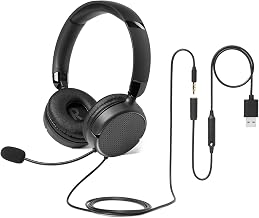
This Amazon Basics headset is best for buyers looking for a compact, foldable wired model for calls, online learning, or meetings. Its listed size and fit are intended for small to medium head sizes, making fit an important point to check before choosing it.
- Connection: The product name describes a 3.5 mm port or inline control with a USB-A port. Check the connection arrangement against your device before ordering.
- Microphone: Its adjustable, flexible boom can be positioned at different angles. The unidirectional microphone is intended to reduce background noise when directed correctly.
- Portability: The headset folds, and the listed dimensions are 6.1 inches wide by 7.2 inches high, with 2.8-inch ear cups.
Choose this headset if foldability and a compact on-ear design matter. The listed fit information says it may initially feel snug and recommends taking breaks during extended use. Avoid it if you need a loose fit or prefer headphones that do not rest on the ears.
Logitech H111 Stereo Headset

The Logitech H111 is best for buyers who want a straightforward wired headset with a 3.5 mm audio jack. It is a useful alternative to USB models when the device has a compatible audio connection and the user wants stereo sound for more than voice calls.
- Audio: The listed features include full stereo sound for music, movies, and games.
- Microphone: Its noise-canceling microphone is designed to reduce room noise during internet calls.
- Positioning: The boom microphone rotates and can be worn on either the left or right side.
Choose the H111 if a 3.5 mm jack is the connection you need and you value a microphone that can be repositioned. It offers fewer listed convenience features than the H390, which has inline volume and mute controls. Avoid it if your device requires USB-A or if you specifically need wireless connectivity.
Yealink BH71 Pro Bluetooth Headset

The Yealink BH71 Pro is best for buyers who want a wireless, single-ear headset for calls on a computer and mobile device. It can connect to a PC or laptop through the included BT51 Bluetooth dongle adapter, or pair with a mobile device over Bluetooth 5.3. The product details state that it can connect to two devices simultaneously.
- Call features: Four beamforming noise-canceling microphones are listed for reducing background noise during conversations.
- Talk time: The stated talk time is up to 10 hours per charge, with a listed charging time of 1.5 hours.
- Charging: A magnetic charging cable is included; the headset docks magnetically for charging.
- Range: The listed wireless distance is up to 130 feet or 40 meters.
Choose this model if you need a wireless earpiece and want to switch between a computer and mobile device. The limitation is that it is a single-ear headset, not a stereo over-ear design. Its advertised connection range and talk time are product specifications, so actual use may vary by setup and conditions.
JIAMQISHI USB And 3.5 Mm Headset

This JIAMQISHI on-ear headset is best for people who want a wired headset described as offering both USB and 3.5 mm connections. Its listed uses include home-office calls, online classes, and conferencing. The feature information also describes an adjustable headband and a boom microphone that can be positioned on either side.
- Microphone: The 270-degree unidirectional boom is described as focusing on the speaker’s voice and limiting background noise.
- Fit: The listed features include an adjustable headband and soft, breathable protein memory foam earpads.
- Audio: A 40 mm audio driver and built-in audio sound card are identified in the product information.
Choose this model if you want an adjustable on-ear fit and the flexibility of USB and 3.5 mm connection options. Before purchase, confirm that the connection configuration suits your device. The listed features make comfort a selling point, but fit remains personal; avoid it if you prefer a wireless headset or an in-ear earpiece.
Buying Guide: How To Choose An Earphone Headset With A Microphone
Which connection does your device need?
Start by checking the ports and connection options on the computer, phone, or other device you plan to use. A USB-A headset such as the Logitech H390 is intended for a compatible USB-A connection. The Logitech H111 uses a 3.5 mm audio jack. The Amazon Basics and JIAMQISHI listings describe more than one connection option, so check the exact configuration and device requirements before choosing.
A wireless headset can reduce cable clutter, but it introduces charging and pairing considerations. The Yealink BH71 Pro offers Bluetooth 5.3 for mobile pairing and a USB Bluetooth dongle for a PC or laptop. Confirm that your intended devices support the connection method you plan to use.
Do you need stereo headphones or a single-ear earpiece?
Stereo headsets use both sides for listening and may suit meetings, classes, music, and general computer audio. The Logitech H390, Logitech H111, Amazon Basics, and JIAMQISHI products are described as on-ear or stereo-style headsets. The Yealink BH71 Pro is a single-ear Bluetooth earpiece, which may be preferable when you want to keep one ear open. Choose based on whether listening to both audio channels or maintaining awareness of surrounding sound matters more.
What microphone features help with calls?
Look for the microphone style and controls that match your environment. A noise-canceling or unidirectional microphone is intended to reduce some unwanted sound, but positioning still matters. The Amazon Basics listing specifically notes that its unidirectional microphone should face the speaker correctly. A rotating or adjustable boom, found on several of these products, helps place the microphone near the mouth or move it aside when not needed.
Inline mute and volume controls can be useful during frequent calls. The H390 lists both controls on its cable. The other products may offer different controls or connection arrangements, so check their detailed listing if a particular control is essential.
How important are comfort and portability?
For long sessions, consider whether you prefer an on-ear headset, an adjustable headband, or a lightweight single-ear earpiece. The Amazon Basics model is described as compact and foldable, but its listed fit may feel snug at first and is intended for small to medium head sizes. The JIAMQISHI listing highlights an adjustable headband and soft earpads. Because fit is personal, prioritize the stated size and design rather than assuming one headset will suit every wearer.
If you carry a headset between locations, folding construction or a wireless design may be useful. A wired headset does not need charging, while a Bluetooth model needs regular power management. Weigh portability against the convenience of staying connected without a cable.
What should you compare before buying?
- Device compatibility: Match the connector or wireless method to your computer, phone, or tablet.
- Call environment: Consider microphone direction, noise-reduction features, and whether you need a mute control.
- Listening style: Pick stereo headphones for two-ear listening or a single-ear headset if that design fits your needs.
- Use duration: Review the fit description and consider breaks during extended wear.
- Mobility: Choose between a cable, foldable design, or Bluetooth connection based on how and where you work.
Frequently Asked Questions
What is the best headset for computer calls?
The Logitech H390 is a strong option for computer calls when the device has a USB-A port. It includes a rotating noise-canceling microphone and inline volume and mute controls.
Which headset in this list uses a 3.5 mm audio jack?
The Logitech H111 is listed with a 3.5 mm audio jack. The Amazon Basics and JIAMQISHI listings also describe 3.5 mm connection options, but buyers should verify the exact connection arrangement.
Which option is wireless?
The Yealink BH71 Pro is the wireless Bluetooth option in this list. Its product details describe Bluetooth 5.3 pairing and a USB Bluetooth dongle for a PC or laptop.
Can I use a headset microphone for online classes?
Yes. The Amazon Basics and JIAMQISHI product details identify online learning or classes as intended uses. A headset microphone can keep the mic positioned near the speaker, but connection compatibility should be checked first.
Are noise-canceling headset microphones completely silent in the background?
No. Noise-canceling and unidirectional microphone features are designed to reduce unwanted sound, not guarantee that all background noise disappears. Microphone placement and the surrounding environment can affect call clarity.
Should I choose USB or Bluetooth for a headset?
Choose USB when you want a wired connection and your device has the required port. Choose Bluetooth when wireless movement matters and your device supports pairing. Wired models do not require headset charging, while wireless models need power management.