
The best game surround sound system depends on where you play and how you want to hear in-game audio. A multi-speaker soundbar such as the ULTIMEA Poseidon D70 is best for a living-room setup with rear speakers, while the Edifier G2000 Pro is better suited to a desktop gaming station. The options below range from virtual surround speakers to systems with a dedicated subwoofer, so you can compare room coverage, connection types, and setup needs before choosing.
| System | Best for | Standout detail |
|---|---|---|
| ULTIMEA Poseidon D70 | Living-room surround sound | Four wired surround speakers and a wireless subwoofer |
| ULTIMEA Aura A40 | TV gaming with rear speakers | 7.1-channel virtual surround system |
| ULTIMEA Poseidon D50 | Gaming and movies in a medium-size setup | 5.1 soundbar with two wired rear speakers |
| Edifier G2000 Pro | PC and console desk setups | Virtual 7.1 sound and Bluetooth, USB-C, and AUX inputs |
| Saiyin Sound Bar | Flexible TV or PC audio on a budget-conscious setup | Subwoofer, adjustable bass, and three equalizer modes |
ULTIMEA Poseidon D70 7.1 Soundbar

Best for: Players who want a broad living-room sound field with separate surround speakers. The Poseidon D70 combines a soundbar, four wired surround speakers, and a wireless subwoofer in a 7.1-channel virtual surround setup.
Its four surround speakers can be placed in front and rear positions to expand the sound field around the room. That layout is useful for games with directional effects, such as footsteps, environmental cues, or action happening outside the center of the screen. The wireless subwoofer adds low-frequency impact without requiring an audio cable back to the soundbar.
Why it stands out: It offers more surround speaker components than the other listed soundbar systems, making it a strong choice when room coverage is the priority. The system also lists HDMI ARC and Bluetooth connectivity, plus app control.
Keep in mind: The four surround speakers are wired, so placement requires routing speaker cables. The wireless subwoofer still needs a power outlet and its included power cable.
ULTIMEA Aura A40 7.1 Soundbar

Best for: TV gamers who want a 7.1-channel virtual surround soundbar package with a subwoofer and four surround speakers. The product name identifies a 330-watt peak power rating and app control.
The Aura A40 is a reasonable option to compare against the Poseidon D70 if you want a similar multi-speaker arrangement. Its title lists optical, AUX, and Bluetooth connections, which may be useful when choosing between a TV-centered setup and other audio sources. The product is described as a virtual surround system for TV.
Why it was selected: It matches the search for game surround sound with four surround speakers and a subwoofer, while its listed input types offer alternatives to HDMI ARC. It may suit a player whose TV or audio setup favors optical, AUX, or Bluetooth connections.
Keep in mind: Detailed feature information was not provided for this listing. Confirm the included components, cable lengths, and supported connections on the product page before purchase. The title lists four surround speakers, but does not specify their cable arrangement.
ULTIMEA Poseidon D50 5.1 Soundbar

Best for: Players who want two rear speakers and a subwoofer without moving up to a four-surround-speaker package. This 5.1 system includes a soundbar, two wired rear speakers, and a wireless subwoofer.
The listing says SurroundX Technology upgrades 2.0 PCM to 5.1 surround sound. It also identifies aerospace-grade speaker magnets and BASSMX Technology in the subwoofer. These listed features are intended to support spatial effects and stronger low-frequency impact during games, movies, and other entertainment.
Why it stands out: A 19.6-foot cable is listed for flexible placement of the rear speakers. That can help when the seating position is away from the TV and the rear speakers need to be positioned behind or beside the player. The system also includes app control and adjustable surround speakers and subwoofer, according to the product name.
Keep in mind: The rear speakers are wired, so the included cable length and room layout should be considered before buying. Choose this over a desktop speaker set if you want a TV-oriented system with separate rear speakers.
Edifier G2000 Pro 2.0 Gaming Speakers

Best for: PC and console players who need a compact speaker setup for a desk. The G2000 Pro is a 2.0 speaker system with 64 watts peak power and virtual 7.1 surround sound listed in its product name.
Unlike the room-oriented soundbars above, this product is designed as a pair of gaming speakers. Its listed connection options are Bluetooth 5.4, USB-C, and AUX, making it a useful candidate for a desk where different devices may be connected. The title also lists 270-degree TempoFlow light sync for players who want RGB lighting as part of their setup.
Why it was selected: It directly targets gaming and offers virtual surround processing in a speaker format suited to near-field listening. Choose it if your priority is desk audio and multiple connection types rather than separate speakers placed around a living room.
Keep in mind: It is a 2.0 system, not a package with separate rear speakers or a dedicated subwoofer. Virtual 7.1 processing should not be confused with a physical 7.1 speaker layout.
Saiyin Soundbar With Subwoofer
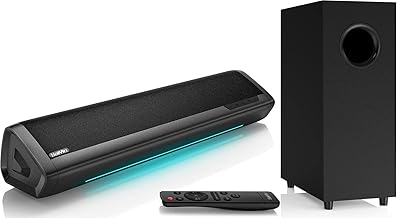
Best for: Players who want a TV or PC soundbar with a separate subwoofer and straightforward sound adjustments. The listing specifies a 5-inch subwoofer with dual bass reflex ports, plus optical, AUX, and Bluetooth 5.3 inputs.
The product includes three equalizer modes for different content, such as news, movies, and music. It also has adjustable bass and a volume indicator. The three-color LED identifies the selected connection mode: purple for optical, blue for Bluetooth, and green for AUX. These controls can make it easier to check the current input and adjust sound without relying on a full surround-speaker arrangement.
Why it was selected: It offers a dedicated subwoofer and multiple common inputs for a mixed TV and PC setup. It can be a better fit than rear-speaker systems when simplicity and bass adjustment matter more than physical surround placement.
Keep in mind: The listed features do not specify separate rear surround speakers or a multi-channel layout. The included remote is not compatible with universal or TV remotes, according to the product details.
Buying Guide: How To Choose A Game Surround Sound System
Do you need physical surround speakers or virtual surround?
Physical rear speakers can place sound sources around a room, but they need suitable positions and may involve cables. The Poseidon D70 and Aura A40 list four surround speakers, while the Poseidon D50 lists two wired rear speakers. These configurations may suit players who sit in a fixed position and have room to place speakers behind or beside them.
Virtual surround systems process audio to create a wider or more spatial effect from fewer physical speaker locations. The Edifier G2000 Pro lists virtual 7.1 surround while remaining a 2.0 speaker set. This can suit a desktop arrangement, but it is not the same as placing individual speakers around the room. Compare the actual speaker layout, not only the channel number in a product name.
Is a soundbar or desktop speaker set a better fit?
A soundbar system is usually the more natural category to compare for TV gaming and shared living-room use. It sits near the display and may include a subwoofer or rear speakers. A desktop speaker pair is designed for closer listening at a computer station and takes less room than a full rear-speaker layout.
For console gaming at a desk, check that the system’s listed inputs match the devices you plan to connect. The G2000 Pro lists USB-C, AUX, and Bluetooth. Soundbars in this selection list different combinations, including HDMI ARC, optical, AUX, and Bluetooth. Do not assume a connection is supported unless the product listing names it.
How important is the subwoofer?
A subwoofer reproduces lower-frequency sound effects, which can add weight to explosions, engines, and other game audio. The Poseidon D70, Aura A40, Poseidon D50, and Saiyin system list a subwoofer. Check whether it connects wirelessly for audio and whether it still requires a power cable; the D70 listing specifically says its subwoofer needs to be plugged into an outlet.
Players in apartments or shared homes may prefer adjustable bass so they can tailor low-frequency output to the room and household. The Saiyin listing specifically identifies adjustable bass. The D50 listing describes BASSMX Technology, but the available details do not provide a specific adjustment range.
What should you check before buying?
- Room layout: Measure the distance between the display, seating position, and likely rear-speaker locations.
- Cable routing: Wired surround speakers need cables routed to their intended positions. Check the listed cable length and whether it suits your room.
- Inputs: Match the system’s named connections to the TV, PC, or console setup. The products listed here vary in their available inputs.
- Power access: Wireless audio does not necessarily mean a component is battery-powered. Confirm where the subwoofer and speakers need outlets.
- Control method: Compare app control, physical indicators, equalizer modes, and included remotes if you expect to change settings often.
- Physical versus virtual channels: A virtual channel description does not establish that a system has a matching number of separate speakers.
Which system is better for a small room?
For a small gaming desk, a 2.0 speaker set such as the Edifier G2000 Pro may be easier to place than a soundbar package with several wired surround speakers. For a small TV room, a soundbar with a subwoofer can reduce the number of components compared with a rear-speaker system. Check actual dimensions and placement requirements on the product listing, since those details were not provided for every product here.
Which system is better for directional game audio?
A system with rear speakers provides physical speaker locations behind or beside the player, which may support a more room-filling presentation when positioned correctly. The D70 and A40 list four surround speakers, and the D50 lists two rear speakers. For desk gaming, virtual surround processing may be more practical, but the listening position and device audio settings can affect the result.
Frequently Asked Questions
What is the difference between 5.1 and 7.1 surround sound?
These labels describe channel configurations or surround processing, but they do not by themselves tell you how many separate speakers are included. Check the product’s component list. In this selection, the Poseidon D50 lists two wired rear speakers, while the D70 lists four surround speakers.
Can a 2.0 speaker system provide 7.1 surround sound?
A 2.0 system can use virtual processing marketed as 7.1 surround, as the Edifier G2000 Pro listing specifies. It still has two physical speakers, so it does not create the same physical speaker arrangement as a multi-speaker surround system.
Are wireless subwoofers completely cable-free?
Not necessarily. A wireless subwoofer may receive audio wirelessly but still need a power connection. The Poseidon D70 listing explicitly says the subwoofer needs an outlet and the included power cable.
Are wired rear speakers difficult to install?
They require placement and cable routing between the speakers and the system. Before buying, consider the distance to the seating area, pathways around the room, and any listed cable length. The Poseidon D50 listing includes a 19.6-foot cable for flexible rear-speaker placement.
Which system should PC gamers consider?
The Edifier G2000 Pro is the clearest desktop-oriented option in this list. Its product name identifies it as gaming speakers and lists USB-C, AUX, and Bluetooth 5.4 inputs. Confirm that those connections fit your computer or other devices before choosing it.
Does HDMI ARC matter for gaming audio?
HDMI ARC can be useful when connecting compatible audio equipment to a TV, but the connection must match the devices in your setup. The Poseidon D70 listing names HDMI ARC; do not assume another system in this comparison includes it unless its product details say so.