
The best GPS setup for a car radio depends on whether you want navigation built into a separate device or displayed through a compatible stereo. The 7-inch GPS navigators are better suited to drivers who want a dedicated screen, while the double-DIN stereo is a candidate for buyers seeking CarPlay or Android Auto access to phone-based navigation. Compare the options below by map details, routing needs, and installation preferences.
| Product | Best suited for | Navigation approach |
|---|---|---|
| 7-inch GPS Navigator with 2026 Maps and Truck Routing | Drivers needing vehicle-specific routing | Dedicated GPS device |
| 7-inch GPS Navigator with North America Maps | Drivers seeking voice alerts and multiple travel modes | Dedicated GPS device |
| Wireless Double-DIN Car Stereo | Drivers who want smartphone navigation on a stereo screen | CarPlay or Android Auto |
| Garmin Drive 53 | Drivers comparing a named standalone GPS model | Dedicated GPS device |
| 7-inch GPS Navigator for Car, Truck, and RV | Drivers considering a dedicated navigation screen for different vehicles | Dedicated GPS device |
7-Inch GPS Navigator With Truck Routing

This dedicated GPS navigator is best for drivers who want a separate navigation screen and need routing options for more than a standard passenger car. Its listed title specifies 2026 lifetime maps, free updates, voice turn-by-turn guidance, speed-camera and red-light alerts, and custom truck routing for seven vehicles.
Choose this option if you prefer a standalone unit rather than relying on navigation displayed through a car-radio interface. The title’s reference to routing for seven vehicles may appeal to households or drivers who use several vehicle profiles, but the available product information does not explain how those profiles are configured.
- Best for: Drivers seeking a dedicated GPS with truck-routing features.
- Why it stands out: The listed features combine voice guidance, alerts, map updates, and vehicle-specific routing.
- Limitation: The supplied details do not specify map coverage, screen mounting method, or the exact routing restrictions.
Before choosing it for commercial or large-vehicle use, confirm that its vehicle settings and map coverage match the routes you plan to drive. A truck-routing label alone does not establish that every road restriction or vehicle dimension is supported.
7-Inch GPS Navigator With North America Maps

This 7-inch standalone navigator is best for drivers who want pre-installed North America maps and voice alerts. The product information says it includes 2026 North America maps and supports free lifetime updates. It also lists turn-by-turn voice guidance and alerts for speed limits and school zones.
Its travel modes include car, truck, bus, RV, bicycle, and pedestrian. In truck and RV modes, the listed routing feature is designed to avoid low bridges, weight-restricted roads, and narrow lanes. These options make it a better fit for buyers who need more than a basic car route, though drivers should still verify route suitability before relying on it for a vehicle with specific dimensions.
- Best for: Drivers who want multiple travel modes and North America maps on a dedicated device.
- Why it stands out: The listed features identify map coverage, update availability, voice guidance, and several alert types.
- Limitation: Europe and other regional maps are not described as pre-installed; the listing says to contact the seller to download other regions.
Choose this model if the stated map region and alert functions match your needs. Avoid assuming that it provides the same software experience as a car radio with phone projection: it is presented as a separate GPS navigator.
Wireless Double-DIN Car Stereo With CarPlay
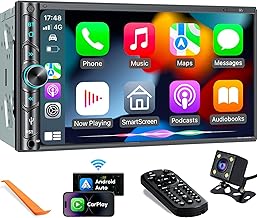
This double-DIN stereo is best for buyers who want a touchscreen car-radio upgrade with CarPlay and Android Auto. Those features can provide a way to use compatible smartphone navigation through the stereo interface. The product name also lists Bluetooth, a 7-inch HD capacitive touchscreen, four-channel RCA outputs, two subwoofer ports, and a backup camera.
Unlike the standalone GPS units in this list, the supplied product information does not say that this stereo includes built-in GPS software or pre-installed maps. Its navigation value is therefore tied to using CarPlay or Android Auto rather than treating it as an independent navigator.
- Best for: Drivers who want a car-radio screen for phone-connected features and navigation.
- Why it stands out: It combines the listed smartphone interfaces with audio connections and a touchscreen.
- Limitation: The listing details supplied here do not establish whether navigation works without a connected phone or describe vehicle-specific installation requirements.
Choose this option if your priority is integrating a phone with a stereo. Check the stereo’s full listing and your vehicle’s installation requirements before purchase, and confirm that your phone and preferred navigation app work with the connection method you plan to use.
Garmin Drive 53 GPS Navigator

The Garmin Drive 53 is best for shoppers comparing a named standalone GPS model with car-radio-based navigation. The supplied product information identifies it as a GPS navigator, but does not provide details about its map coverage, screen size, alert functions, update policy, or routing modes. Those specifications should be checked in the current product listing before comparing it with models that state those details.
A separate navigator can be a practical choice for someone who wants a dedicated navigation device rather than a new stereo. However, this product’s name alone is not enough to establish which navigation features are included or whether they meet a particular trip or vehicle requirement.
- Best for: Buyers seeking a standalone GPS from a specifically named model line.
- Why it is included: It offers a clear comparison point against the listed 7-inch GPS units and the smartphone-connected stereo.
- Limitation: The information supplied for this article does not specify the maps, updates, or alerts included.
Choose this model only after confirming the exact specifications that matter to you, such as map region and update terms. If those details are essential, compare the complete listing rather than relying on the product name alone.
7-Inch GPS Navigator for Car, Truck, and RV

This 7-inch GPS navigator is best for buyers considering a dedicated navigation screen for a car, truck, or RV. Its product name lists 2026 maps and touchscreen operation. The available details do not state the map region, whether updates are free, or which vehicle-specific routing controls are included.
It is a better fit for shoppers who want to compare a standalone device against a stereo that uses phone-based navigation. The title’s reference to truck and RV use signals the intended audience, but does not explain whether the device can route around low bridges, weight limits, or other restrictions.
- Best for: Drivers looking for a touchscreen GPS marketed for cars, trucks, and RVs.
- Why it is included: It offers a dedicated-device alternative with a stated 7-inch screen and 2026 maps.
- Limitation: The supplied information does not confirm map coverage, update terms, or detailed truck and RV routing features.
Before choosing it for a large vehicle, verify the exact routing settings and map details in the listing. If avoiding road restrictions is important, select a product whose supplied specifications clearly describe those capabilities.
Buying Guide: How to Choose GPS Software for a Car Radio
Do you want built-in GPS or navigation from your phone?
Start by deciding where the navigation software should run. A standalone GPS navigator provides a separate device and screen. A compatible stereo with CarPlay or Android Auto can display phone-based navigation through the car-radio interface. The wireless double-DIN model listed above advertises those smartphone interfaces, while its supplied details do not identify built-in maps.
Do not treat a touchscreen as proof that a stereo includes GPS software. Check whether the product says it has built-in navigation, supports phone projection, or requires a connected phone. These are different approaches and may affect how you use navigation on each trip.
Which map coverage do you need?
Match map coverage to the places where you drive. One listed navigator specifies pre-installed 2026 North America maps and says other regional maps may be obtained by contacting the seller. Other products in this selection do not provide enough supplied information to confirm their map regions.
Check whether maps are pre-installed, whether updates are available, and whether the stated update terms apply to the regions you need. “Lifetime updates” is useful only when the coverage and update process fit your travel plans.
Do you need truck or RV routing?
Drivers of trucks and RVs should look beyond ordinary turn-by-turn directions. Road height, weight, and lane restrictions can matter for larger vehicles. The North America navigator explicitly lists avoiding low bridges, weight-restricted roads, and narrow lanes in truck and RV modes. Other product titles mention truck or RV use, but their supplied details do not confirm the same specific restrictions.
Check whether a navigator lets you enter vehicle details or choose a vehicle mode. Confirm that the listed routing functions apply to your vehicle type, and use appropriate judgment because a device’s route guidance is not a substitute for checking road signs and current conditions.
What alerts and guidance are useful?
Voice instructions can help drivers follow routes without continually looking at a screen. Some listed models specify voice turn-by-turn guidance, while the North America navigator also lists speed-limit and school-zone alerts. The first product title lists speed-camera and red-light alerts. These are product-specific claims; do not assume every GPS or stereo provides them.
Compare the alert types you actually want, and verify how they are described in the full listing. Keep attention on driving and follow local laws when interacting with any navigation device.
Will a new stereo fit your vehicle?
A double-DIN stereo is a car-radio replacement, not simply a portable GPS device. Before buying, check the vehicle’s dashboard opening, wiring needs, and any installation requirements using reliable vehicle-specific information. The product details supplied here do not confirm compatibility with particular makes or models.
A standalone navigator avoids replacing the radio, but it still needs a suitable location in the cabin. Compare the screen format, mounting approach, power needs, and visibility using the full product listing. Do not assume these details from screen size alone.
How should you compare update and connectivity needs?
For standalone navigation, verify whether the maps are included and how updates are obtained. For a phone-connected stereo, check the connection method and confirm that your phone supports the advertised interface. The stereo’s product name lists wireless CarPlay and Android Auto, but the supplied details do not establish which phones or software versions are supported.
Choose the setup that matches how you plan to navigate. A dedicated device may suit drivers who want a separate navigator, while a connected stereo may suit drivers who want phone-based navigation on the car-radio screen. Compare specific features rather than assuming one category is universally better.
Frequently Asked Questions
Can a car radio have GPS software?
Yes. Some car stereos provide built-in navigation, while others display navigation from a connected smartphone through systems such as CarPlay or Android Auto. Check the product specifications to identify which approach a stereo uses.
Is a standalone GPS the same as GPS software for a car radio?
No. A standalone GPS is a separate navigation device. GPS software for a car radio runs through the stereo itself or appears on its screen from a connected phone.
Does a CarPlay or Android Auto stereo include maps?
Not necessarily. These interfaces can display compatible phone-based navigation, but they do not by themselves confirm that the stereo has built-in maps. Check the listing for explicit built-in navigation details.
What should truck and RV drivers check before buying?
Check for vehicle modes and routing around restrictions such as low bridges, weight limits, and narrow roads. Confirm which restrictions are specifically listed for the model and do not assume that every device marketed for trucks or RVs supports them.
What does lifetime map updating mean?
It refers to an update benefit stated for a particular product, but the available regions and update process can vary. Confirm the seller’s current terms and whether the maps cover the areas where you drive.