
The best computer speakers depend on your desk space, preferred connection, and need for bass. Logitech Z207 speakers suit buyers who want Bluetooth and a 3.5mm cable in a compact stereo setup. Klipsch ProMedia 2.1 is the choice for shoppers seeking a THX-certified system with a subwoofer, while Logitech Z407 adds wireless control and multiple inputs. The OHAYO and Bluedee models offer other stereo and subwoofer configurations to compare.
| Speaker | Best For | Key Listed Features |
|---|---|---|
| Logitech Z207 | Flexible device connections | Bluetooth, 3.5mm cable, Easy-Switch |
| OHAYO 60W | Bluetooth 5.3 stereo | 60W, Bluetooth 5.3, 2.0 pair |
| Klipsch ProMedia 2.1 | Subwoofer-based desktop audio | 2.1 system, THX certification |
| Bluedee 2.1 | Multiple connection options | Subwoofer, Bluetooth 5.4, USB, USB-C, AUX |
| Logitech Z407 | Wireless control and inputs | Subwoofer, wireless control, USB and multiple inputs |
How To Choose Computer Speakers
Start with the role speakers will play in your setup. For video calls and everyday computer audio, a straightforward stereo pair may be sufficient. For music, films, or games where you want a dedicated subwoofer, compare the 2.1 options. If you regularly switch among a computer, phone, or another audio source, check the listed connection methods and switching controls.
Product descriptions do not provide the same level of detail for every model. The OHAYO listing information supplied here identifies its power rating, Bluetooth version, and stereo format, but does not specify other features. Compare only the details that are stated, and check the current product listing for dimensions, included cables, and setup instructions before buying.
Logitech Z207 Bluetooth Stereo Speakers

The Logitech Z207 is a 2.0 stereo speaker set with Bluetooth and a 3.5mm cable connection. Its Easy-Switch feature lets users switch between audio devices by pausing audio on one device and starting playback on the other. Each speaker has one active, full-range driver and one passive radiator for bass extension.
Best for: People who want a stereo pair that can connect to a computer by cable and also connect to other devices over Bluetooth. The switching feature is useful for households or desks where audio sources change during the day.
Why it stands out: The combination of wired and wireless connections provides more flexibility than a speaker description that lists only one connection type.
Limitation: This is a 2.0 system, so the listed configuration does not include a separate subwoofer. Choose another model if a dedicated subwoofer is a priority.
OHAYO 60W Bluetooth 5.3 Stereo Speakers
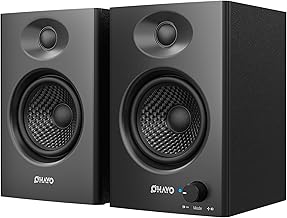
The OHAYO model is identified as a black, 60W, Bluetooth 5.3 stereo 2.0 speaker pair. That makes it a candidate for buyers comparing a wireless stereo setup without a separately listed subwoofer. The supplied product information does not specify additional inputs, controls, driver design, or included accessories.
Best for: Shoppers who want to compare a Bluetooth 5.3 stereo pair and consider the stated 60W rating when narrowing their options.
Why it was selected: Its stated format and wireless connection make it relevant to people looking for desktop speakers rather than headphones or a single portable speaker.
Limitation: Available feature details are limited. Before choosing it, verify the connection options you need and check the product listing for placement dimensions and setup requirements.
Klipsch ProMedia 2.1 THX Speaker System

The Klipsch ProMedia is a 2.1 computer speaker system with THX certification. A 2.1 setup includes stereo speakers and a separate subwoofer, so it is a relevant option for listeners specifically seeking that configuration. The supplied information does not state its inputs, controls, dimensions, or power rating.
Best for: Buyers who want a recognized 2.1 format and place importance on the listed THX certification when comparing desktop audio systems.
Why it was selected: It offers a clear alternative to compact 2.0 pairs for shoppers who want a separate subwoofer in their computer-speaker setup.
Limitation: A system with a subwoofer needs more placement consideration than a two-speaker-only setup. Confirm the available desk or floor space and check the current listing for connection details before purchase.
Bluedee 2.1 Speakers With Subwoofer

The Bluedee speaker system is described as a 2.1 setup with a subwoofer, 80W peak power, and DSP-tuned sound. Its listed connection options include Bluetooth 5.4, USB, USB-C, and AUX. The product description also identifies adapter power and RGB desktop speakers.
Best for: Buyers who want a subwoofer system and several stated connection choices. USB-C, USB, AUX, and Bluetooth provide different ways to connect devices, depending on the source and setup.
Why it was selected: Its broad listed input selection makes it a useful comparison for people who connect more than one type of device or prefer having wired and wireless options.
Limitation: The 80W figure is specified as peak power. Do not treat it as a continuous output rating; compare power specifications carefully across product listings.
Logitech Z407 Speakers With Subwoofer

The Logitech Z407 is described as a Bluetooth computer speaker system with a subwoofer and wireless control. Its product name also calls out immersive sound, multiple inputs, and USB speakers. These features make it a comparison option for users who want more than a basic stereo pair and value wireless control.
Best for: People seeking a subwoofer system with wireless control and multiple inputs. It may suit a desk where users want to adjust or manage audio without relying only on controls built into the speakers.
Why it was selected: It combines Bluetooth, a subwoofer, USB, and multiple inputs in the stated product description, covering several common desktop-speaker priorities.
Limitation: The supplied details do not identify every input type or explain the wireless control’s operation. Check the listing to confirm it supports your intended devices and preferred controls.
Buying Guide: What Should You Compare?
Do You Need 2.0 Speakers Or A 2.1 System?
A 2.0 system has two speakers and no separately listed subwoofer. It is often the simpler format to consider when desk space and straightforward placement matter. The Logitech Z207 and OHAYO pair are identified as stereo 2.0 options.
A 2.1 system adds a separate subwoofer to the stereo speakers. The Klipsch ProMedia, Bluedee, and Logitech Z407 are listed as subwoofer systems. Before choosing one, decide where the subwoofer can sit and whether your desk or room has space for the additional component.
Which Connections Do You Need?
Check the inputs against the devices you plan to use. The Z207 lists Bluetooth and a 3.5mm cable. Bluedee lists Bluetooth 5.4, USB, USB-C, and AUX. Z407 is described as offering Bluetooth, USB, and multiple inputs, although the supplied information does not name every input. The OHAYO description specifies Bluetooth 5.3 but does not give other connection details.
Do not assume that two speakers with Bluetooth support offer the same switching or pairing functions. The Z207 specifically lists Easy-Switch for moving between audio devices. For other models, confirm how connections work in their full product descriptions.
How Much Should You Rely On Wattage?
Use power figures as one comparison point, not a complete measure of sound quality or loudness. The OHAYO name states 60W, while the Bluedee description says 80W peak power. Peak and other power ratings may describe different measurements, so avoid comparing them as though they are identical specifications.
What Should You Check Before Ordering?
- Desk and room space: Consider speaker placement and whether a separate subwoofer will fit.
- Connection needs: Match the listed inputs to your computer and other audio sources.
- Controls: Look for details about volume adjustment, wireless control, and switching between devices.
- Included items: Confirm whether the cables, adapters, or other accessories you need are included.
- Full specifications: Check dimensions and setup instructions, especially when the supplied feature information is limited.
Frequently Asked Questions
Are 2.0 or 2.1 computer speakers better?
Neither format is best for every buyer. A 2.0 pair has no separate subwoofer, while a 2.1 system includes one. Choose based on your sound preferences and available space.
Which speakers here offer Bluetooth?
The Logitech Z207, OHAYO 60W, Bluedee 2.1, and Logitech Z407 list Bluetooth. Bluedee specifies Bluetooth 5.4, and OHAYO specifies Bluetooth 5.3.
Which option has the most connection types listed?
Bluedee lists Bluetooth 5.4, USB, USB-C, and AUX. Logitech Z207 lists Bluetooth and a 3.5mm cable connection.
Which computer speakers include a subwoofer?
The Klipsch ProMedia 2.1, Bluedee 2.1, and Logitech Z407 are described as systems with a subwoofer.
What should I check if I need to connect multiple devices?
Confirm the connection types for each device and check whether the speakers provide a device-switching feature. Logitech Z207 specifically lists Easy-Switch; other models may have different controls or connection behavior.