
If you want music playback from stored files, the ZAQE Android music player is the closest portable option in this selection, while the JLZNLC media player is better for playing music from a connected storage device through a TV. Neither product listing confirms that it contains a built-in hard disk, so check the storage details carefully if you specifically need an internal drive. The Onkyo models play CDs, and the Laurensory drive reads or burns discs rather than functioning as a standalone music player.
| Product | Best suited for | Storage or playback approach |
|---|---|---|
| ZAQE Android Music Player | Portable listening and streaming | 80GB listed storage; supports expansion up to 1TB |
| JLZNLC 4K Media Player | Music playback through a TV | Supports HDDs, USB, and SD cards |
| Onkyo DXC390 6 Disc CD Changer | Home CD collections | Plays audio and MP3 CDs |
| Onkyo DX-C390-B CD Changer | Multi-disc listening at home | Plays audio and MP3 CDs |
| Laurensory External CD/DVD Drive | Reading or ripping discs with a computer | Connects to a computer by USB |
ZAQE Android Music Player

Best for: Listeners who want a portable player for locally stored music as well as Wi-Fi streaming. The listing specifies 80GB of storage and support for expansion up to 1TB, making this the closest match here for someone seeking a storage-focused portable music player. It does not identify that storage as a hard disk, so buyers who require a traditional internal HDD should verify the storage type before choosing it.
The player supports Bluetooth 5.0, dual-band Wi-Fi, Spotify, Amazon Music, and Audible downloads. Its listed audio formats include FLAC, WAV, APE, AAC, and MP3. A 4-inch touchscreen handles music controls and 1080p video playback. The stated battery life is up to 35 hours for music or up to 10 hours for video, with USB-C charging.
- Choose this if portability, wireless listening, and expandable storage matter.
- It is better suited to personal listening than to a home stereo setup.
- Limitation: The listing does not specify an internal hard disk, and streamed services require Wi-Fi access.
JLZNLC 4K Media Player And HDD Enclosure

Best for: People who want to play music files from storage through a television or display. Unlike a standalone portable player, this device is described as a media player and HDD enclosure, with support for HDDs, USB, and SD cards. It can play MP3, WAV, FLAC, and APE files, along with supported video and photo formats.
The device is designed for straightforward playback and digital signage. Listed functions include automatic start, loop playback, and resuming from the last stopping point. It supports HDMI and analog AV output, and the listing describes video output up to 4096 × 2304 at 30 frames per second. These features make it more appropriate for a fixed home or business display than for carrying music on the go.
- Choose this if you already have, or plan to use, compatible external storage and want playback on a TV.
- It is better for shared-room playback and signage than for headphones-first portable listening.
- Limitation: The listing says it supports HDDs but does not specify a hard drive included with the player.
Onkyo DXC390 6 Disc CD Changer
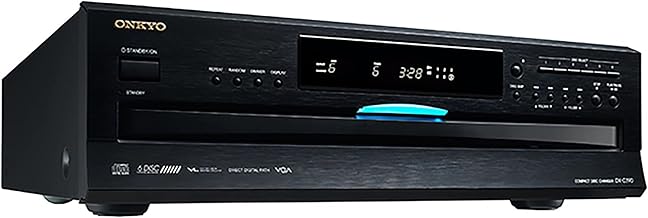
Best for: Home listeners who keep music on CDs and want to load several discs at once. This is a CD changer, not a hard-disk music player: it plays audio CDs, MP3-encoded CDs, and CD-R/RW discs. Its six-disc capacity lets five discs remain in the changer while another plays, according to the supplied product details.
The listing specifies a 192 kHz/24-bit audio DAC, a digital filter, a Direct Digital Path, and a frequency response of 5 Hz to 20 kHz. These details may help buyers comparing disc playback components, but they do not indicate storage for a digital music library. The listed dimensions are approximately 17 1/8 inches wide, 5 3/16 inches high, and 17 1/16 inches deep.
- Choose this if your music collection is primarily on CDs and you want multi-disc playback.
- It is better for a stationary home setup than for portable listening or managing files.
- Limitation: It plays discs rather than storing music on a hard drive.
Onkyo DX-C390-B 6-Disc CD Changer

Best for: Buyers looking for another home CD-changer option for audio CDs, MP3 CDs, and CD-R/RW discs. Like the other Onkyo model in this list, it is not a hard disk music player and does not provide a listed way to store a digital music collection. Its relevance is for people whose “music player” search is really about convenient playback of a physical disc library.
The product information calls it a six-disc carousel changer. It also lists power requirements for North American and other regional models: the North American model is specified as AC 120 V, 60 Hz, while other models may be rated for AC 230 V, 50 Hz. Check the unit’s rear-panel rating and local power requirements before connecting it.
- Choose this if you want to play multiple CDs in a home audio system.
- It is better for physical-disc collections than for digital files stored on a hard drive.
- Limitation: The supplied details do not describe direct playback from a USB drive or internal disk, and the power rating varies by regional model.
Laurensory External CD/DVD Drive

Best for: Computer owners who need to read, burn, or rip music discs. This portable USB CD/DVD drive can read and write CDs and DVDs and is described as a tool for copying, backing up, transferring, and ripping files. It may help move disc-based music onto a computer, but it is not a standalone player and does not include a listed hard disk.
The listing describes USB 3.0, USB 2.0, and USB 1.0 support, with maximum write speeds of 8x for DVD-R and 24x for CDs. It is stated to work with several Windows and Mac operating system versions and Linux, though the listing also names unsupported devices and systems. Review those compatibility exclusions before buying.
- Choose this if you want to use CDs or DVDs with a compatible laptop or desktop computer.
- It is better for transferring disc music to another device than for listening independently.
- Limitation: It requires a computer connection and does not serve as a self-contained music player.
Buying Guide: How To Choose A Hard Disk Music Player
The phrase “hard disk music player” can refer to different products: a portable player with built-in storage, a media player that reads a separate drive, or equipment for playing CDs. These are not interchangeable. Decide whether you want to carry music with you, play files through a TV, or listen to a physical disc collection. Then check whether storage is included or must be purchased separately.
Do you need an internal hard drive or expandable storage?
Check the product specifications for the storage type and capacity, not just wording such as “supports HDD.” A device that supports an external drive may require you to supply that drive. Similarly, a stated storage capacity does not by itself confirm that the device uses a traditional hard disk rather than another storage type. If an internal HDD is essential, confirm that detail with the manufacturer or seller before ordering.
Will you listen on the go or through a home display?
For portable listening, consider the player’s battery life, weight and dimensions, controls, audio formats, and wired or wireless listening options. The ZAQE listing provides a battery-life estimate and Bluetooth support. For TV or room playback, the JLZNLC listing describes HDMI and analog AV outputs and support for connected storage. A display-focused media player is not a substitute for a pocket-sized music player.
What file formats do you need?
Compare the formats your music library actually uses with the formats listed for the device. The ZAQE player lists FLAC, WAV, APE, AAC, and MP3. The JLZNLC player lists MP3, WAV, FLAC, and APE. If your collection uses another format, verify support rather than assuming it will play. Also check whether the device can browse folders and manage files in the way you prefer; those details are not provided for every product here.
Are your recordings on CDs?
A CD changer is suitable for playing compatible discs but does not provide the same convenience as a digital library stored on a drive. The Onkyo models list support for audio CDs, MP3 CDs, and CD-R/RW discs. If your goal is to digitize music from discs, a computer-connected drive such as the Laurensory model may be more relevant. Confirm that your computer and operating system are supported.
Check connectivity, setup, and power
Match the device’s connections to the equipment you already own. For a computer drive, confirm that your computer has a compatible USB port and operating system. For a TV media player, check whether you will use HDMI or analog AV and whether the storage device is supported. For a home CD changer, verify the power rating and audio connections. The listed specifications should guide the comparison, but they do not confirm compatibility with every setup.
Frequently Asked Questions
Is the ZAQE player a hard disk music player?
The listing describes 80GB of storage and expansion support up to 1TB, but it does not specify that the storage is a traditional hard disk. Confirm the storage type if an internal HDD is a requirement.
Does the JLZNLC media player include a hard drive?
The listing says the device supports HDDs, USB, and SD cards, but it does not state that a hard drive is included. Treat the drive as separate unless the seller confirms otherwise.
Can a CD changer store music files?
The Onkyo products listed here play compatible CDs, including MP3 CDs. Their supplied descriptions do not identify internal hard-drive storage or USB music-library storage.
Can the Laurensory drive play music without a computer?
The product is described as an external CD/DVD drive for a computer. The listed information does not describe standalone playback, so plan to connect it to a compatible computer.
Which option is best for music through a TV?
The JLZNLC media player is the most directly suited to TV playback in this selection because its listing specifies HDMI and analog AV outputs and support for music files from storage devices.
What should I verify before buying?
Confirm the storage type, whether a drive is included, supported audio formats, connection requirements, operating-system compatibility, and power specifications. These details determine whether a device will fit your music library and listening setup.