
The best HD audio cable extension depends on the connector you need: a 9-pin motherboard extension for a PC case, a 3.5mm cable for headphones, or an HDMI extension for an audio-and-video connection. The ZORZA cable is best for a short motherboard connection, while the 30cm options suit routing or cable-management needs. The 15-foot 3.5mm cable is better for headphones, and the HDMI extender fits HDMI-based setups.
| Product | Best For | Connection Type |
|---|---|---|
| ZORZA 20cm Front Panel Extension | Short motherboard extensions | 9-pin male to female |
| 30cm Black Ribbon Extension | ATX front-audio routing | 9-pin male to female |
| 30cm Chassis Audio Cable | Basic case wiring extension | 9-pin HD audio |
| 15-Foot 3.5mm Extension | Headphone reach | 3.5mm male to female |
| 15-Foot HDMI Extender | HDMI-connected equipment | HDMI male to female |
ZORZA 20cm Front Panel Audio Extension

This short extension is designed for a PC motherboard’s front-panel audio connection. It uses a 9-pin male-to-female connector and is listed as compatible with HD Audio and AC97 systems. Its 24AWG copper wire is specified for a stable connection, and the 20cm length is suited to a modest routing gap inside a computer case.
Best for: PC builders who need a short extension between a motherboard audio header and front-panel wiring. Choose this if you want a compact cable and need the listed HD Audio or AC97 support.
Limitation: At 20cm, it may not reach across a larger case or around a long, indirect routing path. Check the header and connector orientation before buying.
30cm Black Ribbon Motherboard Audio Extension

This 30cm cable is described as a male-to-female 9-pin HD Audio extension with a black ribbon design. Its listed 24AWG tinned-copper conductors and flat form factor may suit builders who want to route front-panel audio wiring more neatly than a loose cable.
Best for: An ATX case build where the front-audio cable needs extra reach and orderly routing. Compared with the 20cm ZORZA option, this cable offers 10cm more length according to the product name.
Limitation: The supplied product details do not specify AC97 compatibility. Confirm the motherboard header and the cable’s pin layout if your system uses a particular audio standard.
30cm Chassis Front Audio Extension Cable
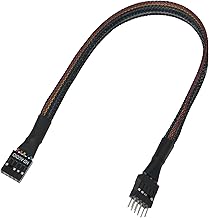
This cable is a 30cm male-to-female front-audio extension for computer motherboard wiring. The listed material is tinned copper, and the product description positions it as a way to extend a front-audio cable that is too short and improve the routing inside a chassis.
Best for: Buyers who need a straightforward 30cm motherboard cable and prioritize extra reach for case wiring. It is a practical alternative to the black ribbon model when the supplied description’s key details—male-to-female connection, tinned copper, and stated length—match the build requirement.
Limitation: The listed details do not mention a specific wire gauge, HD Audio/AC97 support, or a ribbon construction. Verify the pin configuration before connecting it.
15-Foot 3.5mm Headphone Extension

This 15-foot cable uses a 3.5mm male-to-female auxiliary connection and is intended as a headphone extension. The product name lists gold-plated connectors, an OFC core, and five cable ties. Unlike the motherboard cables above, it connects to a compatible 3.5mm audio jack rather than a 9-pin internal header.
Best for: Headphone or auxiliary-audio users who need more distance between a 3.5mm audio source and their listening position. Choose this instead of a motherboard extension when your connection is a standard 3.5mm plug.
Limitation: It is not a 9-pin PC front-panel header cable. Check the plug type and the audio device’s connection before choosing it.
Ultra Clarity 15-Foot HDMI Extender

This product is a 15-foot HDMI male-to-female extender. HDMI carries both audio and video signals, so this option is relevant when the device connection itself is HDMI rather than an analog headphone cable or internal PC audio header.
Best for: Buyers extending an HDMI connection between compatible equipment. It is the most appropriate choice in this list when audio travels over HDMI as part of an HDMI link.
Limitation: The supplied details do not state a resolution, HDMI version, or other performance specification. Confirm the requirements of the connected equipment before selecting it. It will not directly extend a 3.5mm or 9-pin audio connection.
Buying Guide: How to Choose an HD Audio Cable Extension
Which connector does your device use?
Start by identifying the socket and plug at both ends of the connection. “HD audio cable” can refer to different products, and the cable types in this list are not interchangeable. A PC motherboard front-panel header uses a small internal multi-pin connector. Headphones and many auxiliary devices use a 3.5mm plug. HDMI equipment uses a wide HDMI connector and carries audio with video.
- 9-pin motherboard cable: Look for a male-to-female internal front-audio extension and confirm the pin arrangement and supported standard.
- 3.5mm cable: Match the plug size and connector type to the audio source and headphones or speaker input.
- HDMI extension: Choose this only when both devices connect through HDMI and the extension suits their requirements.
How much cable length do you need?
Measure the intended route rather than estimating from the straight-line distance. For a PC case, account for bends, components, and the path from the motherboard header to the front-panel cable. The 20cm ZORZA option is the shorter listed motherboard cable; the two other motherboard extensions are 30cm. For external connections, the listed 3.5mm and HDMI cables are 15 feet.
Extra length can make routing easier, but an unnecessarily long cable may leave more wire to organize. Choose a length that reaches comfortably without putting strain on plugs or creating an awkward coil.
Does HD Audio mean the same thing as HDMI audio?
No. “HD Audio” on an internal PC cable typically refers to the motherboard front-panel audio connection standard. HDMI is a separate digital connection that can carry audio and video. A 3.5mm cable is another distinct connection type, generally used for analog audio. Match the cable to the physical ports, not just the word “audio” in a product title.
What should PC builders check before ordering?
Confirm whether the motherboard and case wiring use the appropriate 9-pin front-audio connector. If AC97 compatibility matters, look for it in the product details; among these choices, the ZORZA listing specifically states support for HD Audio and AC97. Check the cable length, male-to-female arrangement, and connector orientation. If the specifications do not show the pin layout or standard you need, verify them with the seller before purchase.
For cable management, consider whether a ribbon-style cable better suits the route. The black 30cm extension is described as a ribbon cable, while the other 30cm model is listed as tinned copper but does not specify a ribbon design. Compare the details that are actually provided rather than assuming the cables have identical construction.
Should you choose a longer cable for headphones?
A longer 3.5mm extension is useful when the audio source and listening position are separated. The 15-foot auxiliary cable is the relevant option in this group for that purpose. Before choosing it, verify that both devices have compatible 3.5mm connections. A motherboard header extension is not a substitute for a headphone extension, even if both products are described as audio cables.
When is HDMI the right extension?
Choose an HDMI extension when the source and display or other connected device use HDMI and you want to extend that link. Because HDMI can carry audio and video together, it may be suitable for an HDMI-based sound setup. It is not a replacement for an internal motherboard extension or a 3.5mm headphone cable. Check the equipment’s required HDMI performance specifications because they are not provided in the listed product details.
Frequently Asked Questions
Can I use a 3.5mm extension cable for a motherboard front-audio header?
No. A 3.5mm male-to-female cable connects compatible audio jacks. A motherboard front-audio header requires the matching internal multi-pin cable.
Is a 9-pin front-panel cable the same as an HDMI audio cable?
No. A 9-pin cable connects PC motherboard front-panel audio wiring. HDMI is a separate digital connection that can carry audio and video.
Which listed cable supports both HD Audio and AC97?
The ZORZA 20cm motherboard extension is specifically listed as supporting HD Audio and AC97. Check product specifications if you need those standards on another cable.
What is the difference between the 20cm and 30cm motherboard extensions?
The stated length is the main clear difference: the ZORZA cable is 20cm, while the other two motherboard options are 30cm. The ZORZA listing also specifies 24AWG copper and HD Audio/AC97 compatibility; the black ribbon listing specifies 24AWG tinned copper.
Can an HDMI extender connect headphones directly?
No. An HDMI extender connects HDMI ports. Headphones with a 3.5mm plug need a compatible 3.5mm audio connection or another suitable audio output.