
To send sound from an HDMI source to a separate speaker or receiver, choose an HDMI audio extractor with outputs that match your audio equipment. The VPFET is best for buyers who need optical and 3.5 mm outputs with selectable audio modes; the J-Tech Digital model is better for HDMI passthrough with optical and RCA stereo audio. For newer gaming setups, the listed HDMI 2.1 splitter is worth considering, but confirm its detailed specifications before buying.
| Product | Best suited for | Listed audio outputs |
|---|---|---|
| VPFET HDMI Audio Extractor | Optical or 3.5 mm audio and selectable modes | Optical, 3.5 mm |
| J-Tech Digital JTDAT5CH | Optical or RCA stereo alongside HDMI video | SPDIF, RCA stereo |
| HDMI 2.1 1×4 Splitter | Buyers seeking a high-refresh-rate splitter and extractor | SPDIF optical, according to product name |
| HDMI Audio Extractor Splitter | Simple 3.5 mm audio extraction | 3.5 mm |
| Avedio Links HDMI Audio Extractor | Optical or 3.5 mm audio extraction | Optical, 3.5 mm, according to product name |
VPFET HDMI Audio Extractor
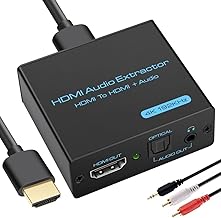
Best for: People connecting an HDMI source to equipment with an optical input or a 3.5 mm stereo connection. This extractor provides both output types, so it can suit different audio setups without requiring one particular connection style.
Its listed audio modes are 2.0-channel, 5.1-channel, and pass-through. The product information specifies 2.0-channel mode for 3.5 mm stereo and 5.1-channel mode for optical output. Optical output supports DTS 5.1, while the 3.5 mm output supports PCM 2.0. It does not support 7.1-channel audio.
For video, the specifications state HDMI 1.4, HDCP 1.4, and support up to 4K at 30 Hz. The listing cautions that some devices, including Fire TV, Apple TV, and PS4/5, are limited to 1080p with this extractor; check the source-specific details before choosing it for a 4K setup.
Limitation: ARC and eARC are not supported, and a TV cannot be used as the input source. Choose this if its stated resolution and audio formats fit your equipment.
J-Tech Digital JTDAT5CH

Best for: Buyers who want HDMI video to continue to a display while audio is separated for a receiver or stereo system. The JTDAT5CH has an HDMI input and HDMI output, plus SPDIF and RCA stereo audio outputs.
According to its listed features, the unit extracts digital audio from an HDMI input and converts it to either two-channel analog stereo or five-channel audio output. It supports video resolutions up to 4K at 30 Hz, HDCP, 12-bit-per-channel deep color, and video EDID pass-through. The product is described as plug and play.
This model is a useful comparison choice when the audio equipment accepts RCA stereo or SPDIF rather than 3.5 mm. Its HDMI-to-HDMI connection also makes it relevant when the video signal needs to remain connected to a display while audio is routed separately.
Limitation: ARC functionality is not supported, and the stated maximum video resolution is 4K at 30 Hz. Avoid choosing it if ARC is required or if your setup depends on a higher refresh rate.
HDMI 2.1 1×4 Audio Extractor Splitter

Best for: Buyers comparing audio extraction with a multi-output HDMI splitter, especially those looking for a product advertised for high-refresh-rate video. The product name lists 4K at 120 Hz, VRR, ALLM, HDCP 2.3, HDR10+, EDID options, and optical SPDIF audio.
Unlike a basic extractor, this product is identified as a 1×4 splitter as well as an audio extractor. That combination may be relevant when a buyer needs to distribute one HDMI source to multiple displays while also sending audio to equipment with an optical input.
Limitation: The supplied product information contains no detailed feature list beyond the product name. Confirm the exact supported audio formats, output behavior, power requirements, and compatibility with your source and displays before purchasing. Do not assume that every listed video feature applies to every combination of connected equipment.
HDMI Audio Extractor With 3.5 Mm Output

Best for: Buyers who need a straightforward 3.5 mm audio connection from an HDMI source. The listed features include compatibility with devices such as Roku, Chromecast, Blu-ray and DVD players, cable or satellite boxes, and game consoles, subject to the stated limitations.
The extractor is specified for 4K at 30 Hz, 3D, and 1080p-compatible use. Its purpose is to extract audio from an HDMI signal and route it to an amplifier or sound system. The listing describes a lightweight design and plug-and-play installation. It normally does not require an external power adapter, but the included USB cable can provide power when a source has a low-power HDMI port.
Limitation: ARC and eARC are not supported, and the listing says a TV cannot serve as the input source. A USB power connection may also be needed with certain low-power devices. Choose this model if 3.5 mm audio meets your needs and its input restrictions match your setup.
Avedio Links 4K Audio Extractor

Best for: Buyers looking for a compact audio extractor advertised with both optical and 3.5 mm outputs. The product name also identifies 4K at 30 Hz and HDCP 1.4, making those specifications useful comparison points for a basic HDMI setup.
This listing may suit someone who wants a choice between connecting an optical-equipped receiver and using a 3.5 mm audio input. The supplied product data does not provide more detail about audio formats, power, ARC support, or device-specific resolution limits, so those details should be checked with the seller or listing before ordering.
Limitation: The available specifications are limited. Buyers who need a specific format such as DTS 5.1, a defined channel mode, or confirmed ARC/eARC behavior should select a model with those details explicitly stated.
Buying Guide: How To Choose An HDMI Audio Extractor
An HDMI audio extractor takes an HDMI signal from a source, separates the audio, and sends video onward over HDMI while routing audio through a separate output. It can help when a source has HDMI but the speaker system or receiver uses a different audio connection. The right choice depends on the ports and formats supported by every device in the signal path.
Which audio output does your speaker system use?
Check the receiver, soundbar, or powered speakers before selecting an extractor. Optical SPDIF is a digital connection, while RCA and 3.5 mm are analog connections. The J-Tech Digital model lists SPDIF and RCA stereo outputs. The VPFET lists optical and 3.5 mm outputs, and the simple HDMI extractor is specified with 3.5 mm audio.
Do not assume that an adapter can change the audio format as well as the connector. For example, a digital optical output and an analog stereo input are not interchangeable without suitable conversion. Match the extractor output to the input on the audio equipment.
What video resolution and refresh rate do you need?
Compare the extractor’s maximum stated video signal with the source and display. Several listed models specify 4K at 30 Hz, while the HDMI 2.1 splitter’s product name advertises 4K at 120 Hz. A 4K/30 Hz extractor may be unsuitable for a setup that requires a higher refresh rate, even if the connected display supports one.
Video capability can also depend on the source, display, cables, and content. Check the full product listing for resolution limits, HDR support, and any device-specific restrictions. The VPFET listing, for example, gives particular 1080p limitations for several named sources.
Do you need stereo, surround sound, or pass-through?
Look for explicit channel and format support. The VPFET lists 2.0-channel, 5.1-channel, and pass-through modes, and specifies which outputs correspond to stereo and 5.1-channel use. The J-Tech model lists two-channel analog stereo or five-channel output. These labels do not mean that every audio format or channel configuration is supported.
Check the source’s audio-output settings as well as the receiver’s supported formats. If you need a particular codec or channel layout, confirm that the extractor, source, and receiving equipment all support it. Avoid inferring 7.1-channel support from general surround-sound wording.
Will the extractor work with a TV or ARC setup?
Many extractors are designed to take input from a media player, game console, or streaming device rather than extract sound from a television. The first and VPFET products explicitly state that ARC and eARC are unsupported and that a TV cannot be used as the input source. If your goal is to send TV audio to an external receiver, verify that the extractor supports the exact TV connection method you plan to use.
Does the device need external power?
Power requirements vary. The simple 3.5 mm extractor is described as normally operating without an external adapter, but its listing recommends USB power for certain low-power HDMI ports. The available information for the other products does not establish their power requirements. Confirm this detail before buying, especially if the device will be placed where a USB or power outlet is not convenient.
When is a splitter more useful than a basic extractor?
A basic extractor is intended primarily to separate audio from an HDMI signal. A splitter sends one HDMI source to multiple display outputs, and some models add audio extraction. The HDMI 2.1 1×4 model is listed as a splitter and advertises optical audio extraction. Buyers needing several display connections should verify the number of usable outputs and the exact supported display and audio configurations.
Frequently Asked Questions
Does an HDMI audio extractor send audio to another HDMI device?
These products generally extract audio from an HDMI signal and send it through a separate audio output, such as optical, RCA, or 3.5 mm. They are not simply HDMI-to-HDMI audio cables. Check whether the extractor also provides HDMI video passthrough if you need the picture to reach a display.
Can I use an HDMI audio extractor with a TV?
It depends on the extractor and the connection direction. Some products in this list explicitly say a TV cannot be the input source and do not support ARC or eARC. Check for TV audio or ARC support if you want to extract sound from a television.
Can an HDMI audio extractor support 4K?
Some can, but the supported refresh rate and other video features vary. Several products here list 4K at 30 Hz, while one splitter’s product name advertises 4K at 120 Hz. Match the stated specifications to the requirements of your source and display.
Which output should I use for 5.1 audio?
Use an output and mode that explicitly support the channel format required by your receiver. The VPFET lists optical output with DTS 5.1 and a 5.1-channel mode. Confirm the source’s audio settings and the receiver’s supported formats before connecting.
Why is there no sound after connecting an extractor?
Check that the source is connected to the HDMI input, the display is connected to the HDMI output, and the audio cable matches the receiver or speaker input. Then check the extractor’s mode switch and the source’s audio-output settings. Some devices may also require USB power or a compatible audio format.