
For extracting 5.1-channel audio from an HDMI source, the VPFET HDMI Audio Extractor and J-Tech Digital JTDAT5CH are the most directly relevant options in this list. Both specify 5.1-channel audio output, but neither supports 7.1-channel audio or HDMI ARC. The HDMI eARC-to-optical adapter is a better fit for a TV with an ARC/eARC port and an optical audio system. The two DisplayPort cables do not extract audio from an HDMI source, so they are poor choices for this task.
| Product | Best suited for | Key limitation |
|---|---|---|
| VPFET HDMI Audio Extractor | HDMI input to optical 5.1 output | Does not support 7.1; stated source limitations apply |
| J-Tech Digital JTDAT5CH | HDMI audio extraction with optical or RCA output | No ARC; maximum 4K at 30Hz |
| HDMI eARC to Optical Adapter | TV ARC/eARC output to optical audio equipment | Requires an ARC/eARC TV port and USB power |
| Amazon Basics DisplayPort-to-HDMI Cable | DisplayPort computer to HDMI display | Does not extract audio from an HDMI source |
| AVACON DisplayPort-to-HDMI Cable | DisplayPort computer to HDMI display with audio pass-through | One-way; not an HDMI audio extractor |
VPFET HDMI Audio Extractor
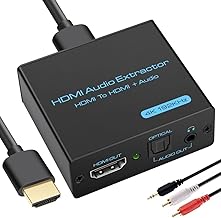
Best for: A setup that needs audio extracted from an HDMI source and sent to an optical-input receiver or a 3.5mm stereo device. This is one of the closest matches for HDMI-to-5.1-channel audio because its listed modes include 5.1CH and its optical output supports DTS 5.1.
The extractor also offers 2.0CH and PASS modes. Its feature list says to choose 5.1CH for optical output and 2.0CH for 3.5mm stereo. It supports HDMI 1.4 up to 4K at 30Hz and HDCP 1.4. The listed 3.5mm output is PCM 2.0, so it is not a six-channel analog output.
Choose this if your source connects through HDMI and your audio equipment accepts optical input for DTS 5.1. Limitation: It does not support 7.1-channel audio, ARC, or eARC. The listing also notes that certain devices, including Fire TV, Apple TV, and PS4/PS5, are limited to 1080p with this product.
J-Tech Digital JTDAT5CH Extractor

Best for: HDMI equipment owners who need extracted audio for either a 5.1-channel connection or two-channel analog stereo. The listed features specify conversion from HDMI audio to a 5.1-channel output or a 2-channel RCA stereo output, making it a relevant choice for separating audio from an HDMI signal.
It supports video up to 4K at 30Hz, HDCP, 12-bit-per-channel deep color, and video EDID pass-through. The product is described as plug and play. Its combination of digital and analog audio options can suit systems where the available audio connection determines the setup.
Choose this if you want both a listed 5.1-channel option and RCA stereo as an alternative. Limitation: ARC functionality is not supported, and the maximum listed video resolution is 4K at 30Hz. Check that your source and receiving audio equipment use compatible connections and audio formats.
HDMI eARC To Optical Audio Adapter

Best for: A television with an HDMI ARC or eARC port that needs to send audio to an optical soundbar, amplifier, or active speaker. Unlike a conventional HDMI input extractor, this adapter is specifically described as taking audio from the TV’s ARC/eARC connection and converting it to optical.
The listed setup instructions call for selecting the ARC audio device on the TV, setting the audio format to PCM or Dolby/DTS 5.1, and connecting the included USB power cable to a power port. The product name identifies a 6.6-foot cable and 192kHz support.
Choose this if your goal is routing TV audio from ARC/eARC to optical equipment. Limitation: It only works with a TV that has an ARC or eARC interface, and the listing states that CEC is not supported. It is not the best match for extracting audio from a separate HDMI source plugged into a standard input.
Amazon Basics DisplayPort-To-HDMI Cable

Best for: Connecting a computer’s DisplayPort output to an HDMI display, not extracting audio from an HDMI source. The listed product is a unidirectional DisplayPort-to-HDMI cable, with support for up to 4K at 30Hz and 1080p.
This product appears less relevant to HDMI-to-6-channel audio than the two dedicated extractors. Its direction of signal flow matters: it connects a DisplayPort-equipped device to an HDMI display. It is not described as an HDMI input audio converter or as having optical, coaxial, or multichannel analog audio outputs.
Choose this if your actual requirement is video and sound from a DisplayPort computer to an HDMI screen. Avoid this if you need to extract 5.1 audio from a game console, streaming device, or other HDMI source. The supplied features do not establish an audio-extraction function or a 5.1 output.
AVACON DisplayPort-To-HDMI Cable

Best for: Sending video and audio from a DisplayPort computer to an HDMI television, monitor, or projector. The listing identifies a one-way DisplayPort-source-to-HDMI-display connection, up to 4K at 30Hz, with audio pass-through for uncompressed digital 7.1, 5.1, or two-channel audio.
Although the listed audio formats include 5.1, this cable does not perform the same job as an HDMI audio extractor. It carries audio along with the video from a DisplayPort source to an HDMI display; the features do not describe extracting audio from HDMI or providing a separate optical or analog output.
Choose this if you need to connect a DisplayPort computer to an HDMI display and want audio to pass through. Avoid this if your source has HDMI output and you need a separate six-channel connection to an audio receiver. Its one-way direction also means it cannot send an HDMI source signal to a DisplayPort monitor.
Buying Guide: Choosing HDMI-To-6-Channel Audio Equipment
Do you need an extractor or an ARC adapter?
Use an HDMI audio extractor when a source device sends audio and video over HDMI and you need audio routed separately to an amplifier, receiver, or other audio equipment. The VPFET and J-Tech products are the direct candidates in this list for that setup.
Use an ARC/eARC-to-optical adapter when the television itself sends audio from its ARC/eARC port to an optical device. The listed adapter is designed for that TV-to-audio connection, not for a standard HDMI source connected to an extractor input.
Which output does your audio system accept?
Check the input ports on the receiver, soundbar, or amplifier before selecting a product. The VPFET lists optical and 3.5mm outputs, while the J-Tech lists a 5.1-channel option and RCA stereo. The TV adapter provides optical output. These connections are not interchangeable, and the product features do not establish that a particular receiver will decode every signal format.
Does “6 channel” mean 5.1 surround sound?
Six channels commonly refers to 5.1 audio: five main channels plus a low-frequency effects channel. The VPFET listing specifies optical DTS 5.1, and J-Tech specifies a 5.1-channel output. Neither listing claims 7.1-channel output. Confirm that the source content, extractor settings, and receiving equipment all support the intended 5.1 format.
What video resolution and HDMI version matter?
Match the extractor’s stated video capability to the source and display. The VPFET lists HDMI 1.4 and 4K at 30Hz, while the J-Tech lists a maximum of 4K at 30Hz. These details matter if you want the picture to continue through the extractor to a display. The VPFET listing also calls out device-specific limitations, so check those notes for your source device.
What settings should you check if there is no sound?
For the VPFET, select the appropriate 2.0CH, 5.1CH, or PASS mode for the output and signal. For the ARC/eARC adapter, the listed instructions call for selecting the ARC device on the TV, choosing PCM or Dolby/DTS 5.1, and connecting USB power. Also verify the cable path and that the receiving audio device is set to the correct input.
Frequently Asked Questions
Can an HDMI audio extractor provide 5.1 sound?
Yes, if the extractor explicitly supports 5.1 and the source and receiving audio equipment also support the selected format. The VPFET lists DTS 5.1 over optical, and the J-Tech lists a 5.1-channel output.
Will these products convert HDMI audio to 7.1?
The VPFET listing explicitly says it does not support 7.1. The other listed HDMI extractors do not claim 7.1 output in their supplied features, so do not assume that they provide it.
Can I use an ARC-to-optical adapter with a game console?
The listed adapter is intended for a television’s ARC/eARC port. It is not presented as a standard HDMI-input extractor for a game console. For an HDMI source, consider an extractor with the required audio output instead.
Do the DisplayPort-to-HDMI cables extract HDMI audio?
No. The AVACON cable carries audio pass-through from a DisplayPort source to an HDMI display, and the Amazon Basics cable is also a DisplayPort-to-HDMI cable. Neither is listed as an HDMI audio extractor.
Does the HDMI eARC adapter support CEC?
No. Its product name specifically states that CEC is not supported.