
The right HDMI-to-audio adapter depends on where your signal starts and which audio input your sound system accepts. For an HDMI player feeding a stereo system, the HDMI Audio Extractor Splitter is a simple 3.5mm option. The VPFET adds optical output and audio modes, while the avedio links model is better suited to 4K 60Hz setups and ARC/eARC-compatible TV connections. If your goal is to take sound out of a TV, check whether the TV’s HDMI port supports ARC before choosing a standard extractor.
| Product | Best suited for | Audio connections | Key limitation |
|---|---|---|---|
| HDMI Audio Extractor Splitter | Basic HDMI-player-to-stereo connection | 3.5mm | Does not support ARC/eARC |
| VPFET HDMI Audio Extractor | Choosing between stereo and optical audio | 3.5mm, optical | Listed 4K compatibility has source-device limits |
| Eanetf Passive HDMI to RCA Cable | Devices with built-in HDMI-to-RCA conversion | RCA | Does not convert signals by itself |
| XPTSFDU HDMI ARC Adapter | ARC-enabled TV to analog audio system | 3.5mm, left/right RCA | Requires TV ARC and PCM 2.0 settings |
| avedio links HDMI Audio Extractor | 4K 60Hz and ARC/eARC audio setups | Optical, 3.5mm, HDMI ARC | ARC audio depends on the TV’s ARC/eARC port |
HDMI Audio Extractor Splitter

This compact extractor is best for someone who wants to send audio from an HDMI source to a sound system with a 3.5mm input. It extracts audio from compatible HDMI signals and passes video through, with listed support for up to 4K at 30Hz and 3D when the connected devices also support 3D.
Listed sources include media players, Blu-ray and DVD players, cable or satellite boxes, game consoles, and cameras. The product is described as plug and play and normally does not need an external power adapter. A USB cable is included for devices whose HDMI port provides insufficient power.
- Best for: A straightforward HDMI-source-to-3.5mm connection.
- Choose this if: Your sound system accepts 3.5mm stereo audio and the signal comes from an HDMI player.
- Limitation: It does not support ARC or eARC, and a TV is not supported as the input source. Some devices may need USB power.
VPFET HDMI Audio Extractor
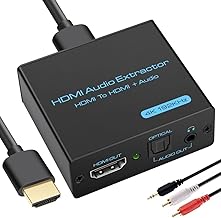
The VPFET extractor is better for buyers who need a choice of analog 3.5mm or optical audio. It offers 2.0-channel, 5.1-channel, and pass modes. The product instructions specify 2.0CH for 3.5mm stereo output and 5.1CH for optical output. Optical supports DTS 5.1, while 3.5mm supports PCM 2.0.
Its listed video capability is up to 4K at 30Hz, with HDMI 1.4 bandwidth and HDCP 1.4 support. The product description notes that some listed source devices, including Fire TV, Apple TV, and PS4/5, support only 1080p through this extractor. Check the intended source and video resolution before buying.
- Best for: A setup that needs optical or 3.5mm audio from an HDMI source.
- Choose this if: You want selectable audio modes for stereo, optical surround, or pass-through troubleshooting.
- Limitation: It does not support ARC/eARC or 7.1-channel audio. A TV cannot be used as the input source.
Eanetf Passive HDMI To RCA Cable

This five-foot cable is an option only when the connected TV or receiver already has built-in HDMI-to-RCA conversion. It connects HDMI and RCA ports, but it is a passive cable: it does not convert a digital HDMI signal into analog RCA audio or video. That distinction is important because HDMI and RCA use different signal formats.
The listed product information says the connected devices must handle the required coding and decoding. If neither device performs that conversion, the cable alone will not provide a working connection. In that case, an active HDMI-to-RCA converter box is the type of product to look for instead.
- Best for: A device that explicitly supports HDMI-to-RCA conversion through a passive cable.
- Choose this if: You have confirmed that the source or receiving equipment provides the conversion function.
- Limitation: It does not convert HDMI signals by itself, so it is not a general-purpose HDMI audio extractor.
XPTSFDU HDMI ARC Adapter

This adapter is designed for extracting sound from an ARC-enabled TV, rather than from an ordinary HDMI player. It sends audio from the TV’s ARC connection to left/right analog outputs and a 3.5mm headphone port. The product states that both analog output types can operate simultaneously.
Before choosing it, confirm that the HDMI port on the TV is labeled ARC and that the TV’s settings enable ARC audio return. The product also specifies PCM 2.0 as the required TV audio output format. It recommends a high-speed HDMI cable and notes that some TVs require ARC mode to be selected in their settings.
- Best for: Connecting an ARC-enabled TV to a stereo system with analog inputs.
- Choose this if: Your TV has ARC and your sound system accepts 3.5mm or left/right audio.
- Limitation: It is described as compatible with TVs only, requires an ARC-capable TV port, and may not work unless the TV outputs PCM 2.0.
avedio links 4K 60Hz Audio Extractor

The avedio links extractor is the better match for buyers whose system needs up to 4K at 60Hz video pass-through and multiple audio-output choices. Its listed features include HDMI 2.0b, 18 Gbps bandwidth, HDR 10, HDCP 2.2, and audio output through optical Toslink or 3.5mm. The product also supports ARC, with ARC audio available through its optical and 3.5mm outputs.
Three audio modes are listed: TV, 2.0CH, and 5.1CH. The 3.5mm output supports two-channel PCM/LPCM stereo. Optical supports two-channel PCM and listed surround formats. The product description says it can output audio to a receiver without powering on a connected TV or monitor.
- Best for: A higher-resolution HDMI setup that needs optical, analog stereo, or ARC audio extraction.
- Choose this if: You want 4K 60Hz video support alongside several audio modes.
- Limitation: ARC functionality requires an ARC/eARC interface on the TV. Confirm the TV port and desired audio format before connecting.
Buying Guide: How To Choose An HDMI Audio Adapter
“HDMI to audio input” can describe two different jobs: extracting audio from an HDMI source, or sending audio from a TV’s HDMI ARC port to a sound system. Identify the direction of the signal first. A standard extractor generally takes audio from an HDMI player, while an ARC adapter receives audio returned by a compatible TV.
Does the audio come from a player or from the TV?
If the source is a streaming device, disc player, game console, or cable box, look for a standard HDMI audio extractor. Connect the source to the extractor’s HDMI input, then connect the extractor’s audio output to the sound system. The HDMI output carries video onward to a display.
If you need sound from apps or channels playing on the TV, check for an HDMI port labeled ARC or eARC. A standard extractor that does not support ARC cannot usually take audio back from a TV over an ordinary HDMI connection. Choose an ARC-capable product and follow its TV-port and audio-setting requirements.
Which audio input does your sound system accept?
- 3.5mm input: Choose a model with 3.5mm stereo output, such as the basic extractor, VPFET, or avedio links device.
- Optical input: Choose an extractor with Toslink optical output. Check which audio formats it supports and select the specified output mode.
- Left/right RCA input: An ARC adapter with analog L/R output may suit a TV connection. Do not assume a passive HDMI-to-RCA cable performs signal conversion.
Match the output on the adapter to an input on the speaker, amplifier, receiver, or soundbar. A cable with the right-shaped connectors is not always enough: digital optical, digital HDMI, and analog 3.5mm or RCA connections carry audio differently. Confirm both the connector and the supported signal format.
What resolution and refresh rate do you need?
Check the extractor’s video specifications against the source and display. The basic and VPFET models list support up to 4K at 30Hz. The avedio links model lists 4K at 60Hz, HDR 10, and HDCP 2.2. If your system relies on a particular resolution, refresh rate, HDR format, or copy-protection standard, verify support across the source, extractor, cable, and display.
Some listed product information also identifies source-specific limits. For example, VPFET notes that certain devices may be limited to 1080p through its extractor. Treat a general maximum resolution as a product capability, not a guarantee that every source will pass that resolution in every configuration.
Which audio mode should you select?
Use the mode specified for the output you plan to use. VPFET calls for 2.0CH with its 3.5mm output and 5.1CH with optical. Its pass mode is offered as an alternative if the first modes do not produce audio or video. The avedio links model lists TV, 2.0CH, and 5.1CH modes. The TV, source, and receiving audio system must still support the format being sent.
For analog stereo connections, PCM 2.0 is a common requirement in the listed product instructions. The XPTSFDU ARC adapter specifically says to set the TV audio output to PCM 2.0. If you encounter silence, check the TV’s digital audio format and the extractor’s mode before assuming the adapter is defective.
Does the adapter need power?
Power needs vary. The basic HDMI Audio Extractor Splitter is described as normally operating without an external adapter, but it may need USB power when connected to a low-power HDMI port. Other models may have different power requirements, so check the supplied product details and installation instructions. If an extractor is not detected or audio drops out, verify its power connection as well as the HDMI and audio cables.
Is a passive HDMI-to-RCA cable enough?
Usually, not if the devices do not already perform conversion. HDMI carries digital signals, while RCA connections are analog. The Eanetf cable’s listing explicitly says it does not convert signals. Use a passive cable only when the connected equipment is confirmed to have built-in HDMI-to-RCA conversion; otherwise, seek an active converter designed for the required direction of conversion.
Frequently Asked Questions
Can I connect HDMI directly to a 3.5mm audio input?
Not with a basic cable alone in most setups. HDMI carries digital audio and video, while a 3.5mm input expects analog audio. An HDMI audio extractor can separate the audio and provide a compatible 3.5mm output.
Can a standard HDMI audio extractor get sound from my TV?
Only if the product supports the required TV audio-return function. A standard extractor may accept an HDMI player as its input but not a TV. For TV audio, use an ARC-compatible adapter with the TV’s ARC/eARC port and follow the listed setup requirements.
What is the difference between HDMI ARC and a regular HDMI input?
ARC, or Audio Return Channel, lets a compatible TV send audio back through a designated HDMI port. A regular HDMI input generally receives audio and video from a source device. A TV must have an ARC/eARC-capable port for an ARC adapter to receive TV audio.
Will an HDMI-to-RCA cable convert digital audio to analog?
Not if it is a passive cable like the Eanetf product listed here. It requires conversion capability built into the connected equipment. If the devices do not provide that function, use an active converter instead.
Why is there no sound after connecting an extractor?
Check that the signal runs in the correct direction, the chosen audio output matches the sound system’s input, and the extractor has power if required. Then verify the audio mode and source format. For an ARC setup, confirm that the cable is connected to the TV’s ARC port, ARC is enabled, and the TV output format meets the adapter’s requirements.