
The best HDMI-to-digital-audio adapter depends on your TV’s HDMI connection and the inputs on your sound system. Choose an ARC or eARC converter to send TV audio to an optical or coaxial device; choose an HDMI audio extractor when you need to separate audio from an HDMI source. The five options below include models with CEC volume control, USB power, and support for different audio formats, so you can compare them against your setup.
| Product | Best For | Key Distinction |
|---|---|---|
| 192KHz HDMI eARC/ARC Converter | ARC/eARC setups needing volume control | Optical and coaxial outputs; CEC volume control |
| 192KHZ HDMI eARC Adapter, 6.6FT | ARC/eARC setups without CEC needs | USB powered; optical output |
| VPFET HDMI Audio Extractor | Separating audio from an HDMI connection | Optical and 3.5mm AUX outputs |
| 192kHz HDMI eARC Adapter, PCM/Dolby/DTS | ARC/eARC systems needing format options | USB powered; optical output |
| VPFET HDMI eARC Audio Extractor | ARC/eARC systems with optical or coaxial input | Optical and coaxial outputs |
192KHz HDMI eARC/ARC Converter With CEC

This adapter converts audio from a TV’s HDMI ARC or eARC connection to optical or coaxial output. Its listed features include CEC volume control, a 5-foot cable, and support for PCM 2.0, Dolby 5.1, and DTS 5.1.
Best for: TV owners whose soundbar or audio system accepts optical or coaxial digital audio and who want CEC volume control. It stands out among these options because its product name specifically lists both output types and CEC support.
Limitation: It is designed for an ARC/eARC connection, not described as a general-purpose HDMI source extractor. Check that the TV has an ARC or eARC port and that the audio device has a matching digital input.
192KHZ HDMI eARC Adapter With 6.6-Foot Cable

This USB-powered adapter sends audio from an HDMI ARC/eARC connection to an optical soundbar, amplifier, or speaker. The product name specifies a 6.6-foot cable and explicitly says that it does not support CEC.
Best for: Buyers who need an optical output and want a longer listed cable than the 5-foot option above. It may suit a TV and optical audio device with some distance between them, provided the cable length works for the installation.
Limitation: Do not choose it if you need CEC volume control through the adapter. The listed output is optical, so it is not the right match for a system that requires coaxial digital audio.
VPFET HDMI Audio Extractor With Optical And AUX
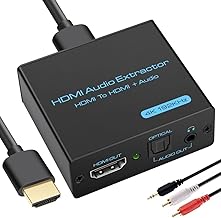
This VPFET adapter is described as an HDMI audio extractor and splitter. Its listed features include 4K HDMI, optical and 3.5mm AUX audio outputs, HDCP support, and support for digital DTS 5.1 and PCM.
Best for: Buyers who want to extract audio from an HDMI connection and need a choice between optical and 3.5mm AUX output. Its HDMI extractor description makes it distinct from the other products here, which are specified for TV ARC/eARC audio return.
Limitation: The listing information provided does not describe ARC/eARC support. If you want audio returned from a TV’s built-in apps over an ARC/eARC port, confirm the product’s connection requirements before choosing it.
192kHz HDMI eARC Adapter For PCM And Surround

This USB-powered HDMI ARC/eARC-to-optical converter is listed with a 6.6-foot cable and support for PCM, Dolby 5.1, and DTS 5.1. Its product name also states that it does not support CEC.
Best for: Buyers looking for an optical connection and a product listing that explicitly names several audio formats. It is a useful comparison with the other 6.6-foot adapter: both state that they lack CEC, while this model specifically lists PCM, Dolby 5.1, and DTS 5.1 support.
Limitation: It does not provide listed coaxial or AUX output, and it does not support CEC. Check the audio device’s input type and the TV’s ARC/eARC configuration before buying.
VPFET HDMI eARC Extractor With Optical And Coaxial

This VPFET adapter is specifically described as an HDTV ARC/eARC audio converter. It sends TV audio through Toslink optical and coaxial ports, lists support up to 192 kHz, and states that it does not support CEC.
Best for: Owners of ARC/eARC TVs who need to choose between optical and coaxial digital audio output. The dual-output design offers more connection options than the optical-only ARC/eARC models in this guide.
Limitation: It does not support CEC, so it is not the choice for buyers seeking CEC volume control. Confirm whether the TV and audio system’s supported audio format and connection settings are suitable for the intended setup.
Buying Guide: How To Choose An HDMI-To-Digital-Audio Adapter
Do you need an ARC/eARC converter or an HDMI audio extractor?
Start by identifying where the sound originates. An ARC/eARC converter is intended to receive audio from a TV through its HDMI ARC or eARC connection and send it to a separate audio device. It is often the relevant type when you want TV audio—including audio from the TV itself—to reach an older soundbar or amplifier with optical or coaxial input.
An HDMI audio extractor serves a different purpose: it separates audio from an HDMI connection. The VPFET extractor listed here includes optical and 3.5mm AUX outputs and specifies 4K HDMI. Do not assume that a general extractor supports TV ARC/eARC; check the product’s stated connection type and intended signal path.
Which digital audio output does your sound system accept?
Check the back or connection guide for the soundbar, amplifier, or receiver. Toslink is another name commonly used for optical digital audio. Coaxial digital audio uses a different connection, and a 3.5mm AUX input is an analog connection rather than an optical or coaxial digital input.
Choose an adapter with an output that matches an available input on the audio device. The first and fifth products list optical and coaxial outputs. The two 6.6-foot ARC/eARC adapters list optical output, while the VPFET HDMI extractor lists optical and 3.5mm AUX.
Does CEC volume control matter?
CEC can be relevant when you want compatible connected devices to share certain control functions. Among these five listings, the 5-foot 192KHz ARC/eARC converter specifically includes CEC volume control. The two 6.6-foot optical converters and the VPFET eARC extractor explicitly state that they do not support CEC.
If you plan to adjust volume with a TV remote, verify how the TV, adapter, and audio device handle volume control. Do not assume that an adapter without stated CEC support will pass volume commands.
Which audio formats should you check?
Match the adapter’s stated formats to the audio device and the TV’s output settings. The 5-foot converter lists PCM 2.0, Dolby 5.1, and DTS 5.1 support. One 6.6-foot model lists PCM, Dolby 5.1, and DTS 5.1, while the VPFET extractor lists digital DTS 5.1 and PCM.
Format support across the full setup matters. A compatible adapter cannot make an audio device decode a format it does not support. If sound is missing or incorrect, check the TV’s audio output setting and consult the instructions for each device.
How should you think about power and cable length?
Two listed optical ARC/eARC adapters specify USB power and a 6.6-foot cable. The CEC-capable converter lists a 5-foot cable. Measure the route between the TV, adapter, and audio equipment, and consider where a USB power connection will be available if the selected model requires it.
The product information provided does not specify every installation detail for every adapter. Confirm the included connections and power requirements in the product listing before purchase, especially if the TV and audio system are mounted far apart or have limited access to outlets and ports.
What should you verify before ordering?
- Confirm whether the TV has an HDMI ARC/eARC port if choosing an ARC/eARC converter.
- Check whether the sound system accepts optical, coaxial, or 3.5mm AUX audio.
- Compare the adapter’s stated audio formats with the formats supported by the TV and sound system.
- Decide whether CEC volume control is necessary; several options explicitly do not support it.
- Check cable length and any stated USB power requirement against your installation.
- For a non-ARC HDMI source, verify that the adapter is designed to extract audio from that source.
Frequently Asked Questions
What does an HDMI-to-digital-audio adapter do?
It routes or converts audio from an HDMI connection to a separate audio output, such as optical or coaxial. The exact function depends on the adapter: an ARC/eARC converter receives audio from a TV, while an HDMI extractor separates audio from an HDMI source.
Can an HDMI ARC adapter connect a TV to an optical soundbar?
Yes, if the TV has an ARC/eARC connection, the adapter is designed for that connection, and the soundbar has an optical input. Check the adapter’s supported audio formats and the TV’s audio output settings as well.
Do all HDMI audio adapters support CEC volume control?
No. CEC support varies by model. The 5-foot 192KHz ARC/eARC converter in this guide lists CEC volume control, while several other listed adapters state that they do not support CEC.
Is optical the same as coaxial digital audio?
No. Optical and coaxial are different connection types. Select an adapter output that matches an input available on your audio device; some products in this guide list both, while others list optical only.
Can an HDMI audio extractor handle audio from TV apps?
Only if the extractor supports the TV’s audio return connection and is configured for that use. A product described simply as an HDMI extractor may not support ARC/eARC, so verify the listing rather than assuming it can receive audio from built-in TV apps.