
The VPFET HDMI Audio Extractor is the closest match for sending sound from an HDMI source to a 3.5mm line input: it extracts audio and provides a 3.5mm output for stereo PCM. The other listed products are cables or converters for different signal paths, so they are not equivalent substitutes. Use the comparison below to identify the right type of device before connecting a TV, computer, console, or other HDMI source.
| Product | Best suited for | Fit for HDMI-to-line-in audio |
|---|---|---|
| VPFET HDMI Audio Extractor | Extracting HDMI audio to 3.5mm stereo | Closest match |
| Passive HDMI-to-RCA Cable | Specific one-way HDMI-to-RCA setups | Not a dedicated extractor |
| Cratree 8K HDMI Cable | Carrying HDMI audio and video between HDMI devices | No 3.5mm output |
| HDMI-to-3-RCA Cable | Limited HDMI-to-RCA signal setups | Not a line-in extractor |
| BD&M RCA-to-HDMI Converter | Connecting RCA-output devices to HDMI displays | Wrong direction for HDMI source audio |
VPFET HDMI Audio Extractor
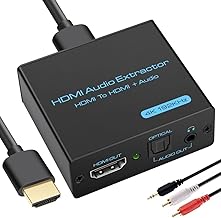
Best for: Buyers who need to take audio from an HDMI signal and feed a stereo 3.5mm line input. The product description specifically identifies HDMI audio extraction and a 3.5mm output, making this the most relevant option in the supplied list.
It offers 2.0-channel, 5.1-channel, and pass modes. For the 3.5mm stereo output, choose 2.0CH mode. The listing says the 3.5mm output supports PCM 2.0; the optical output supports DTS 5.1. Its HDMI specification is listed as HDMI 1.4, with support up to 4K at 30Hz and HDCP 1.4.
Choose this if your source sends audio over HDMI and your destination accepts analog stereo through a 3.5mm input. Limitation: the listing says ARC and eARC are not supported, and a TV is not supported as the input source. It also does not support 7.1-channel audio. Check your source’s audio format and output path before buying.
Passive HDMI-To-RCA Cable

Best for: A buyer investigating a one-way HDMI-to-RCA connection where the connected devices themselves provide the required signal coding and decoding. The listing describes a five-foot cable and explicitly says that its direction is HDMI to RCA, not RCA to HDMI.
This is not the same as a dedicated HDMI audio extractor. A 3.5mm line input is not an RCA input, and the product information does not specify a 3.5mm audio output or independent audio conversion. Do not assume that a passive cable can convert digital HDMI audio into analog line-level audio.
Choose this only if the equipment manuals confirm that the devices support the required conversion and the destination accepts RCA. Limitation: the listing warns that it is not compatible with PC, laptop, PS4, Xbox, or DVD devices, and says to check the equipment manual. Avoid it for a typical HDMI-to-3.5mm line-in connection unless the full setup is confirmed.
Cratree 8K Short HDMI Cable

Best for: Buyers who need a short HDMI cable between HDMI-equipped devices, rather than an adapter that changes HDMI audio into a line-level connection. The listed cable is 3.3 feet long and is described as compatible with earlier HDMI versions. Its feature list includes 48Gbps bandwidth, 8K at 60Hz, 4K at 120Hz, eARC, and support for multiple audio streams.
An HDMI cable carries audio as part of the HDMI connection, but this product has no listed 3.5mm analog output. It therefore cannot, on its own, connect an HDMI source to a separate line-in jack. It may be useful as part of a setup that includes a separate audio extractor, but that extractor—not the cable—does the audio separation.
Choose this if you need an HDMI-to-HDMI connection and already have the appropriate audio-routing equipment. Limitation: it does not provide the analog output needed for a direct line-in connection. Its listed performance features do not replace a converter.
HDMI-To-3-RCA Cable

Best for: Buyers whose equipment specifically supports the signal conversion required for a one-way HDMI-to-RCA connection. The listing describes a five-foot cable with three RCA connectors and warns that the source device must be capable of decoding or transferring the signal, or that an HDMI/AV converter box may be needed.
This cable is not a straightforward solution for connecting HDMI audio to a 3.5mm line input. RCA and 3.5mm are different connector types, and a connector change alone does not guarantee conversion from digital HDMI audio to analog audio. The product description also gives differing resolution details, so confirm the supported format with the seller and device manuals.
Choose this if you have a verified HDMI-to-RCA use case and the connected devices support the necessary conversion. Limitation: the listing says the cable is one-way and may require a separate converter. It should not be treated as a general-purpose HDMI audio extractor.
BD&M RCA-To-HDMI Converter

Best for: Connecting an older device with composite RCA output—such as a VCR, DVD player, or listed retro game console—to a display with HDMI input. The listing describes conversion from analog RCA/composite AV to HDMI and HDMI output at 720p or 1080p.
This product is included as a directionality comparison, not as a match for HDMI-to-line-in. Its stated direction is RCA to HDMI, which is the reverse of taking an HDMI source’s audio to an analog line input. A converter’s input and output direction matters; choosing a device with the wrong direction will not solve the connection.
Choose this if your source outputs RCA and your display accepts HDMI. Limitation: it does not extract audio from an HDMI source or provide a stated 3.5mm line-level output. It is not the appropriate choice for the search need addressed by this guide.
Buying Guide: How To Choose HDMI-To-Line-In Equipment
What does “HDMI to line in” usually require?
A typical setup needs an HDMI audio extractor that separates audio from the HDMI signal and outputs analog stereo through a 3.5mm jack. That 3.5mm output can then connect to a compatible line input. A passive cable generally changes connectors, not signal formats, so it should not be assumed to perform digital-to-analog conversion.
Check both ends of the signal path. Identify the source’s HDMI output and the destination’s exact input: 3.5mm line-in, RCA, optical, or another connection. A headphone output, microphone input, and line input may use the same 3.5mm plug but serve different purposes. Confirm the destination’s manual to determine which input it supports.
Does the source send audio through HDMI?
Verify that the source device is configured to send audio over HDMI. Some computers, game systems, and media players let users select an audio output in system settings. If the source is not sending sound through HDMI, an extractor cannot pull audio from that signal. Also check whether the extractor supports the source’s audio format and video requirements.
Which audio mode should you use?
For a stereo 3.5mm line input with the VPFET extractor, the product information specifies 2.0CH mode and PCM 2.0 output. The listing identifies 5.1-channel support for optical output, not for its 3.5mm stereo output. If sound is missing in the selected mode, the product description recommends trying pass mode, but the correct mode depends on the connected equipment.
Do not assume that an analog line input can accept multichannel digital audio. For a basic stereo connection, select stereo PCM when the source offers that setting. If you need surround sound, check whether the destination and connection support the required format; the listed extractor does not support 7.1 channels.
Why do direction and conversion matter?
Signal direction is a common source of buying mistakes. HDMI-to-RCA and RCA-to-HDMI describe opposite paths, and a one-way cable may not work in reverse. Likewise, an HDMI cable carries a signal between HDMI devices but does not create a 3.5mm output. Match the product’s stated input and output to the direction you need: HDMI source in, analog audio out.
When a listing says a device must perform its own decoding or conversion, confirm that capability in the manuals for both devices. If a product does not clearly specify active conversion or a 3.5mm audio output, do not rely on it as an HDMI audio extractor.
What video limits should you check?
An extractor sits in the HDMI path, so its supported video format matters as well as its audio output. The VPFET listing specifies HDMI 1.4, up to 4K at 30Hz, and HDCP 1.4. It also notes that certain named streaming devices and consoles support only 1080p signals with this product. Compare the extractor’s stated limits with the source and display before connecting the full system.
If you only need audio and your setup permits a direct analog output from the source, a separate HDMI extractor may not be necessary. If audio must come from HDMI, choose a device whose specifications explicitly state HDMI audio extraction and the analog output you need.
How should you check the connection before buying?
- Confirm that the source has an HDMI output and sends audio over it.
- Confirm that the receiving device has a line-level input, not only a headphone or microphone jack.
- Look for an extractor with an explicitly listed 3.5mm stereo output.
- Check channel mode, audio format, HDMI version, resolution, and HDCP limits.
- Follow the specified signal direction and avoid assuming that a cable performs conversion.
Frequently Asked Questions
Can I connect HDMI directly to a 3.5mm line-in jack?
No. HDMI carries digital audio and video, while a typical 3.5mm line input expects analog audio. Use an HDMI audio extractor that explicitly provides a compatible analog 3.5mm output.
Is the VPFET extractor suitable for stereo line-in?
It is the closest match among the listed products. Its features specify HDMI audio extraction and a 3.5mm output that supports PCM 2.0. The listing says to select 2.0CH mode for the 3.5mm output.
Can an HDMI-to-RCA cable replace an audio extractor?
Not necessarily. A cable does not automatically convert digital HDMI audio into analog RCA audio. Check whether the product includes active conversion and whether the connected devices support the stated signal path.
Can the BD&M converter extract audio from HDMI?
No. Its listed direction is RCA input to HDMI output. It is intended for sending analog composite AV from an older device to an HDMI display, not for sending HDMI audio to a line input.
Does a short HDMI cable provide a line-level output?
No. The Cratree cable connects HDMI devices and has no listed 3.5mm analog output. A separate extractor is needed when the destination requires analog line-in audio.