
The best HDMI-to-SPDIF option is an audio extractor or ARC converter, not a passive cable: it separates digital audio from an HDMI signal and sends it to an optical SPDIF input. The VPFET is best for basic HDMI audio extraction, while the 4K@60Hz model suits buyers who also need HDMI 2.0b video pass-through. For TV-to-soundbar connections, consider an ARC-specific converter, and check signal direction before buying.
| Product | Best For | Key Listed Features |
|---|---|---|
| VPFET HDMI Audio Extractor | Basic HDMI audio extraction | Optical and 3.5mm outputs; PCM and DTS 5.1 support |
| 192KHz eARC/ARC Converter | TV ARC/eARC to optical or coaxial audio | CEC volume control; PCM 2.0, Dolby 5.1, DTS 5.1 |
| 4K@60Hz HDMI 2.0b Extractor | 4K pass-through and multiple audio outputs | ARC/eARC, SPDIF, 3.5mm; HDCP 2.2 |
| HDMI ARC Audio Extractor | ARC TV connections with several output types | Optical, coaxial RCA, and 3.5mm outputs |
| TUOLNK Optical-to-HDMI ARC Adapter | Connecting an optical source to an ARC soundbar | 192kHz, PCM 2.0, 6.6-foot cable |
VPFET HDMI Audio Extractor
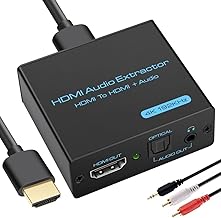
The VPFET is a straightforward choice for buyers who need to separate sound from an HDMI source and send it to a device with an optical SPDIF or 3.5mm audio input. Its listed outputs make it more versatile than a cable that only carries one type of audio connection.
- Best for: A basic source-to-audio-device setup where optical or 3.5mm output is needed.
- Why it stands out: The product name lists 4K HDMI support, optical and 3.5mm audio outputs, and support for HDCP, digital DTS 5.1, and PCM.
- Choose this if: You want an HDMI audio splitter with both digital optical and analog stereo output options.
Limitation: The supplied product information does not specify a 4K refresh rate or detailed HDMI pass-through limits. Check the listing and your source/display requirements before choosing it for a particular video format. Like other extractors, it should not be treated as a passive HDMI-to-SPDIF cable.
192KHz HDMI eARC/ARC Audio Converter

This converter is aimed at sending audio from a TV’s HDMI ARC or eARC connection to an audio device with an optical or coaxial input. Its product name also lists CEC volume control and support for PCM 2.0, Dolby 5.1, and DTS 5.1, which are useful details to compare with the formats your TV and sound system can output and decode.
- Best for: A TV-and-soundbar or TV-and-receiver setup that needs ARC/eARC audio conversion.
- Why it stands out: It lists both optical and coaxial outputs, a 192kHz specification, CEC volume control, and a 5-foot cable.
- Choose this if: You need an ARC-oriented solution and want to compare support for PCM, Dolby, and DTS formats.
Limitation: The listed supported formats do not guarantee that every TV will send them over ARC or eARC. Verify audio output settings and the exact connection direction in the product listing before purchase.
4K@60Hz HDMI 2.0b Audio Extractor

For buyers who want audio extraction while maintaining a clearly specified video format, this HDMI 2.0b model lists 4K at 60Hz pass-through. It provides HDMI ARC/eARC, optical Toslink SPDIF, and 3.5mm stereo audio options, making it a flexible candidate for systems with different audio input types.
- Best for: A setup requiring listed 4K@60Hz pass-through alongside digital optical or analog stereo audio output.
- Why it stands out: The product name specifies HDMI 2.0b, HDCP 2.2, PCM and DTS 5.1 support, and included optical and HDMI cables.
- Choose this if: You need several audio-output choices and want the pass-through resolution and refresh rate stated in the product name.
Limitation: The listed audio support is not a promise that all surround formats from all source devices will be available. Confirm the complete supported-format details and whether your setup uses the extractor’s ARC/eARC function or standard HDMI input.
HDMI ARC Audio Extractor With Multiple Outputs

This ARC-focused adapter is designed for a TV’s HDMI ARC connection and lists optical SPDIF, coaxial RCA, and 3.5mm AUX outputs. That range is useful when a soundbar, amplifier, or speaker system has a different input from the one provided by the TV. The product name also notes an included cable.
- Best for: TV owners who want to convert ARC audio for equipment with optical, coaxial, or 3.5mm input.
- Why it stands out: It lists three output types, allowing a buyer to match the converter to several kinds of audio equipment.
- Choose this if: You need an ARC-specific adapter and are not sure whether your receiving device uses optical, coaxial RCA, or analog AUX.
Limitation: The supplied information does not state supported resolutions, audio formats, or eARC support. Do not assume those capabilities from the word “ARC”; check the product details and your TV’s port labeling.
TUOLNK Optical-To-HDMI ARC Adapter

This product is listed as an optical-to-HDMI ARC converter, so its stated direction is important: it is intended for an optical audio source connecting toward an HDMI ARC soundbar or similar ARC input. That is different from the more common task of taking HDMI audio and sending it out through an optical SPDIF port.
- Best for: Buyers whose signal needs to travel from an optical audio output to an HDMI ARC device.
- Why it stands out: The product name lists 192kHz, PCM 2.0, a 6.6-foot cable, and use with soundbars, receivers, and speakers.
- Choose this if: Your source provides optical output and your receiving audio device expects HDMI ARC.
Limitation: Avoid this if you need HDMI input converted to optical SPDIF output; the stated direction is the reverse. The listed PCM 2.0 support also should not be mistaken for listed multichannel Dolby or DTS support.
Buying Guide: How To Choose An HDMI-To-SPDIF Converter
Do you need an extractor or an ARC converter?
Start by identifying where the audio originates. A standard HDMI audio extractor takes an HDMI signal from a source device and provides a separate audio output. An ARC converter works with the TV’s Audio Return Channel connection, carrying audio from the TV toward an audio device. These jobs are related, but the devices are not automatically interchangeable.
Look at the ports and labels on both devices. A streaming player or game system may connect to an extractor’s HDMI input, while the TV’s HDMI ARC port is used when sound from the television itself needs to reach a soundbar or receiver. If the source is an optical output and the destination is an HDMI ARC input, a converter with that direction must be selected instead.
Is HDMI-to-SPDIF a cable or an active adapter?
In most setups, HDMI-to-SPDIF conversion requires an active extractor or converter rather than a passive cable. HDMI carries audio and video together, while SPDIF optical carries digital audio. A converter must separate or translate the signal for the receiving device. Therefore, match the product’s named input and output ports instead of searching only for a cable with two connector types.
Check whether the product requires a separate power connection or has other installation requirements in its listing. The provided product descriptions do not specify power details for every model, so do not assume a particular power method based on appearance alone.
Which output should you use: optical, coaxial, or 3.5mm?
Choose optical SPDIF when the receiving soundbar, receiver, or speaker has an optical input. Optical uses a Toslink connection and carries digital audio. Coaxial SPDIF is another digital connection, but it uses a coaxial-style connector; it is not the same as an optical port. A 3.5mm AUX output is analog stereo, so it is a different signal type from digital SPDIF.
Some listed products offer more than one output. Multiple ports can make an adapter easier to match to existing equipment, but they do not mean every output carries every audio format. Confirm which output you intend to use and whether the receiving device has the matching input.
How should you compare audio formats?
Compare the formats supported by the source, converter, and receiving audio device. These products mention combinations of PCM 2.0, Dolby 5.1, and DTS 5.1. The full chain matters: a format listed by the adapter will not help if the TV does not send it through the chosen connection or the sound system cannot decode it.
PCM 2.0 generally refers to two-channel PCM audio, while the listed Dolby 5.1 and DTS 5.1 labels refer to multichannel formats. If you want surround sound, verify the format and connection requirements in the manuals for the TV and sound system, as well as the converter listing. Do not assume that “digital” means every surround format will pass through.
Does 4K@60Hz pass-through matter?
Video pass-through matters when a source device sends video through the extractor before it reaches the TV. If your system uses this arrangement, compare the extractor’s stated resolution, refresh rate, HDMI version, and HDCP information with the video source and display requirements. The 4K@60Hz model specifically lists HDMI 2.0b and HDCP 2.2; the other supplied descriptions do not all provide the same level of detail.
If you are using an ARC-only connection from a TV to an audio device, video may not pass through the converter in the same way as a source-to-TV extractor arrangement. Identify the wiring path before deciding that a particular pass-through specification is essential.
What should you check before connecting it?
- Confirm the direction: HDMI to optical is different from optical to HDMI ARC.
- Match the source port and receiving device input to the converter’s labeled connections.
- Check whether the TV has an ARC or eARC port and whether the product supports the connection you plan to use.
- Review audio output settings on the TV or source device, including PCM or bitstream options where available.
- Verify supported audio formats and video pass-through details in the product listing.
- Check cable lengths and included cables against your planned placement.
Frequently Asked Questions
Can I use a regular HDMI cable to connect to an optical SPDIF input?
No. HDMI and optical SPDIF use different connection types and carry signals differently. Use an active audio extractor or converter that lists HDMI input and optical SPDIF output for that direction.
Does HDMI ARC send TV audio to a soundbar?
Yes, ARC is intended to return audio from a compatible TV to an audio device through an HDMI ARC connection. Both connected devices and the selected ports must support the required ARC function. Check whether a specific converter supports ARC or eARC before buying.
Will an HDMI-to-optical adapter provide Dolby 5.1?
Only if the source, converter, and receiving device all support the relevant format and the source sends it through the connection in use. Some products list Dolby 5.1 or DTS 5.1 support, but format availability depends on the complete setup.
Is optical SPDIF the same as 3.5mm AUX?
No. Optical SPDIF is a digital audio connection, while 3.5mm AUX is an analog audio connection. Choose the output that matches the input on the soundbar, receiver, or speaker you plan to use.
Can an optical-to-HDMI ARC converter work as an HDMI-to-optical extractor?
Not necessarily. Signal direction matters. A product described as optical-to-HDMI ARC is intended to send audio from an optical source toward an HDMI ARC device, not to extract HDMI audio to an optical output.
Do I need eARC for optical SPDIF?
Not in every setup. The required connection depends on the TV, converter, audio device, and audio format you want to use. If a product lists ARC but not eARC, do not assume eARC support; check the exact specifications and connection requirements.