
The best HDMI-to-SPDIF splitter depends on whether you need audio from an HDMI source or from a TV’s ARC/eARC port. The avedio links 4K@60Hz extractor is best for a modern HDMI setup with ARC support, while the VPFET extractor is better for a basic 4K@30Hz source. For TV audio return, choose an ARC-specific model and confirm that the TV has an HDMI port labeled ARC or eARC.
| Product | Best for | Key distinction |
|---|---|---|
| avedio links 4K@60Hz HDMI 2.0b | Modern HDMI and ARC setups | 4K@60Hz, optical, and 3.5mm |
| avedio links 4K@60Hz extractor | HDMI source to optical audio | Separate pass, 2-channel, and 5.1 modes |
| VPFET HDMI Audio Extractor | Basic 4K@30Hz setups | Optical DTS 5.1 and analog PCM 2.0 |
| HDSUNWSTD 1080P Extractor | 1080p equipment | HDMI 1.4 and SPDIF output |
| avedio links 4K60Hz ARC Extractor | ARC-enabled TV audio | Optical, coaxial, 3.5mm, and L/R outputs |
avedio links 4K@60Hz HDMI 2.0b Extractor

Best for: A buyer who wants an HDMI audio extractor for a 4K@60Hz setup and may also need ARC audio from a compatible TV. This model offers HDMI input and output, optical Toslink SPDIF, and 3.5mm stereo output.
The listed video capabilities include 4K at 60Hz, HDR10, HDCP 2.2, and up to 18 Gbps bandwidth. Its three audio modes are TV, 2.0-channel, and 5.1-channel. The 3.5mm output is specified for 2-channel PCM/LPCM, while the optical output is listed for PCM and several multichannel formats.
Choose this model if both resolution and ARC support matter. Its listing says ARC is supported through a compatible HDTV input and ARC/eARC interface. Limitation: ARC audio depends on using the correct TV port and settings; it is not a universal way to extract audio from any TV connection.
avedio links 4K@60Hz HDMI Extractor

Best for: Connecting an HDMI source to a display while routing sound to an optical receiver or 3.5mm stereo device. The product provides one HDMI input, one HDMI output, optical SPDIF, and analog 3.5mm output.
It supports 4K@60Hz, 3D, and several lower video resolutions, along with HDMI 2.0 and HDCP 2.2. Pass, 2CH, and 5.1CH modes help match the audio output to the connected equipment. The listing specifies PCM/LPCM stereo for 3.5mm and describes optical output for two-channel PCM and listed surround formats.
This is a practical choice when a source device needs to pass video to a display and send audio separately to a receiver, soundbar, or headphones. Its ARC function is intended for a TV with an ARC/eARC interface. Limitation: The listing says it does not support Dolby Digital Plus or CEC, and simultaneous optical and analog output requires the source to be set to PCM/stereo.
VPFET HDMI Audio Extractor
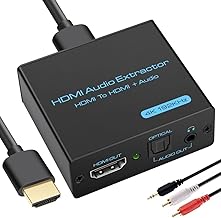
Best for: A straightforward HDMI source setup that does not require 4K at 60Hz or TV ARC. This extractor offers optical and 3.5mm audio outputs, with selectable 2.0CH, 5.1CH, and pass modes.
The listed video support reaches 4K@30Hz and includes HDCP 1.4. Optical output is specified for DTS 5.1, while the 3.5mm output supports PCM 2.0. The product instructions call for 2.0CH mode with 3.5mm audio and 5.1CH mode with optical audio. Pass mode is another setting to try if the selected mode does not produce audio and video.
Choose this model when its resolution and channel limits match the source and display. Limitation: It does not support 7.1-channel audio, ARC, or eARC, and its listing warns that some named streaming devices and consoles are limited to 1080p with this extractor. Confirm the source’s output format before purchase.
HDSUNWSTD 1080P HDMI Extractor

Best for: Older or 1080p HDMI systems where 4K pass-through is unnecessary. The device sends HDMI video onward and offers SPDIF and 3.5mm audio outputs, so it can suit a basic display-and-audio separation arrangement.
Its listed video formats include 1080p, 1080i, 720p, and lower resolutions. It supports HDMI 1.4 and HDCP 1.4. The product description instructs users to set the source audio output to PCM, making source configuration an important part of setup.
Choose this model if the equipment is compatible with its 1080p-oriented specifications and you do not need ARC. Limitation: It does not support ARC, so it cannot take sound from a TV’s ARC connection and send it to an audio system. It is also not the right pick when 4K video pass-through is required.
avedio links 4K60Hz ARC Extractor

Best for: A buyer who needs to send sound from an ARC-enabled TV to an audio device. Unlike a standard source-side extractor, this adapter is specifically described for taking TV audio through an HDMI ARC interface.
Its listed output choices are optical, coaxial, 3.5mm, and L/R audio. The product also lists 4K60Hz, a 192kHz sampling rate, and support for 5.1-channel Dolby and DTS audio. The listing says to set the TV audio output to PCM or LPCM before use.
Choose this model when the TV is the audio source and the TV has a port labeled ARC or eARC. Limitation: Without that TV port and ARC support, the stated TV-audio function will not work. Optical and coaxial output volume cannot be controlled by the TV remote according to the listing; adjust volume at the connected audio equipment.
Buying Guide: How To Choose An HDMI To SPDIF Splitter
Do you need source-side extraction or TV ARC audio?
First identify where the sound originates. A standard HDMI audio extractor receives a signal from a device such as a media player or game console, passes video to a display, and sends audio to an optical receiver. An ARC extractor receives audio from a TV through a port labeled ARC or eARC. These uses are different, so check the port labels and product instructions before choosing.
If you want audio from built-in TV apps or devices connected to the TV, an ARC-compatible unit may be necessary. If you want to separate audio from an HDMI source before it reaches the television, select a model designed for HDMI input and output. A product without ARC cannot be treated as a TV-audio-return adapter.
What video resolution and refresh rate do you need?
Match the splitter’s stated video support to the source and display. The products here range from a 1080p-focused HDMI 1.4 model to extractors listed for 4K@30Hz or 4K@60Hz. A 4K@60Hz system should not be paired with a unit limited to 1080p or 4K@30Hz if you need to preserve the higher signal format.
Also check HDCP support when connecting protected video sources. The products list HDCP 1.4 or HDCP 2.2, so compare that specification with the rest of the video chain. The source, extractor, cable path, and display all need to work together for the desired video signal.
Which audio format should the source send?
SPDIF usually refers to an optical Toslink connection in this product category. It can carry stereo PCM and supported compressed surround formats, but it is not equivalent to every HDMI audio capability. Confirm that the extractor, source, and receiver share a supported format. The product listings distinguish optical surround output from 3.5mm stereo output.
When there is no sound, check the source’s digital audio setting. Several listings recommend PCM or LPCM for particular outputs or simultaneous output use. If a 5.1 setting produces silence, test the mode recommended by the manufacturer and verify that the receiver accepts the selected format.
Do you need optical, analog, or both?
Choose optical SPDIF for a receiver, soundbar, or other device with a Toslink input. Choose 3.5mm when the destination accepts analog stereo. Do not assume that every splitter outputs the same audio to both connections at once: some product instructions require a specific mode or PCM source setting, and some models describe outputs separately.
Check the receiving device’s inputs before buying. If it only has optical, a 3.5mm-only adapter will not solve the connection problem. If you need coaxial or left/right RCA-style output, select an ARC converter whose listed outputs include those connections rather than assuming a standard optical extractor has them.
What setup checks prevent common problems?
- Confirm whether the signal path starts at an HDMI source or at a TV’s ARC/eARC port.
- Match the extractor’s video limit to the resolution and refresh rate you intend to use.
- Set the source or TV to a supported audio format, such as PCM/LPCM where specified.
- Select the extractor’s correct 2-channel, 5.1-channel, pass-through, or TV mode.
- Check that the receiver or soundbar has the required optical, analog, or coaxial input.
- Verify HDCP support across the connected source, extractor, and display.
Frequently Asked Questions
Is HDMI to SPDIF the same as HDMI ARC?
No. HDMI-to-SPDIF extraction usually takes audio from an HDMI source and outputs it through optical. ARC sends audio from a compatible TV back through its HDMI ARC/eARC port. Choose based on whether the source device or the TV is supplying the audio.
Can an HDMI audio extractor send 5.1 sound over optical?
Some models in this list specify optical output for supported 5.1 formats. The source must send a compatible format, the extractor must be set to the correct mode, and the receiving equipment must support that format.
Will an HDMI-to-SPDIF splitter work with any television?
No. A standard extractor may take audio from an HDMI source rather than extract sound from the TV itself. For TV audio, check for an ARC/eARC port and choose a product that explicitly supports ARC.
Why is there no audio from the optical output?
Check the audio mode, source output format, and receiver input. Try PCM/LPCM if the product instructions recommend it, then verify that the selected optical format is supported by both the extractor and the audio device.
Does an optical SPDIF connection carry 4K video?
No. Optical SPDIF carries audio. The extractor’s HDMI connections handle video pass-through, so its stated resolution, refresh rate, and HDCP support determine the video capabilities of the overall setup.