
The best headphone inline mic adapter depends on the connection you need: choose a 3.5mm Y splitter for a computer with separate headphone and microphone jacks, a radio adapter for compatible two-way radios, or a USB adapter for a computer without a suitable analog input. The options below cover those three setups, with specific picks for gaming headsets and portable use. Check your headset’s plug standard and your device’s ports before choosing.
| Product | Best For | Connection Type |
|---|---|---|
| D & K Exclusives Store Y Splitter | Portable computer headset connection | 3.5mm female to dual 3.5mm male |
| BTECH Universal 2-Pin Adapter | Compatible two-way radios | Two-pin radio to 3.5mm headset |
| Bordsek Headphone Mic Splitter | CTIA headsets and PC audio ports | TRRS female to dual TRS male |
| ienza Headset Splitter | Gaming headsets and separate PC jacks | CTIA TRRS female to dual 3.5mm male |
| daily headset 3.5mm-to-USB Adapter | USB computer connection | 3.5mm CTIA headset to USB |
D & K Exclusives Store Headset Y Splitter

This adapter connects a headset with one 3.5mm audio-and-microphone plug to a computer or laptop with separate headphone and microphone jacks. Its single female socket branches into two male connectors, one for audio output and one for microphone input.
Best for: People who want to use a newer single-plug headset with a PC or laptop that has two separate 3.5mm ports. The compact design is also useful as a spare to keep in a laptop bag. The listed features include gold-plated connectors and oxygen-free copper conductors.
Choose this if your headset has a combined plug and your computer has distinct headphone and mic jacks. Limitation: It is an analog splitter, not a USB adapter, and will not combine separate computer jacks into one headset connection.
BTECH Universal Two-Pin Radio Adapter

This adapter is designed for compatible two-pin radios, including the listed BaoFeng and Kenwood radio types, and connects them to a standard 3.5mm headset or audio output. It supports an inline headset microphone for two-way communication. The cable setup includes a push-to-talk button, which can be secured with the included Velcro or snap line.
Best for: Users who need an inline mic and push-to-talk control with a compatible radio. It is the only option in this selection specifically described for radio communication rather than computer audio.
Choose this if your radio uses the compatible two-pin connection and you want to use a 3.5mm headset mic. Limitation: This is not a general-purpose PC headset splitter. Confirm the radio’s connector and headset requirements before purchasing; the listed compatibility does not establish support for every radio or headset.
Bordsek TRRS Headphone Mic Splitter
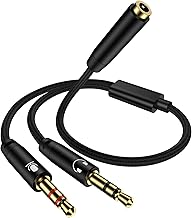
The Bordsek splitter takes a 3.5mm TRRS headset connection and separates it into two 3.5mm male connections for audio and microphone. The listed features describe it as plug-and-play, with no app or driver required. It is identified for CTIA-standard headsets and lists examples including Turtle Beach, HyperX Cloud, Razer Kraken X, Bose, and Sennheiser models.
Best for: Buyers whose CTIA headset needs to connect to a computer with separate mic and headphone ports. The product listing also notes gold-plated contacts and names a range of gaming and wired headset examples.
Important caution: The listing says the microphone will not work with Apple original earphones and Beats headphones. Compatibility examples are not a guarantee for every model, so check the headset’s plug standard and the computer’s port layout.
ienza Gaming Headset PC Splitter

This 8-inch Y splitter is listed for connecting a four-pole CTIA TRRS gaming headset to a PC with separate audio and microphone connectors. It has one 3.5mm female socket and two 3.5mm male plugs. The listing names headset brands and product lines such as Astro A10 and A40, Turtle Beach, HyperX Cloud, SteelSeries, Razer Kraken, Sennheiser, and Sades.
Best for: Gaming headset owners who need to split a single headset plug between separate PC mic and headphone jacks. Its short cable is a simple option when the computer’s ports are close to the headset connection.
Choose this if your headset uses the stated CTIA four-pole standard and your computer has two separate 3.5mm jacks. The listing also mentions PS4, Xbox One, Switch, and smartphone headsets, but the splitter’s stated PC use requires separate audio and mic connectors at the computer.
Limitation: It is a short analog cable, not a USB sound adapter. The listing does not specify support for every headset standard or every device configuration.
daily headset 3.5mm-to-USB Adapter

This adapter converts a 3.5mm CTIA four-pole headset plug to a USB plug for a computer, laptop, or softphone. The listed features support both listening and speaking and describe plug-and-play setup without a driver download or external power. Its cable is listed as 3.28 feet long, with inline speaker volume up and down controls.
Best for: Someone who wants to connect a compatible analog headset to a computer through USB rather than use separate 3.5mm mic and headphone ports. It is the only product here that changes the connection to USB.
Choose this if your headset has a CTIA TRRS plug and you want USB audio with microphone support. Limitation: The listing specifies CTIA headsets; it does not establish compatibility with every 3.5mm plug standard, device, or operating system configuration.
Buying Guide: How To Choose A Headphone Inline Mic Adapter
What ports does your device have?
Start by checking the device you want to connect. A desktop computer may have separate headphone and microphone jacks, while a laptop may have one combined headset jack or USB ports. A radio uses its own accessory connector. An adapter only helps when its input and output match the ports on both the headset and the device.
- Two PC audio jacks: Look for a splitter with one headset socket and two separate male plugs.
- One USB port: Consider a USB adapter that explicitly supports both microphone input and headphone output.
- Two-way radio: Choose a radio-specific adapter with the correct radio connector and push-to-talk setup.
Does your headset have a single plug or two?
A single 3.5mm headset plug usually carries both audio and microphone signals. A Y splitter can route those signals to separate computer jacks. If your headset already has separate headphone and microphone plugs, a one-female-to-two-male splitter is generally the wrong direction for the connection. Match the cable’s female and male ends to your equipment.
What do TRRS and CTIA mean?
TRRS describes a 3.5mm plug with four contact sections, commonly used to carry stereo audio and microphone signals. CTIA is a wiring standard for that type of headset connection. Some adapters specifically identify CTIA support, so check the headset’s documentation or plug requirements rather than assuming all four-pole headsets are wired identically.
Connector shape alone does not guarantee that the microphone will work. The Bordsek listing, for example, specifically warns that its mic does not work with Apple original earphones and Beats headphones. Use stated compatibility information as a starting point and confirm the exact headset model where possible.
Do you need a splitter or a USB sound adapter?
A splitter separates analog microphone and headphone signals; it does not convert them to USB. The daily headset adapter changes a compatible 3.5mm CTIA headset connection to USB and is listed as supporting listening and speaking. Choose based on the ports available and the connection method you need, not just the word “adapter” in a product name.
Will an inline microphone work with a radio?
Radio communication needs more than a standard PC splitter. The BTECH adapter is designed for compatible two-pin radios and includes a push-to-talk button, allowing the user to transmit by pressing the button. Verify the radio’s connector and the headset’s microphone requirements. A computer headset splitter should not be treated as a radio adapter unless the product explicitly supports the radio connection.
What should you check before ordering?
- Count the headset plug’s contact sections and identify whether the mic is built into that plug.
- Check whether the computer has one combined headset jack, separate mic and headphone jacks, or USB ports.
- Confirm CTIA support when the product specifies it, and look up compatibility for the exact headset model.
- For radios, verify the radio’s accessory connector and whether you need push-to-talk operation.
- Check cable length and layout when the ports are far from where you will use the headset.
Frequently Asked Questions
Can a headphone splitter make my headset microphone work on a PC?
Yes, if it is the correct Y splitter for a single-plug headset and a computer with separate microphone and headphone jacks. Connect each male plug to its matching PC port.
Can I use a headphone mic splitter with a single combo jack?
Usually, a splitter designed to separate a headset plug into two plugs is intended for a computer with separate ports. A single combo jack may not need that splitter. Check the computer’s port configuration and the adapter’s intended direction.
Does a 3.5mm-to-USB adapter support microphone input?
The daily headset adapter in this guide is listed as supporting both listening and speaking with compatible CTIA headsets. Check the product specifications for microphone support before choosing another USB adapter.
Are CTIA and TRRS interchangeable terms?
No. TRRS describes a four-contact plug, while CTIA identifies a wiring arrangement for headset signals. A product that supports one standard may not necessarily support every four-contact headset.
Can I use a PC headset splitter with a two-way radio?
Not based on the product descriptions here. A two-way radio requires an adapter designed for its connector and communication controls, such as a compatible radio adapter with push-to-talk support.