
Best USB Headphone Jack Adapters for Clear Audio
If you need a simple USB solution to add a 3.5mm headset port to a computer, laptop, PS4/PS5, or other USB-enabled devices, these USB to 3.5mm adapters are ideal. They deliver plug-and-play convenience with built-in DACs for better sound and mic support. This guide highlights five versatile options, showing who each is best for, plus a buying guide and quick FAQs to help you pick the right one.
| Product | Best For | Key Benefit | Notes |
|---|---|---|---|
| MOSWAG USB to 3.5mm Jack Audio Adapter External Stereo Sound Card | Multimedia users seeking reliable mic and audio input/output | Stable 16-bit/48kHz audio with noise reduction | Supports CTIA/OMTP; wide OS compatibility |
| STSAUX USB to 3.5mm Jack Audio Adapter (2-Pack) | Gaming and calls on Windows/Mac/Linux | 24-bit/96kHz high-resolution audio with plug-and-play | Not compatible with iOS mic functionality |
| JXMOX USB to 3.5mm Audio Adapter (2-Pack) | PS4/PS5 and PC users needing simple USB audio | Hi-Fi stereo with DAC for low-noise audio | Unidirectional output; some devices unsupported |
| SABRENT USB External Stereo Sound Card Adapter | Legacy systems and broad OS compatibility | No drivers; class-compliant USB audio | Two jacks: stereo out and mono mic in |
| DUKABEL USB Headphone Adapter | All-in-one PC/console setups | 2-in-1 listening and speaking with easy plug-and-play | Not for TV/PS3/Car/Truck |
MOSWAG USB To 3.5mm Audio Adapter

The MOSWAG adapter adds a 3.5mm TRRS port with integrated microphone input and audio output to USB-enabled devices. It uses a built-in DAC for stable 16-bit/48kHz output and offers noise reduction for clearer sound. Best for users who need both microphone and headset support on laptops, desktops, or consoles. Note: The 3.5mm microphone jack does not support TS or TRS connectors. Suitable for Windows, macOS, Linux, Chrome OS, and some gaming consoles.
STSAUX USB To 3.5mm Audio Adapter (2-Pack)

STSAUX offers a high-performance DAC with 24-bit/96kHz audio output and built-in microphone support. It’s plug-and-play with Windows, Mac, Linux, Chrome OS, and Surface devices. Best for gamers and communicators who want high-resolution sound and quick setup. Limitation: Not compatible with iOS microphone functionality; intended for USB audio output primarily.
JXMOX USB To 3.5mm Audio Adapter (2-Pack)

JXMOX provides a simple USB-to-TRRS solution that adds a 3.5mm port for both input and output. It’s ideal for PS4/PS5 and PC users who want a compact, no-driver setup. Best for users who need portable adapters for multiple devices. Caution: The USB port is output-only in some configurations, so it may not support microphone input on all devices.
SABRENT USB External Stereo Sound Card Adapter

SabRENT’s model is a classic plug-and-play USB sound card with separate 3.5mm stereo output and mono microphone input. It’s driverless and widely compatible across Windows, Mac, and Linux. Great for older systems or environments that require a straightforward, class-compliant USB audio device. Limitation: Does not support a combined single-headset jack and is a two-jack solution only.
DUKABEL USB Headphone Adapter
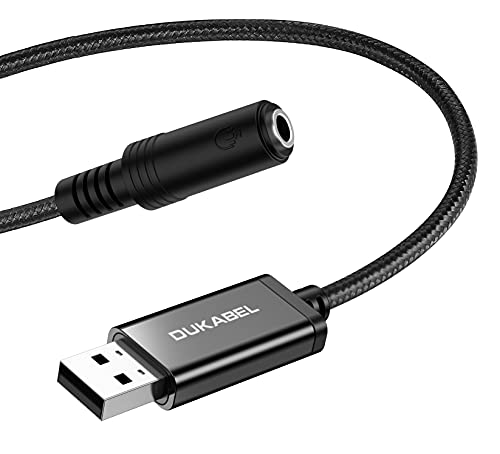
DUKABEL’s 2-in-1 USB audio adapter combines listening and speaking capabilities with plug-and-play simplicity. It supports Windows, PS4, PS5, laptops, and desktops. Best for all-in-one setups where you want a single device for audio input and output. Caution: Not compatible with TV, car, PS3, or trucks in some configurations.
Buying Guide
- Intended use: If you need microphone input, look for USB adapters labeled as TRRS with microphone support. If you only require audio output, verify that the mic jack is compatible or optional.
- DAC quality and sample rate: Higher bit depth and sampling rate (e.g., 24-bit/96kHz) generally deliver clearer audio, especially for gaming and music.
- Operating system compatibility: Confirm support for Windows, macOS, Linux, or Chrome OS as needed; some adapters explicitly avoid iOS or TVs.
- Connection type and ports: Check whether you need separate stereo out and mic in jacks or a single combined port. Consider unidirectional output limitations for some models.
- Plug-and-play vs drivers: Driverless devices are simpler but ensure your OS supports class-compliant USB audio.
- Multi-pack considerations: If you need multiple units, a 2-pack option can simplify setup for classrooms, studios, or households.
FAQ
- Do USB headphone adapters require drivers? Most are plug-and-play and do not require drivers, especially those labeled as class-compliant.
- Can these adapters work with consoles? Yes, many models support PS4/PS5 and other USB-enabled consoles, but verify each device’s compatibility with mic input or output limitations.
- Will they improve mic quality on a laptop? They can improve mic quality by providing an external DAC/ADC, but results depend on your headset and the device’s USB implementation.
- Can I use a single 3.5mm jack for both mic and headphones? Some adapters support TRRS combined jacks, but many use separate ports for mic input and headphone output; check the product’s port configuration.
- Are there limitations with iOS devices? Some adapters do not support iOS microphone functionality; verify the compatibility if using with iPhone or iPad accessories.
- What is a DAC, and why does it matter? A DAC converts digital audio to analog; a better DAC can reduce noise and improve clarity in gaming, music, and calls.