
The best hi-fi monitor speakers depend on whether you need accurate sound for creative work, flexible connections, or compact desktop listening. The PreSonus Eris 3.5 is a practical fit for near-field studio use, while the Edifier MR5 offers a three-way design, room tuning, and multiple inputs. OHAYO suits buyers seeking compact bookshelf-style speakers; LENRUE and Nylavee are desktop-focused alternatives with different form factors.
| Product | Best For | Standout Detail |
|---|---|---|
| PreSonus Eris 3.5 | Near-field listening and studio tasks | 50 watts; 3.5-inch woofers |
| Edifier MR5 | Home studios and input flexibility | Three-way design and room tuning |
| OHAYO 60W Computer Speakers | Compact desktop or small-room audio | Bluetooth 5.3 and front volume knob |
| LENRUE G11 | Space-saving computer audio | Compact design and touch-controlled lights |
| Nylavee Computer Speakers | Desktop users wanting a sound bar | Bluetooth 5.0 and AUX |
PreSonus Eris 3.5 Powered Studio Monitors

Best for: Desktop listeners who want a stereo pair for music production, gaming, movies, streaming, and everyday audio. PreSonus describes these as near-field studio monitors, a format suited to listening from a relatively close position at a desk.
The pair has 50 watts of built-in amplification, 3.5-inch woven-composite woofers, and 1-inch silk-dome tweeters. The listed frequency range is 80 Hz to 20 kHz. Those details make the Eris 3.5 a straightforward choice for buyers prioritizing powered near-field speakers with clearly specified driver sizes and frequency coverage.
Why it was selected: It directly fits the monitor-speaker search and is described for both studio tasks and general listening. Limitation: Its listed low-frequency range begins at 80 Hz, so buyers focused on deeper bass should compare that specification with their needs.
Edifier MR5 Three-Way Studio Monitors

Best for: Home-studio users who want several connection options and controls for adapting sound to a room. The MR5 uses a three-way active crossover design with a 5-inch woofer, 3.75-inch mid driver, and 1-inch silk-dome tweeter. The product lists a 46 Hz–40 kHz frequency response.
Its listed features include XLR/TRS/RCA inputs, Bluetooth 6.0, and support for 24-bit/96 kHz wired and wireless audio, including LDAC. Physical rear controls adjust high and low frequencies. The EDIFIER ConneX app adds room-compensation options such as low cut-off, desktop control, and acoustic-space presets.
Why it was selected: It is the most feature-rich option here for buyers comparing driver layout, connection choices, and room adjustments. Limitation: Its controls and multiple connection formats may be unnecessary if you want a simple, small desktop pair.
OHAYO 60W Compact Bluetooth Speakers
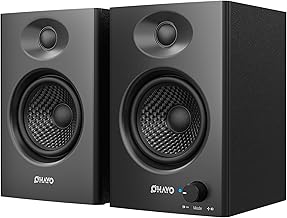
Best for: People who want compact speakers for a desktop, home office, gaming station, or small-room setup. OHAYO lists a stereo 2.0 pair with Bluetooth 5.3 and 30 watts per speaker, for 60 watts total.
The drivers are a 0.75-inch carbon-fiber silk-dome tweeter and a 3-inch carbon-fiber full-range driver. A rear bass port is intended to add low-end depth, and the MDF wooden enclosure is described as reducing cabinet resonance. A front-panel volume knob provides quick access to level adjustment.
Why it was selected: The small bookshelf format and combination of wireless connection, front volume control, and stated driver specifications suit space-conscious listeners. Limitation: The provided features do not specify a frequency response or list wired input types, so check the product listing if those details are essential.
LENRUE G11 Compact Desktop Speakers

Best for: Computer users who need a compact speaker setup that fits beneath a monitor. LENRUE describes the G11 as a USB-C or USB-powered desktop speaker with AUX audio. Its compact, all-in-one layout is designed to take up little desk space, and the cables are joined to help reduce desktop clutter.
The manufacturer highlights four amplifier IC horns and describes the sound as distortion-free and noiseless. The product also includes angular gaming lights that can be switched on or off with a touch control. These features make it more oriented toward convenient desktop playback and visual effects than a conventional studio-monitor setup.
Why it was selected: It is a space-saving option for buyers whose priority is computer audio rather than a larger pair of studio monitors. Limitation: The supplied product details do not specify driver sizes, frequency response, or Bluetooth connectivity.
Nylavee Bluetooth and AUX Sound Bar

Best for: Desktop users who prefer a single sound bar and want Bluetooth or a wired AUX connection. Nylavee lists four speaker units and two independent bass diaphragms. Its stated connections are Bluetooth 5.0 and 3.5 mm AUX, with the product described for computers, phones, tablets, and gaming systems.
The manufacturer also identifies double-layer neodymium magnets and mica-fiber diaphragms. This makes the Nylavee a useful comparison for buyers deciding between a compact sound bar and separate left-and-right monitor speakers.
Why it was selected: It offers a distinct desktop form factor and two stated connection methods. Limitation: It is a sound bar rather than a traditional separate-pair monitor arrangement, so avoid it if stereo speaker placement or studio-monitor inputs are a priority.
Buying Guide: How to Choose Hi-Fi Monitor Speakers
Do you need studio monitors or desktop speakers?
Start with the main task. Studio monitors are generally chosen when a listener wants to assess music or other audio at close range. Among these options, the PreSonus Eris 3.5 is explicitly described as a powered near-field studio monitor pair. The Edifier MR5 is also positioned as a studio monitor and provides room-adjustment features.
For everyday computer listening, a compact desktop speaker may be more convenient. OHAYO emphasizes a bookshelf-style design, while LENRUE is made to sit under a monitor. Nylavee uses a single sound-bar layout. These products can serve desktop playback needs, but their listed specifications do not make them equivalent to dedicated studio monitors.
How much space do you have?
Measure the available desk or shelf space before choosing. A separate stereo pair needs room for both speakers and a listening position between them. A compact under-monitor speaker or sound bar can suit a narrow desk, while bookshelf-style cabinets may need shelf or desktop space and clearance around their enclosures.
Also consider where the speakers will sit relative to a wall. The OHAYO features a rear bass port, so placement may affect how its low frequencies interact with the nearby surface. The Edifier MR5 provides physical frequency adjustments and app-based room compensation, which gives buyers more listed ways to tailor output to their setup.
Which connections matter for your devices?
Check the inputs against the source devices you actually use. The Edifier MR5 lists XLR/TRS/RCA inputs and Bluetooth 6.0. OHAYO lists Bluetooth 5.3 in its product name. Nylavee specifies Bluetooth 5.0 and a 3.5 mm AUX connection. LENRUE specifies USB-C or USB power and AUX audio.
Do not assume that a speaker supports an input merely because it is common in its category. The supplied details for the PreSonus Eris 3.5 do not list connection types, so confirm the current product listing before buying if a particular input is required. Distinguish USB power from USB audio: the LENRUE description identifies USB as a power method and AUX as its audio connection.
What do driver size and frequency response tell you?
Driver specifications help compare products, but they do not describe the entire listening experience. The Eris 3.5 lists 3.5-inch woofers and an 80 Hz–20 kHz range. The MR5 lists a 5-inch woofer, dedicated mid driver and tweeter, and 46 Hz–40 kHz response. OHAYO lists a 3-inch full-range driver and a separate tweeter, but not a frequency range.
For music with prominent low frequencies, compare the published lower-frequency figures and consider whether you need a separate subwoofer. Do not infer exact bass output from a driver size or a claim such as “powerful bass” alone. Product specifications are useful for narrowing choices, but room size, placement, and listening distance also matter.
When are room controls useful?
Speakers can sound different depending on desk position, room size, and nearby walls. The Edifier MR5 is the only model in this selection whose provided details specifically describe room compensation, including physical high- and low-frequency adjustments and app presets. These controls may help buyers adapt the sound to a particular placement.
If a speaker has no listed room controls, placement becomes especially important. Keep a pair positioned consistently on the left and right, and avoid blocking the drivers. Follow the product instructions for setup and allow enough space for any rear-facing ports or connections.
Should you choose Bluetooth or wired audio?
Bluetooth can make it convenient to play audio from compatible devices without a cable, while a wired connection may better suit a fixed computer or studio setup. The MR5 lists both Bluetooth and wired inputs; Nylavee lists Bluetooth and AUX. OHAYO lists Bluetooth 5.3, while LENRUE specifies AUX audio.
Choose based on your source devices and how you use the speakers. For production work, confirm that the connection and workflow meet your requirements instead of assuming that a wireless feature alone makes a speaker suitable. If you switch frequently between a computer and a phone, compare the supported inputs and connection methods before deciding.
How should you compare total power claims?
Power figures are only one part of a speaker comparison. PreSonus lists 50 watts of built-in amplification, OHAYO lists 30 watts per speaker, and the Edifier product name specifies 110 watts RMS. These figures are not a complete measure of sound quality, accuracy, or maximum usable loudness.
Consider the intended listening distance, room, speaker placement, and driver configuration alongside power. For near-field desk use, clear sound at a short distance may matter more than choosing the largest stated wattage. Compare specifications supplied by each manufacturer rather than treating differently presented power figures as directly interchangeable.
Frequently Asked Questions
What are hi-fi monitor speakers?
Hi-fi monitor speakers are speakers intended to reproduce audio with clarity and detail. Studio monitors are often used for close-range listening and audio work, while desktop speakers may prioritize compact size, convenience, or general playback. Product features and intended uses vary by model.
Which product in this list is best for a home studio?
The Edifier MR5 and PreSonus Eris 3.5 are the most directly suited to studio-oriented use in this selection. The MR5 lists room-compensation controls and several wired inputs, while the Eris 3.5 is explicitly described as a near-field studio monitor pair.
Which option is designed to save desk space?
The LENRUE G11 is described as fitting under a monitor, and the Nylavee uses a single sound-bar design. OHAYO is also presented as a compact bookshelf-style speaker for desktop or small-room setups.
Which speakers list room-adjustment features?
The Edifier MR5 lists rear high- and low-frequency controls and app-based room-compensation options. The other product details provided here do not specify comparable room-tuning features.
Do all five products have Bluetooth?
No. Bluetooth is listed for OHAYO, Edifier MR5, and Nylavee. The provided LENRUE details list USB power and AUX audio, while the provided PreSonus features do not specify Bluetooth or other connection types.