
The best high-end audio recorder depends on what you need to capture: the Zoom F3 is best for professional field recording with XLR microphones, while the TASCAM DR-10L Pro is better for discreet on-person audio and video workflows. For meetings and searchable notes, the Comu Action Pro and Pocket AI Voice Recorder focus on transcription and summaries. The Tonfarb is a simpler, high-capacity option for long voice recordings.
| Recorder | Best For | Standout Feature |
|---|---|---|
| Zoom F3 | Field production and music | 32-bit float recording and dual locking XLR inputs |
| TASCAM DR-10L Pro | Video and personal audio | Lavalier recorder with 32-bit float and timecode support |
| Comu Action Pro | Meetings and team workflows | AI transcription and generated documents |
| Pocket AI Voice Recorder | Everyday notes and summaries | One-tap recording with AI organization |
| Tonfarb 136GB Recorder | Long voice-recording sessions | Large stated storage capacity and one-click recording |
Zoom F3 Professional Field Recorder

The Zoom F3 is best for filmmakers, musicians, and field recordists who need a recorder built around external microphones. Its 32-bit float recording is designed to capture quiet dialogue and sudden loud peaks without requiring the operator to stop and adjust recording levels. That makes it a strong fit for run-and-gun work, changing sound levels, and situations where a missed take is costly.
Two locking XLR inputs help keep microphone connections secure when the recorder is mounted out of reach or used in a more complex rig. These inputs make the F3 a better choice than a basic voice recorder for users building a production audio setup.
- Best for: Field production requiring XLR microphone connections.
- Why it stands out: 32-bit float recording and dual locking XLR inputs address common location-recording needs.
- Consideration: Choose this if you have, or plan to use, compatible XLR microphones; it is not presented as an all-in-one lavalier recorder.
TASCAM DR-10L Pro Lavalier Recorder

The TASCAM DR-10L Pro is best for filmmakers and content creators who want to record personal audio with a lavalier microphone. Its 32-bit float recording is intended to capture a wide range from whispers to loud speech, which can help when a speaker’s volume changes unexpectedly. The compact, discreet recording approach is useful when a larger field recorder and microphone setup is impractical.
Firmware version 2.0 adds LTC Jam Sync support for timecode synchronization in multi-device workflows. The recorder also supports high-capacity microSDXC media, including cards up to 512GB according to the product details. This makes it a better fit for individual speaker audio and post-production coordination than a meeting recorder focused on AI summaries.
- Best for: Video shoots and discreet personal audio capture.
- Why it stands out: It combines a lavalier microphone workflow, 32-bit float recording, and LTC Jam Sync support.
- Consideration: Check the package details and your media needs before recording; the listed features specify card support, not whether a memory card is included.
Comu Action Pro AI Voice Recorder

The Comu Action Pro is best for professionals and teams who want recordings turned into usable meeting materials. Its features include AI-generated documents such as presentation slides, email drafts, reminders, to-do lists, and action items. It also provides transcription and summaries in 113 languages through its app and website, plus real-time translation of conversations and recordings.
The adaptive six-microphone setup includes four omnidirectional microphones, one directional microphone, and one bone-conduction microphone. The product describes this arrangement as supporting capture in meetings, interviews, phone calls, and other situations. Choose it when searchable notes and follow-up tasks matter as much as the original audio.
- Best for: Meeting-heavy work and teams that need transcripts, summaries, and action items.
- Why it stands out: It combines multiple microphone types with multilingual transcription and automated document creation.
- Consideration: Its transcription and document workflow uses the Comu app and website, so it is a less direct fit for buyers seeking only a standalone audio file recorder.
Pocket AI Voice Recorder

The Pocket AI Voice Recorder is best for people who want a compact, quick way to capture conversations and turn them into organized notes. Its one-tap recording is designed for meetings, phone calls, and in-person conversations. After capture, its AI tools can create summaries, identify action items, and arrange content into conversation maps.
This model is more focused on productivity than on production audio connections. It may suit an individual who wants to review the important points without listening through an entire recording. The listed features say core tools are included, with optional advanced tools available for power users.
- Best for: Everyday meeting notes, conversation summaries, and personal productivity.
- Why it stands out: It pairs one-tap capture with automated summaries and action-item organization.
- Consideration: Buyers who need XLR inputs, timecode sync, or a clearly specified high-capacity removable-media workflow should compare a field recorder instead.
Tonfarb 136GB Digital Voice Recorder
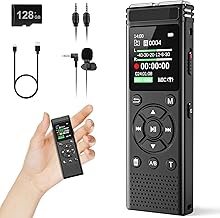
The Tonfarb is best for students, journalists, and other users who want straightforward voice capture with ample stated storage. The product lists 8GB of built-in storage plus a complimentary 128GB TF card, for 136GB in total. It claims up to 9,775 hours of recordings in MP3 format or WAV format, although actual recording time can depend on recording settings and file format.
Its listed features include PCM recording at 1536 kbps, dual noise-reduction microphones, automatic noise reduction, and voice-activated recording. A side switch can start recording even when the device is powered off, and a USB-C connection supports transferring files to a computer. The stated battery life is up to 68 hours of continuous recording on one charge.
- Best for: Long lectures, interviews, and voice notes where simple controls and storage capacity matter.
- Why it stands out: It combines one-click recording, voice activation, USB-C file transfer, and a large advertised storage capacity.
- Consideration: It is a voice recorder rather than a field recorder with listed XLR inputs or timecode features.
Buying Guide: How To Choose A High-End Audio Recorder
What will you record most often?
Start with the recording situation rather than the word “high-end.” Film dialogue, music, lectures, interviews, and meetings place different demands on a recorder. A production setup may need external microphone connections and secure cables. A speaker recording for video may benefit from a discreet lavalier workflow. Meeting notes may be easier to use when the device also generates transcripts and summaries.
For location sound with external microphones, the Zoom F3 is the clearest match in this group because its listed features include two locking XLR inputs. For individual speaker audio and video post-production, compare the TASCAM DR-10L Pro. For searchable workplace notes, the Comu and Pocket models emphasize AI processing rather than professional XLR connections.
Do you need 32-bit float recording?
Both the Zoom F3 and TASCAM DR-10L Pro list 32-bit float recording. This feature is aimed at capturing a broad range of sound levels, from quiet speech to unexpected peaks. It can be useful when levels change quickly or the operator cannot monitor and adjust them constantly. It does not replace good microphone placement, careful listening, or checking the recording before an important shoot.
If your main need is recording lectures or spoken notes, compare the full workflow before prioritizing this specification. The Tonfarb, for example, emphasizes one-click operation, voice activation, and extended stated battery life rather than listing 32-bit float recording.
Do you need a recorder for AI notes or audio production?
AI note tools and production recorders solve different problems. Comu and Pocket are aimed at turning conversations into searchable text, summaries, and action items. The Comu feature list specifically includes multilingual transcription, translation, and generated documents. Pocket focuses on one-tap capture, summaries, and organized conversation maps.
By contrast, the Zoom and TASCAM models are better aligned with recording workflows that involve microphones, video production, or timecode. If you need both clean source audio and written notes, check whether your chosen workflow requires separate recording and transcription steps.
How much storage and battery capacity do you need?
Estimate recording time based on session length, file format, and how often you can transfer files. Tonfarb lists 136GB total storage, including a 128GB TF card, and up to 68 hours of continuous recording. Those are manufacturer-stated figures; actual recording duration can vary with settings and use.
The TASCAM supports microSDXC cards up to 512GB, according to its listed features. Confirm the included accessories and the card format you plan to use before a job. For any recorder, plan to move or back up important files instead of treating device storage as the only copy.
Which connections and workflow features matter?
Check how the recorder will connect to microphones, cameras, computers, or post-production systems. The Zoom’s locking XLR inputs suit external-microphone rigs. The TASCAM’s LTC Jam Sync feature is relevant to multi-device timecode workflows. Tonfarb lists USB-C for computer file transfer. Comu describes access to AI tools through its app and website.
Make a short checklist before choosing: microphone type, number of inputs, mounting or carrying needs, file transfer method, storage media, and whether transcription is required. A recorder with features you will not use may be less useful than one that fits your daily recording process.
What should you verify before buying?
Review the current package contents, supported media, operating workflow, and any software or account requirements. Product details may distinguish between a recorder’s supported capability and an accessory supplied in the box. For professional work, confirm that your microphones, camera setup, and post-production process match the recorder’s listed connections and synchronization features.
Also consider how you will monitor, label, and back up recordings. Clear file names and reliable backups matter for interviews, shoots, and meetings. If an AI transcript will be used for work, verify that its language and review workflow suit your needs; automated summaries should be checked against the original recording when accuracy is important.
Frequently Asked Questions
What is the best high-end audio recorder for field recording?
The Zoom F3 is the strongest fit in this selection for field recording with external microphones. It lists 32-bit float recording and two locking XLR inputs for professional production setups.
Which recorder is best for recording a video speaker?
The TASCAM DR-10L Pro is designed around a lavalier microphone and personal audio recording. Its 32-bit float recording and LTC Jam Sync support are useful features to compare for video workflows.
Which option is best for meeting transcription?
The Comu Action Pro is a strong choice when multilingual transcription, summaries, translation, and generated meeting documents are priorities. The Pocket AI Voice Recorder is another option for one-tap capture, summaries, and action-item organization.
Is the Tonfarb suitable for long lectures?
Its listed 136GB total storage, one-click recording, voice activation, and up-to-68-hour stated continuous battery life make it suitable to consider for long spoken sessions. Confirm settings and available storage before relying on the maximum recording-time claim.
Do all high-end audio recorders need external microphones?
No. The Zoom F3 is designed for external microphones through its XLR inputs, while the TASCAM model is built around a lavalier recording workflow. The AI-focused and basic voice-recording options serve different capture needs.