
The best high-quality desk microphone depends on how you record and which controls or connections you need. The FIFINE AM8 is a strong fit for buyers who want USB and XLR options, while the Logitech Blue Yeti suits people who want four pickup patterns. The ZealSound emphasizes on-mic controls and device compatibility; the MAONO PD200W adds a wireless option; and the FIFINE AM8T includes a boom arm. The comparison below focuses on the features stated in each product listing.
| Microphone | Best For | Standout Listed Features |
|---|---|---|
| FIFINE AmpliGame AM8 | Gaming and streaming | USB/XLR, RGB light, mute button, headphone jack |
| Logitech Blue Yeti | Flexible recording setups | Four pickup patterns, Blue VO!CE effects |
| ZealSound Podcast Microphone | On-mic adjustments and device variety | Gain, volume, mute, monitoring, echo |
| MAONO PD200W | Buyers interested in wireless recording | Hybrid wireless, USB, and XLR design |
| FIFINE AmpliGame AM8T | Desk setups needing a boom arm | USB/XLR mic kit with boom arm stand |
FIFINE AmpliGame AM8 USB/XLR Microphone
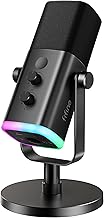
The FIFINE AmpliGame AM8 is a dynamic microphone presented for gaming, streaming, podcasting, vocal recording, singing, and YouTube use. Its listed USB and XLR connections make it a useful option for buyers comparing a straightforward computer connection with an XLR-based setup. It also includes an RGB light, mute button, headphone jack, and desktop stand.
Best for: Gamers and creators who want a desk-ready microphone with both USB and XLR connection options. The included stand and listed headphone jack make it a particularly relevant choice for a compact desktop recording or streaming setup.
Why it stands out: It combines a dynamic microphone design with visible gaming-oriented styling and practical controls. Choose this model if you value the listed mute button and RGB light alongside connection flexibility.
Limitation: The listing does not specify detailed audio controls or the requirements for an XLR setup. Check the full product details if those specifics are essential before buying.
Logitech Blue Yeti USB Microphone
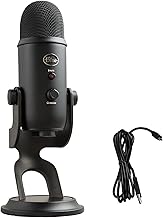
The Logitech Blue Yeti is a USB condenser microphone listed for PC and Mac use, with applications including gaming, recording, streaming, podcasting, and studio work. Its defining feature in the supplied product details is four pickup patterns. The listing also names Blue VO!CE effects and plug-and-play setup.
Best for: Buyers who want a USB microphone with multiple pickup-pattern options for different recording situations. It is better suited to users who value that flexibility than to someone whose main priority is a wireless connection or an included boom arm.
Why it stands out: Four pickup patterns give this microphone a clearly stated point of difference among the products in this guide. Blue VO!CE effects are another listed feature for buyers interested in voice processing options.
Limitation: The supplied details do not name the four patterns or explain how to select them. Review the product information if you need a specific pattern or want to compare the effects in detail.
ZealSound Podcast USB Microphone

The ZealSound Podcast Microphone is a USB microphone whose listing highlights noise cancellation, gain and volume adjustment, a mute button, monitoring, and echo. It is presented for podcasting, YouTube, TikTok, and streaming. The product name also lists use with PC, iPhone, iPad, Android, and Mac.
Best for: Creators who want several named adjustments and controls on or for the microphone, especially gain, volume, and mute. Its stated range of device types also makes it worth considering for buyers who plan to record across computer and mobile platforms.
Why it stands out: Monitoring and echo are specifically listed alongside basic level and mute controls. That makes it a better match for buyers who want those functions than a microphone listing that focuses mainly on connection type or stand hardware.
Limitation: The supplied information does not describe the noise-cancellation method or clarify connection requirements for every listed device. Confirm the setup details for your particular phone or tablet before purchasing.
MAONO PD200W Hybrid Wireless Podcast Microphone

The MAONO PD200W is described as a hybrid wireless podcast microphone with USB and XLR connections. The listing also identifies a desktop stand, software, and noise cancellation. Its intended uses include vocal recording, streaming, content creation, home studio work, and voiceover.
Best for: Buyers who want to consider a wireless microphone while retaining USB and XLR connection options. It may suit creators comparing flexible connection choices for recording, streaming, and voiceover rather than looking for a USB-only model.
Why it stands out: Its hybrid wireless description distinguishes it from the other products here, while USB and XLR are also named. The desktop stand and software are additional listed parts of the package.
Limitation: The supplied product details do not state wireless range, battery life, or the exact wireless connection method. Buyers who need any of those specifications should verify them in the complete product listing.
FIFINE AmpliGame AM8T USB/XLR Microphone Kit
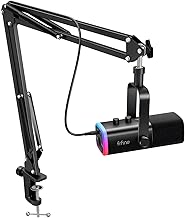
The FIFINE AmpliGame AM8T is a dynamic USB/XLR gaming microphone kit listed with a boom arm stand. The product name also identifies RGB lighting, a mute button, and a headphone jack. Its stated uses include streaming, podcasting, recording, vocals, and voiceover.
Best for: Buyers who want a microphone kit with a boom arm stand rather than a desktop stand. It is a practical comparison point for desk users who want to position a microphone on an arm and who also value USB/XLR options.
Why it stands out: The boom arm is the most distinct listed feature compared with the FIFINE AM8, which is described with a desktop stand. The AM8T also lists the same kinds of gaming-oriented controls, including RGB lighting, mute, and a headphone jack.
Limitation: The supplied details do not specify the boom arm’s dimensions or adjustment range. Check those measurements if desk space or microphone positioning is a deciding factor.
Buying Guide: How To Choose A Desk Microphone
Which connection type fits your setup?
Start by checking how you plan to connect the microphone. USB is a key feature of the Blue Yeti, ZealSound, and both FIFINE models. USB can be a straightforward choice when you want a computer-oriented setup, but verify compatibility and connection requirements for your specific device rather than assuming every model works with every port.
XLR appears in the product names for the FIFINE AM8, FIFINE AM8T, and MAONO PD200W. If you are considering XLR, check what additional equipment or cables your setup may require. The listed product information does not establish which accessories are included beyond the stated stand or kit contents.
The MAONO is the only product in this selection explicitly described as hybrid wireless. That may be relevant if avoiding a wired connection is important, but confirm its wireless method and operating details before deciding.
Do you need a desktop stand or a boom arm?
Choose based on the way you want the microphone positioned. The FIFINE AM8 and MAONO PD200W list a desktop stand, while the FIFINE AM8T lists a boom arm stand. A desktop stand is suited to a setup where the microphone can sit on the desk; a boom arm may be preferable if you want the microphone mounted off the desktop. Compare included hardware and available desk space before buying.
Which controls matter for your recording routine?
For quick access to mute, both FIFINE AM8 models and the ZealSound list a mute button. The ZealSound also names gain and volume adjustment, monitoring, and echo. These details make it a relevant option for buyers who want several audio controls identified in the listing. The Blue Yeti instead emphasizes four pickup patterns and Blue VO!CE effects. Check each product’s full details to understand how the controls work.
What type of recording do you plan to do?
For gaming and streaming, compare the FIFINE models because their listings specifically mention those uses and include RGB lighting. For a range of recording and content tasks, the Blue Yeti is listed for podcasting, recording, streaming, and studio use. The MAONO is named for voiceover and home studio work, while the ZealSound calls out YouTube and TikTok. These descriptions indicate intended uses, not a guarantee that one microphone will suit every room or voice.
How should you compare noise-related features?
The ZealSound listing names noise cancellation, and the MAONO listing also names noise cancellation. The other supplied product descriptions do not state that feature. Product names alone do not explain how noise cancellation works or how it performs in a particular room. If background noise is a concern, look for detailed product information and consider the recording environment, microphone placement, and the controls available.
What should you verify before ordering?
- Confirm the exact connection and device requirements for your computer, phone, or tablet.
- Check whether the included stand style suits your desk and preferred microphone position.
- For an XLR setup, verify what other equipment and accessories are needed.
- For wireless use, confirm the connection method and operating specifications.
- Review detailed controls and software information if pickup patterns, effects, monitoring, or noise features are important.
Frequently Asked Questions
What is the best desk microphone for streaming in this selection?
The FIFINE AmpliGame AM8 and AM8T are both listed for gaming and streaming. Choose the AM8 for its desktop stand, or the AM8T if you want the listed boom arm stand.
Which microphone has multiple pickup patterns?
The Logitech Blue Yeti is listed with four pickup patterns. The supplied product information does not name the individual patterns.
Which option includes a boom arm stand?
The FIFINE AmpliGame AM8T is described as a microphone kit with a boom arm stand. Check the full listing for its dimensions and adjustment details.
Which microphone is described as wireless?
The MAONO PD200W is described as a hybrid wireless podcast microphone and also lists USB and XLR connections. The supplied information does not state its wireless range or battery life.
Which model lists mobile device compatibility?
The ZealSound product name lists use with iPhone, iPad, and Android, along with PC and Mac. Confirm the connection requirements for your specific device before purchasing.